In this article
07:40. Nobody logged on to Windows
The morning begins with an awkward question rather than a crashed server: why does a critical virtual machine have an unexpected management operation? Windows is running, EDR has no detection, and the selected interval contains no expected suspicious logon. One administrator is ready to close the investigation. Another opens Tasks and Events in vCenter. They were checking an apartment door while the relevant action happened in the building around it.
This is a fictional composite teaching scenario, not a customer incident. Its purpose is to test hypotheses without confusing a missing record in one log with the absence of an action everywhere. An unfamiliar task is not proof of an attack either: backup, maintenance or approved automation might explain it.
The useful question is not whether a VMware administrator is omnipotent. It is which operations a particular identity can perform, against which objects, through which interface, and what independent evidence those operations leave. Both protection and a defensible investigation depend on that distinction.
Three authority planes, not one server
Guest users, services, ACLs and security products govern the operating system. vCenter identities, roles, tasks and APIs govern the management plane. ESXi local access and the hardware form another plane. Storage, backup, identity services, key management and the BMC provide adjacent paths with their own authority and records.
Reducing these planes to a single label, “administrator”, loses the essential differences. An operator allowed to power on two VMs is not a root-inventory administrator. Neither role automatically means physical control of the equipment. A stolen account is also a different threat from compromised hypervisor software.
Start with a trust map. Include not only network reachability but also the ability to change another identity’s permissions, reset an administrator’s credentials, grant access to a backup or administer keys. These transitions can turn a narrow-looking permission into broad authority.
What an absent guest logon actually means
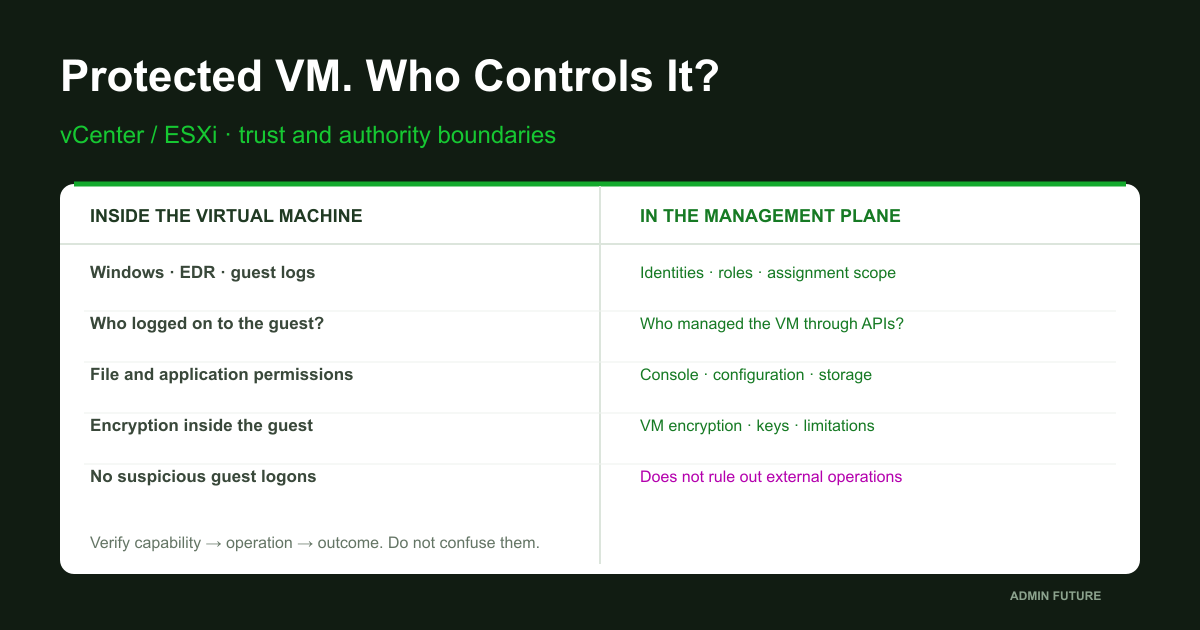
No Windows logon record means no observed record in the available selection, subject to known audit coverage. External power operations, configuration changes and storage-object access may not require an interactive guest logon. Windows Security is therefore important, but it is not a universal VM-management audit trail.
The opposite shortcut is equally misleading: opening a vSphere console does not automatically log somebody into Windows. A console provides interaction with a display and devices. What follows depends on guest state, protections, permitted operations and authority. A console event alone does not establish document access.
Separate four questions: was the capability granted, was an operation attempted, did it succeed, and what happened to the data? Evidence for one is not evidence for all four.
A management-plane investigation map
The diagram describes an investigation order, not a mandatory attacker sequence. Establish identity and permission scope, connect an operation to its object, then check independent evidence and the actual encryption boundary.

If the identities under investigation also administer logs and backups, that does not prove either was altered. It does establish a dependency: independent corroboration may be unavailable precisely when it matters most.
A role is only part of a permission
Role names sound reassuring: operator, support, monitoring. A role actually contains privileges; an assignment connects it to a principal and an object. Propagation can extend an assignment to descendant objects where applicable. Review the relationship between identity, operation and scope, not the role label.
VM folders, hosts, resource pools and datastores do not form one simple line. An operation can involve multiple objects and require permissions in different places. A modest-looking role on one VM does not establish that the identity is restricted everywhere.
Review groups and nested membership, global permissions, ancestor assignments and the ability to modify roles themselves. Avoid a universal rule that one denial always overrides every other assignment. Validate effective authority for the specific identity, operation and platform version.
Connect to one known vCenter
These examples assume an approved diagnostic workstation with a compatible PowerCLI installation already in place. Replace every REPLACE value and run the blocks sequentially in one session. Do not automatically install modules or elevate permissions for an article. A certificate error calls for checking names, trust and the destination, not disabling TLS verification.
# Approved workstation with an already approved, compatible PowerCLI installation.
Import-Module VMware.VimAutomation.Core -ErrorAction Stop
$VCenterFqdn = 'REPLACE_EXACT_VCENTER_FQDN'
if ($VCenterFqdn -like 'REPLACE_*') { throw 'Set the approved vCenter FQDN.' }
$Credential = Get-Credential -Message 'Approved diagnostic identity for this vCenter'
$Vc = Connect-VIServer -Server $VCenterFqdn -Credential $Credential -NotDefault -ErrorAction Stop
if (-not $Vc.IsConnected) { throw 'No verified vCenter session.' }
$Vc | Select-Object Name,Version,Build,IsConnected
$Si = Get-View -Id ServiceInstance -Server $Vc -ErrorAction Stop
$Si.Content.About | Select-Object Name,Version,Build,InstanceUuid
# Do not ignore certificate errors or change global PowerCLI TLS settings.
# All following requests explicitly use this server; no fleet-wide default-server query.
An explicit Server parameter matters because PowerCLI can maintain multiple connections. Selecting the wrong management server makes an otherwise correct query investigate the wrong environment. Retain the version, build and vCenter instance identifier with the evidence. Identical VM display names in separate inventories do not identify the same object.
Identify the VM without creating objects
Obtain the inventory ID from a verified inventory or an approved object record. There is no fleet-wide discovery command here. Metadata anchors the investigation: current name, host, identifiers, disks and existing snapshots. Reading this information neither creates a snapshot nor exports disk contents.
# Use the observed PowerCLI inventory ID, not an ambiguous display name.
$VmInventoryId = 'REPLACE_OBSERVED_VM_ID'
if ($VmInventoryId -like 'REPLACE_*') { throw 'Set the observed VM inventory ID.' }
if (-not $Vc -or -not $Vc.IsConnected) { throw 'Run the connection block first.' }
$Candidates = @(Get-VM -Id $VmInventoryId -Server $Vc -ErrorAction Stop)
if ($Candidates.Count -ne 1) { throw 'VM selection is absent or ambiguous.' }
$Vm = $Candidates[0]
$Vm | Select-Object Id,Name,PowerState,@{N='CurrentHost';E={$_.VMHost.Name}}
$Vm.ExtensionData.Config | Select-Object Uuid,InstanceUuid,Version
[pscustomobject]@{VM=$Vm.Id;ConfigKeyIdPresent=($null -ne $Vm.ExtensionData.Config.KeyId)}
Get-HardDisk -VM $Vm -Server $Vc -ErrorAction Stop |
    Select-Object Name,Filename,CapacityGB,@{N='BackingKeyIdPresent';E={$null -ne $_.ExtensionData.Backing.KeyId}}
Get-Snapshot -VM $Vm -Server $Vc -ErrorAction Stop | Select-Object Name,Created,SizeGB
# Key-ID presence is metadata, NOT a complete encryption/security verdict.
# A missing backing key ID says nothing by itself about vSAN encryption or BitLocker.
# No snapshot creation, disk read/export, clone, guest command or power operation.
Names can change and VMs can move. A managed object reference belongs in the context of its vCenter; UUIDs also require awareness of cloning and object history. Current placement does not prove yesterday’s placement. A KeyId field is useful metadata, not a verdict on every disk, vSAN, BitLocker or key custody.
From assignments to actual privileges
The next query retrieves assignments for the selected VM; it does not calculate a complete effective-permission matrix for every user. Supplement it with relevant ancestor objects and global assignments. If the diagnostic identity lacks visibility, record that collection limit rather than conclude there are no assignments.
# Selected VM only. Inspect ancestor/global assignments and other paths separately.
if (-not $Vm -or -not $Vc -or -not $Vc.IsConnected) { throw 'Select the verified VM first.' }
Get-VIPermission -Entity $Vm -Server $Vc -ErrorAction Stop |
    Select-Object Entity,Principal,IsGroup,Role,Propagate
# Assignment entries are NOT a full effective-privilege evaluation for every user.
# Review relevant folders, datacenter, resource pool, datastore and global permissions.
# Account/group membership, inheritance, direct ESXi access and identity-provider rights matter.
# No New/Set/Remove-VIPermission or group membership change in this collection.
Then inspect one role actually observed in the evidence. Ask which privileges the workload needs, who approved exceptions and whether scope can be narrowed. A backup service identity may legitimately hold sensitive privileges. Calling it a service account does not reduce their consequences.
# One observed role; identical names across vCenters need separate investigation.
$ObservedRoleName = 'REPLACE_EXACT_ROLE_NAME'
if ($ObservedRoleName -like 'REPLACE_*') { throw 'Set the observed role name.' }
if (-not $Vc -or -not $Vc.IsConnected) { throw 'Connect to the selected vCenter first.' }
$Roles = @(Get-VIRole -Server $Vc -ErrorAction Stop | Where-Object Name -eq $ObservedRoleName)
if ($Roles.Count -ne 1) { throw 'Role absent or ambiguous.' }
$Roles[0] | Select-Object Name,Id,IsSystem
$Roles[0].PrivilegeList | Sort-Object
# A role lists privileges; object scope and assignments decide where they are usable.
# A restricted role is insufficient if the identity can change roles/permissions elsewhere.
An especially important finding is a restricted role assigned to an identity that can modify permissions through another group. The restriction exists on screen but not in the trust model. Fixing it requires reviewing the authority chain, not renaming the role.
Which operations deserve a separate question?
Do not build one endless list of dangerous events. Separate capabilities by consequence: availability, guest interaction, configuration changes, representations of data, and administration of protection. An operation can be normal for backup automation yet inappropriate for a first-line operator.
| Operation group | Audit question | Do not automatically conclude |
|---|---|---|
| Power and configuration | Who can change state and devices? | Not equivalent to a Windows logon |
| Console | Who can interact with the VM? | Does not establish document access |
| Storage and backup | Who controls representations of data? | A snapshot alone does not prove theft |
| Permissions and keys | Who can change the protection boundary? | A role name does not establish isolation |
A granted capability is not evidence of use. An attempt is not success. A successful task is not necessarily the business consequence an investigator imagines. For example, a snapshot operation says little about intent without the surrounding backup history.
Reconstruct five minutes, not the entire world
In the teaching scenario the relevant activity was noticed around 07:40. Start with a small approved interval and one VM. Supply ISO 8601 timestamps with explicit offsets. The script converts boundaries to workstation local time for the query and retains event times in UTC. Check source clocks separately before correlating evidence.
# Same approved PowerCLI session and selected VM. Current retention/visibility limits apply.
$StartText = 'REPLACE_START_ISO8601_WITH_OFFSET'
$EndText = 'REPLACE_END_ISO8601_WITH_OFFSET'
if (@($StartText,$EndText) -match 'REPLACE_') { throw 'Set exact incident boundaries.' }
$Start = [datetimeoffset]::Parse($StartText)
$End = [datetimeoffset]::Parse($EndText)
if ($End -le $Start -or ($End-$Start).TotalMinutes -gt 5) { throw 'Use a positive window <=5 minutes.' }
if (-not $Vm -or -not $Vc -or -not $Vc.IsConnected) { throw 'Select the verified VM first.' }
# IMPORTANT: MaxSamples is ignored by Get-VIEvent when Start AND Finish are supplied.
# This is time/object-scoped, NOT server-side event-count-capped. Assess busy systems first.
$Events = @(Get-VIEvent -Entity $Vm -Start $Start.LocalDateTime -Finish $End.LocalDateTime -Server $Vc -ErrorAction Stop)
$Rows = @($Events | Sort-Object CreatedTime,Key | ForEach-Object {
    [pscustomobject]@{
        VCenter=$Vc.Name;VCenterInstanceUuid=$Si.Content.About.InstanceUuid
        VmInventoryId=$Vm.Id;VmInstanceUuid=$Vm.ExtensionData.Config.InstanceUuid
        TimeUtc=$_.CreatedTime.ToUniversalTime().ToString('o')
        EventKey=$_.Key;ChainId=$_.ChainId;Type=$_.GetType().Name
        Account=$_.UserName;Message=$_.FullFormattedMessage
    }
})
if ($Rows.Count -eq 0) { Write-Warning 'No visible records in this selection. Not proof of no action.' }
$Rows | Format-Table TimeUtc,EventKey,Type,Account -AutoSize
# No Username/type filter initially: service identities, successful actions and failures matter.
# VM scope misses some inventory-wide, session, permission and direct-host/storage activity.
# Use approved adjacent windows/other scopes or a reviewed paged API acquisition if required.
An important Get-VIEvent detail: MaxSamples is ignored when both Start and Finish are supplied. This query is bounded by time and object, not event count. Assess collection cost on busy platforms. Larger investigations need separately reviewed paged API acquisition or supported collection facilities.
Do not initially filter only on the suspicious username: a service identity may be involved. An empty selection means no available matching records were retrieved, not that nothing happened.
A task, an event and a person are different things
Build a timeline from multiple sources. For a task, examine initiator, object, available parameters, start and completion times, error and result. For an event, retain type, key, chain and message. Attribution additionally needs management sessions, connection sources, SSO and external identity evidence.
| Plane | Evidence sought | Limitation |
|---|---|---|
| vCenter | Task + event + session | VM scope does not cover everything |
| ESXi | hostd / vpxa / available authentication | Investigate direct access separately |
| Identity | Principal + source + session | An account does not establish a person |
| Storage / backup | Operation + object + result | Separate history is needed |
| Independent receiver | Receipt + time + retention | Configuration does not establish delivery |
An account recorded in an event identifies an execution context, not a proven human operator. Stolen tokens, automation and shared identities make that distinction important. Without connected evidence there is insufficient information to blame an employee or assert that a particular file was read.
A VM-scoped query may miss vCenter logins, global permission changes and direct host operations. Expand acquisition deliberately: state which question requires another source and why the existing scope cannot answer it.
Preserve a working selection without platform secrets
Use an existing restricted evidence directory, a unique filename and a checksum for the working copy. The directory must comply with evidence-retention policy; infrastructure metadata is sensitive too. Do not post the file in a public chat.
# Selected event rows from the previous block; existing restricted evidence directory.
$CaseDirectory = 'REPLACE_EXISTING_RESTRICTED_CASE_DIRECTORY'
if ($CaseDirectory -like 'REPLACE_*') { throw 'Set the approved restricted case directory.' }
if (-not (Test-Path -LiteralPath $CaseDirectory -PathType Container)) { throw 'Directory absent.' }
if (-not $Rows -or $Rows.Count -eq 0) { throw 'No collected rows; inspect coverage before exporting.' }
$CaseFile = Join-Path $CaseDirectory ('vSphere-events-' + [guid]::NewGuid().ToString('N') + '.clixml')
$Rows | Export-Clixml -LiteralPath $CaseFile -Encoding UTF8 -NoClobber -ErrorAction Stop
Get-FileHash -LiteralPath $CaseFile -Algorithm SHA256
# Restricted working selection, not a full native log/task export or forensic image.
# Preserve original event/task objects and relevant host/SSO logs through approved acquisition.
# No key-provider exports, VM disks, guest secrets or memory dumps collected by this block.
This CLIXML contains selected event fields, not a complete native audit export. Its hash can reveal later changes to the collected file; it does not establish that the source was truthful before acquisition. A serious investigation separately preserves original event and task objects, relevant logs and acquisition details.
Do not conflate evidence collection with extracting VM disks, memory, passwords or keys. Those activities have different sensitivity, operational cost and approval requirements. None is included in these examples.
The second entrance: ESXi without vCenter
Well-designed vCenter roles do not answer the direct-ESXi-access question. Review Host Client, APIs, local identities, approved administration channels and independent emergency access. Review the BMC, storage and backup systems separately. Restricting one interface does not automatically close the others.
Lockdown Mode helps constrain direct host administration, but modes and exceptions differ. In Strict Mode, do not assume the usual DCUI recovery path remains available. Exception users need individual review; emergency access must be tested before restricting the normal route.
Do not enable Lockdown fleet-wide from an article or open SSH simply to collect diagnostics. Pilot vCenter management, SSO dependencies, approved automation and recovery procedures first. Otherwise a protective change can itself remove manageability. Source: Broadcom on Lockdown Mode.
Whose logs survive a management compromise?
Logs beside the investigated system are diagnostically useful but have limited independence. If the authority under investigation can modify both source and archive, completeness requires outside corroboration. A separately administered log receiver, constrained deletion rights and verified retention create a stronger boundary.
In Broadcom’s log description, hostd.log concerns host management, vpxa.log the vCenter agent, auth.log Shell authentication, and shell.log Shell commands. The last is not an audit of every API operation. Verify paths and rotation for the installed version; current files and rotated archives cover different intervals.
Correlate those sources with vCenter, SSO, identity services, firewall/VPN and backup history. Do not promise a single event meaning “the administrator stole data”. A defensible timeline connects time, identity, object, operation and outcome while keeping coverage gaps visible.
Syslog configuration is not delivery
If an approved administrative session already exists on the selected ESXi host, the commands below read current configuration. They are not VCSA commands or a general Linux script. Without such a session, use the approved management interface; do not change access mode for the example.
# ESXi ONLY, selected host, already approved console/session. Not a VCSA or Linux shell.
# Do not enable SSH or weaken Lockdown just to run this article's examples.
esxcli system version get
esxcli system syslog config get
esxcli system ntp get
esxcli network firewall get
# Read-only current configuration. No reload/set/test message or connection probe.
# A configured syslog destination does NOT prove receipt, retention or completeness.
# Firewall enabled does NOT establish management-network isolation or least privilege.
A collector address does not prove message receipt. Check the last record actually received from the host, clocks, gaps, rotation, retention and deletion access. In an approved window, a harmless authorized administrative event can test delivery to the independent receiver; this article does not include code that generates one.
An enabled ESXi firewall does not establish management-network isolation either. Review actual allowed sources, routes and boundary rules. Broadcom’s syslog documentation describes configuration; receiver-side observations establish delivery.
Encryption: first identify what is encrypted
Media or datastore encryption protects a particular at-rest representation. VM encryption protects selected virtual-machine objects. BitLocker operates inside the guest and depends on boot state, protectors and recovery-data custody. Transport encryption addresses another problem: protecting transfer between defined endpoints.
These are not interchangeable checkboxes. When storage legitimately supplies decrypted data to the running platform, stolen-drive protection does not automatically prohibit VM management. Once the guest has unlocked a volume, offline-disk protection does not describe every risk to a running application.
A useful assessment names the protected object, data state, trusted components and key-management authority. “Everything is encrypted” without those four qualifications is insufficient to evaluate a management-plane threat.
A vTPM does not prove every VMDK is encrypted
A polished but incorrect conclusion is easy here. The presence of a vTPM does not justify reporting that every virtual disk is encrypted. Broadcom describes cases in which VM configuration files associated with a vTPM are encrypted while the disks are not. Verify actual policy and state for each relevant object. Broadcom source.
The reverse mistake is also possible: a missing KeyId in one inspected field does not establish plaintext on physical media. Neither vSAN encryption nor BitLocker can be assessed from that signal alone. A finding is useful only when the measured layer is known.
The teaching investigation can now use a defensible statement: this state was established for these objects; these other mechanisms were not independently checked. It is less dramatic than a green badge but does not mislead the business owner.
Cryptographic privileges and the limits of promises
VM encryption introduces cryptographic permission requirements. For example, Broadcom specifies Direct Access for an encrypted VM console in the vCenter 8.0 U3 context. An acquireTicket denial should not automatically be “fixed” with Administrator privileges: the intended boundary may be working. Broadcom explanation.
That restriction matters only while the identity cannot bypass it by changing its own assignments, administering keys or controlling another trusted system. Separation of duties must include authority to grant authority. Two logins in the same all-powerful group are not independent administrators.
Conventional VM encryption is not proof of protecting a running workload’s memory against a fully compromised hypervisor. That involves a separate trust model and confidential-computing technologies outside this article. Equally, do not claim every restricted operator can read arbitrary memory. Such capability requires evidence for the specific model.
Keys: availability is part of security
After discussing encryption, somebody inevitably suggests simply removing key access. That is not an operational plan. Identify the provider, dependencies, backup and recovery sequence instead of experimenting with production key availability.
Native Key Provider and external key managers have different operational dependencies. For the deployed design, verify current documentation, backup protection, recovery authority and access to the required material after losing the management system. Do not store secret backups beside broadly readable audit reports. Broadcom separately addresses Native Key Provider backup.
The meaningful acceptance test is recovery of a nonsensitive test workload under an approved scenario. Successfully exporting a backup file does not prove recoverability. These scripts do not export, rotate or delete keys, or test them through destructive disconnection.
Constrain management without stopping the company
Start with a pilot VM group and actual job requirements. Support may need a console, an on-call operator a restart, and backup automation its own operations. Grant the minimum sufficient scope rather than one shared Administrator role. Sensitive operations can use temporary access, a separate administrative workspace and approval.
Management-network isolation must account for vCenter, ESXi, backup, keys, BMCs and administration workstations. MFA at entry is useful but does not erase the consequences of a stolen active session or excessive post-login authority. Check the whole path, not only the authentication screen.
Each change needs a recorded baseline, an approved window, rollback and positive validation of legitimate work. Blocking a dangerous action is not success if the same change breaks recovery or leaves the cluster without a controlled emergency-management route.
Tests that answer a question instead of ticking a box
A useful test specifies identity, object, operation and expected outcome beforehand. For example: the operator sees only the pilot scope; permitted diagnostics work; permission changes are denied; backup completes and restores a test VM; a harmless approved operation reaches the independent log receiver.
Access-denial tests belong on nonsensitive test workloads under an approved procedure. Proving the model does not require downloading production disks, opening somebody else’s documents or disconnecting keys. Validate denial with a safe test and available outcome evidence, not an experiment on business data.
Recovery exercises must include loss of the usual management path. Who grants emergency access? Where are the instructions and independent identity? What if AD, vCenter or the key manager is unavailable? If the answers depend on the very VM being recovered, you have found a circular dependency.
If suspicion is confirmed, preserve context
An unauthorized operation needs a containment plan, not reflexive host shutdown. The host may run dozens of other systems, and shutdown changes available evidence. First identify known identities, active paths, time intervals, critical dependencies and independent copies. Then agree restrictions with the incident owner.
A confirmed management-system compromise cannot be cleared solely through that system’s own green status. Review connected authority, automation, backup, secrets and recovery trust. Returning to service may require rebuilding a trusted management environment rather than changing one password.
The evidentiary limits remain unchanged. A suspicious task does not prove exfiltration. Incomplete history does not prove no consequences. A defensible report separates established actions, supported conclusions and untested hypotheses.
How this investigation ends
The teaching scenario does not name a culprit without evidence. Even if the operation was authorized, the work is valuable: we now know the execution identity, why authority existed, where the outcome was corroborated and which records survive loss of the management system. Unanswered questions become a specific improvement plan, not a blanket all-clear.
The audit deliverable is not a version list or another Windows agent. It is a tested authority matrix, a map of alternative paths, verified log delivery, documented encryption boundaries and an exercised recovery procedure. That supports a concrete risk discussion with the business owner.
For an assessment of your virtualization environment, a sensible first step is an approved management-plane review without changing production VMs. Deliver evidence, collection limits and a prioritized plan with pilots and rollback. Buying another protective product without that picture can leave the main management path unchanged.
Sources, versions and verification limits
Checked against public documentation on 22 October 2026. The main operational context is vSphere 8.x; verify requirements for the actual build, licensing, policy and key provider separately. This is not a claim that every release behaves identically. The PowerCLI and ESXi examples received editorial static review but were not executed in an author-operated VMware lab. Begin with an approved pilot.
Core references: Broadcom: ESXi/vCenter hardening; Get-VIPermission; Get-VIRole; Connect-VIServer. The hardening index helps select version-specific guidance; it does not replace checking the deployed configuration.
Additional primary references appear beside the relevant explanations. The code deliberately avoids production permission changes, VM/key export and certificate-validation bypasses. Visibility depends on diagnostic privileges and retained history; no results do not establish no risk.