In this article
Everyone knows the password, but nobody can change it
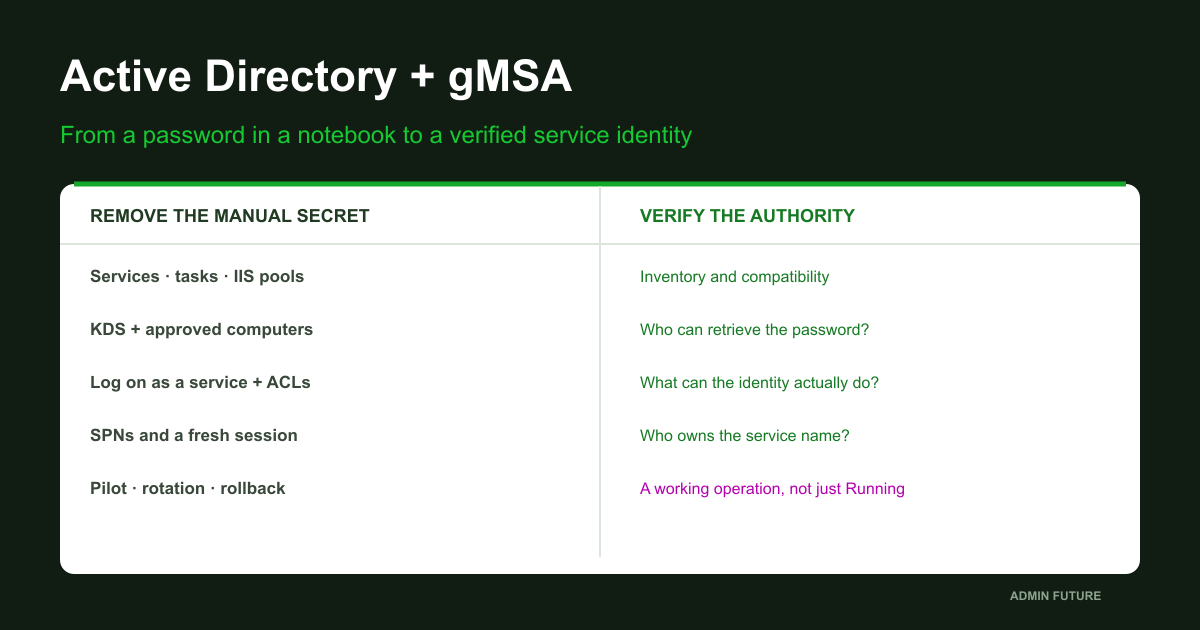
The service-account password exists in three places, yet changing it feels dangerous: nobody knows which service will fail next. We will move a compatible service to a gMSA and verify who is now trusted to retrieve its password.
Hello, colleagues. I am Maxim, a systems administrator. Imagine a nightly report running under a domain account. Its password was once shared with a contractor, copied into instructions, and reused for two scheduled tasks. When someone leaves the company, password rotation becomes an investigation with an uncertain recovery time.
The obvious fix is “Password never expires” plus removing the shared notebook entry. That leaves the unknown dependencies intact. The secret remains shared, and responsibility for rotation is deferred until an incident forces the issue.
I suggest changing the model: people stop distributing the password to services; Windows retrieves and maintains it for approved computers. A group Managed Service Account, or gMSA, implements that model. The account still has a password. Retrieving it becomes a distinct, controlled authority.
We will move from dependency discovery to a pilot service, examine KDS, approved hosts, permissions and SPNs, exercise a useful operation, and prepare rollback. This is a practical configuration walkthrough with explicit applicability boundaries, not a promise that every legacy application can suddenly use a gMSA.
The problem: four debts attached to one service account
Before adding controls, distinguish four different risks associated with svcReports.
- Dependency debt. Three services, an IIS pool and a forgotten scheduled task use the account. Rotation breaks a component other than the one being tested.
- Privilege debt. An old workaround made the account a local administrator or granted write access across a share. Managed password handling removes none of those permissions.
- Identity debt. An SPN remains on an old account, clients use an alias, and a seemingly successful login actually uses NTLM. Changing the service Log On field does not migrate the complete authentication model.
- Recovery debt. The previous password is unknown or already revoked, while rollback instructions say “put it back.” Restoring the account name is insufficient.
Our four levels are dependency and compatibility discovery; AD and password-retriever preparation; permissions and a pilot; then operation, rotation and recovery testing. The objective is to reduce the places where a human must maintain a secret, rather than hide the same secret more carefully.
Example boundaries: one domain, one host, one new service
The scenario uses a fictional ad.example.com domain with NetBIOS name EXAMPLE. Domain controllers already exist. APP01 is a domain application server, APP02 is a negative-control host, and FS01 is a separate file server. Replace these names with your isolated lab values; do not run the examples against whichever domain happens to be open.
The reference platform is Windows Server 2022/2025 with 64-bit Windows PowerShell 5.1. gMSA predates those releases, but operating-system capability does not establish application or installer support. Confirm suitable domain and forest levels, a reachable writable DC, and healthy DNS, time and replication. APP01 obtains AD PowerShell through RSAT; it does not need promotion to a domain controller.
The bundle includes source for AFGmsaPilot, a small service with no network listener, document creation or externally supplied command execution. Every 15 seconds it records its identity and UTC timestamp in a dedicated directory. An optional UNC target triggers a one-byte read of a lab file. It implements ServiceBase instead of pretending an ordinary powershell.exe process is an SCM-compatible service. See Microsoft’s ServiceBase model.
The validation boundary is explicit: commands were checked against documentation and artifacts received static review and source/text integrity checks. I did not run a Windows domain or measure service behavior while preparing this publication. Results below are expectations to reproduce, not an invented successful deployment report.
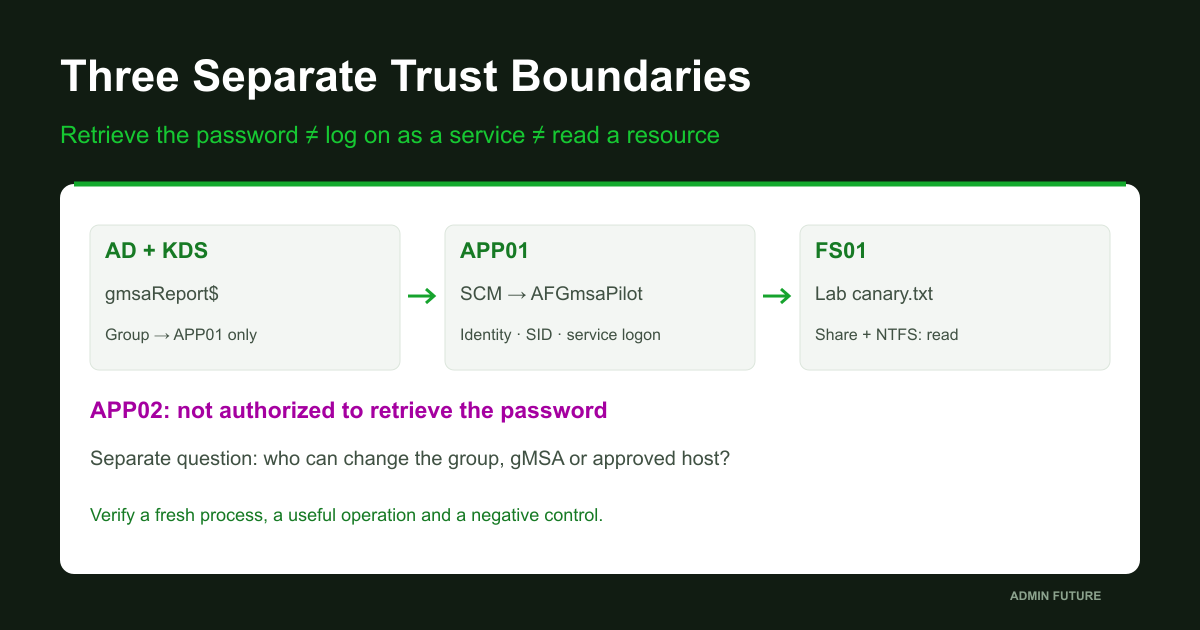
We first investigate the existing svcReports account, then create a separate gmsaReport authorized only for APP01. The first test will not migrate every task or the production reporting service at once.
Level 1. Inventory dependencies, not familiar-looking names
Opening services.msc on the main server finds one class of consumer on one host. A task may store a SID or UPN, and an application may maintain separate credentials unrelated to its process identity.
The bundle includes Get-AFServiceInventory.ps1. It queries explicitly listed computers over CIM, records service and task matches, and separately records collection coverage. Access errors are never silently converted into “nothing found.” It does not retrieve passwords or export task arguments and service command lines that might contain secrets.
# Windows PowerShell 5.1; replace the fictional lab names.
Import-Module ActiveDirectory
$old = Get-ADUser -Identity 'svcReports' -Properties UserPrincipalName
$aliases = @('EXAMPLE\svcReports',$old.UserPrincipalName,$old.SID.Value)
$aliases = @($aliases | Where-Object { $_ })
.\Get-AFServiceInventory.ps1 -ComputerName 'APP01','APP02','FS01' -AccountAlias $aliases -OutputDirectory 'C:\PrivateAudit\Reports-20261025'
# On each IIS server, locally, if WebAdministration is installed:
Import-Module WebAdministration
Get-ChildItem IIS:\AppPools | Select-Object Name,@{n='IdentityType';e={$_.processModel.identityType}},@{n='UserName';e={$_.processModel.userName}}
AccountAlias explicitly lists equivalent representations of one identity: DOMAIN\name, UPN and SID. Add another observed representation only after checking it. A substring search for Reports can mix unrelated service identities.
matches.csv answers where a consumer was found; coverage.csv answers what was actually readable. Empty matches alongside FAILED coverage do not establish absence. Tasks are matched on Principal.UserId; Get-ScheduledTask supports CIM sessions. IIS has a separate local query on its server.
Next review SQL Agent jobs and proxies, application schedulers, integrations, offline hosts, configuration stores and authentication logs. Observe an appropriate business cycle: a nightly task and month-end close may not appear in one day. Missing events with auditing disabled prove nothing.
The output of this level is a map of consumer, operation, resource, owner, compatibility and recovery procedure. Only then choose a pilot candidate.
Where gMSA fits and where another model is required
I check three compatibility layers: the Windows service can use a managed identity; the vendor supports that product version and configuration path; and downstream resources accept the domain identity. Passing one layer does not establish the others.
| Scenario | Verify | Boundary |
|---|---|---|
| Compatible Windows service | Product support, SCM, service logon and resources | Not every SCM change is vendor-supported |
| IIS pool | Application version, pool identity, profile and keys | Separate from a Windows-service configuration |
| Scheduled task | Supported logon type, batch logon and network access | S4U is not a universal network-password substitute |
| SQL Server and 1C applications | Exact version, vendor guidance and supported tool | Do not blindly apply the lab Change method to SQL/1C |
| Application requiring a string password | Native managed-account support or another mechanism | A gMSA is not a fixed password to paste into a form |
| Workgroup / Linux / containers | Separate architecture and confirmed support | Outside this domain-member Windows pilot |
| Failover Cluster | Cluster service versus workloads hosted above it | Workload support does not authorize changing Cluster service identity |
Microsoft identifies SCM services, IIS pools and tasks as applicable mechanisms, not blanket permission to reconfigure every product. SQL Server, for example, needs its supported account-change workflow. An installer can manage ACLs, keys and other settings beyond SCM. See gMSA management.
An application requesting a string password for its own LDAP bind, SFTP connection or external API does not acquire gMSA support merely by changing a field. A process may run as a gMSA while an integration still needs an API token. Those are separate requirements.
Check user profiles, DPAPI, EFS, certificate private keys and settings created as svcReports. The new gMSA has a different SID. Group membership, private-key access and decryption capability do not migrate with a service name.
dMSA in Windows Server 2025, container credential specifications and cross-forest identity architecture are outside this pilot. They have separate prerequisites and identity-acquisition paths. Our scope is an ordinary domain member running a compatible Windows service.
Level 2. KDS: do not create a root key for every service
The Key Distribution Service participates in managed-password generation on domain controllers. Approved hosts retrieve the necessary credentials through AD; this does not require deploying a separate application-specific “KDS server.” The gMSA overview explains the mechanism.
The obvious mistake is copying Add-KdsRootKey into every account-creation recipe. Forest preparation becomes uncontrolled key accumulation. Read the current state first.
Import-Module ActiveDirectory
Get-ADForest | Select-Object Name,ForestMode
Get-ADDomain | Select-Object DNSRoot,NetBIOSName,DomainMode
Get-ADDomainController -Filter * | Select-Object HostName,OperatingSystem,Site,IsReadOnly
Get-KdsRootKey | Select-Object KeyId,CreationTime,EffectiveTime
repadmin.exe /replsummary
# On APP01, elevated; tests only, no repair operation:
Test-ComputerSecureChannel -Verbose
Resolve-DnsName -Type SRV '_ldap._tcp.dc._msdcs.ad.example.com'
w32tm.exe /query /status
Warning: creating a KDS root key is a forest-level change, not an automatic repair step. If a key exists, investigate readiness and replication. If several exist, do not delete them merely to tidy the list: establish their history and dependencies.
Only when no key exists and the operation is approved, perform this separate step:
# ONE-TIME forest operation, only after approval and if no key exists.
# Run in an authorized DC session with the Kds module.
$keys = @(Get-KdsRootKey)
if ($keys.Count -ne 0) { throw 'A KDS root key already exists. Review it; do not create another.' }
Add-KdsRootKey -EffectiveImmediately
# STOP HERE. Allow at least the documented 10-hour convergence window,
# and verify replication before creating/using the pilot gMSA.
Get-KdsRootKey | Select-Object KeyId,CreationTime,EffectiveTime
EffectiveImmediately does not remove the waiting period. Microsoft describes a ten-hour convergence window before safe use. Broken or infrequent replication remains a problem after that window; a timer does not repair it. Backdating EffectiveTime belongs only to the appropriate single-DC test scenario and is deliberately absent from our operational commands. See KDS root-key creation.
A current nuance deserves attention: Microsoft documents failures involving multiple keys and particular DC version/update combinations following April 2026 changes. One False result does not diagnose that issue or justify immediately adding another key. Record key IDs, times, DC versions and updates, then compare the conditions with Microsoft’s specific troubleshooting article.
Password retrievers: a small group instead of every server
Only APP01 needs the password in our scenario. Create a dedicated security group for approved computers and add the computer object. The administrator executing PowerShell and the host subsequently running the service are different principals.
# Authorized AD management session; fictional lab values.
Import-Module ActiveDirectory
$domain = Get-ADDomain
if ($domain.DNSRoot -ne 'ad.example.com') { throw 'Wrong domain: adapt and review the lab values first.' }
if (Get-ADGroup -Filter "SamAccountName -eq 'GG-gMSA-Report-Hosts'") { throw 'Host group already exists; inspect it.' }
if (Get-ADServiceAccount -Filter "Name -eq 'gmsaReport'") { throw 'gMSA already exists; inspect it.' }
$hostComputer = Get-ADComputer -Identity 'APP01'
$group = New-ADGroup -Name 'GG-gMSA-Report-Hosts' -SamAccountName 'GG-gMSA-Report-Hosts' -GroupScope Global -GroupCategory Security -Path $domain.UsersContainer -PassThru
Add-ADGroupMember -Identity $group -Members $hostComputer
$parameters = @{
    Name = 'gmsaReport'
    DNSHostName = 'gmsaReport.ad.example.com'
    PrincipalsAllowedToRetrieveManagedPassword = $group
    KerberosEncryptionType = @('AES128','AES256')
    ManagedPasswordIntervalInDays = 30
    Description = 'Report pilot; owner IT; authorized host APP01 only'
}
New-ADServiceAccount @parameters
Get-ADServiceAccount -Identity 'gmsaReport' -Properties PrincipalsAllowedToRetrieveManagedPassword,KerberosEncryptionType,ServicePrincipalNames | Select-Object Name,SamAccountName,PrincipalsAllowedToRetrieveManagedPassword,KerberosEncryptionType,ServicePrincipalNames
PrincipalsAllowedToRetrieveManagedPassword sets the password-retrieval policy. Here it references one group containing APP01. We explicitly select AES128/AES256 and a 30-day interval at creation. This avoids relying on RC4 but does not repair an incompatible client. See New-ADServiceAccount for parameters and limitations.
DNSHostName on a gMSA neither starts an application nor automatically provisions the service’s DNS record or replaces its specific SPNs. Clients still need the real name of a real service.
Adding Domain Computers is the convenient shortcut: testing becomes easy on every server. It also includes unnecessary machines in the same trust scope. I separate gMSAs by function and risk rather than sharing one across SQL, backup, monitoring and every integration.
Choose the rotation interval at creation instead of assuming a later change is supported by the same cmdlet. Also, Set-ADServiceAccount with PrincipalsAllowedToRetrieveManagedPassword replaces the complete authorized-principal list; it is not an append operation. Preserve the current list and every required host before changing it. Microsoft explicitly warns about this in its gMSA validation guidance.
Who can retrieve the password: look beyond group members
The password has disappeared from the instructions, but authority to retrieve a managed secret still exists. msDS-GroupMSAMembership stores the security descriptor used for the corresponding access check; it is not merely a descriptive host list. See Microsoft’s attribute definition.
I examine three trust layers. First, authorized principals and recursively expanded groups. Second, owners and ACLs on the gMSA and controlling groups: who can rewrite retrieval policy or group membership? Third, control of authorized computers and their services. A local administrator on an approved host is inside a significant trust boundary for that identity.
#requires -Version 5.1
#requires -Modules ActiveDirectory
[CmdletBinding()]
param([Parameter(Mandatory)][string]$Identity)
$ErrorActionPreference = 'Stop'
Import-Module ActiveDirectory
$account = Get-ADServiceAccount -Identity $Identity -Properties PrincipalsAllowedToRetrieveManagedPassword,ServicePrincipalNames,MemberOf,KerberosEncryptionType
$targets = New-Object 'System.Collections.Generic.List[object]'
$targets.Add([pscustomobject]@{Role='gMSA object'; DN=$account.DistinguishedName})
$retrievers = foreach ($principal in @($account.PrincipalsAllowedToRetrieveManagedPassword)) {
    $object = Get-ADObject -Identity $principal -Properties sAMAccountName,objectSid
    $targets.Add([pscustomobject]@{Role='Authorized principal'; DN=$object.DistinguishedName})
    $members = @()
    if ($object.ObjectClass -eq 'group') {
        $members = @(Get-ADGroupMember -Identity $object.DistinguishedName -Recursive | Select-Object Name,SamAccountName,ObjectClass,DistinguishedName)
    }
    [pscustomobject]@{Name=$object.Name; Class=$object.ObjectClass; DN=$object.DistinguishedName; ExpandedMembers=$members}
}
$aclEvidence = foreach ($target in $targets) {
    $acl = Get-Acl -LiteralPath ('AD:\'+$target.DN)
    [pscustomobject]@{
        Role=$target.Role; DN=$target.DN; Owner=$acl.Owner
        ACEs=@($acl.Access | Select-Object IdentityReference,AccessControlType,ActiveDirectoryRights,ObjectType,InheritedObjectType,IsInherited,InheritanceType)
    }
}
[pscustomobject]@{
    CapturedUtc=(Get-Date).ToUniversalTime().ToString('o')
    Account=$account.SamAccountName
    SID=[string]$account.SID
    MemberOf=@($account.MemberOf)
    SPNs=@($account.ServicePrincipalNames)
    Encryption=[string]$account.KerberosEncryptionType
    RetrieverPrincipals=@($retrievers)
    AclEvidence=@($aclEvidence)
    EffectiveAccessComputed=$false
    Limitations='Evidence only, not a complete effective-access graph. Review nested-group control, ancestor ACL changes, computer-object control, local admins, delegated rights and deny ACEs separately. No password attribute is requested.'
} | ConvertTo-Json -Depth 10
This is the complete Get-AFGmsaAuthorization.ps1 from the bundle. Run .\Get-AFGmsaAuthorization.ps1 -Identity gmsaReport. It emits JSON containing authorized principals, expanded members, owners and ACEs. EffectiveAccessComputed=false is deliberate: this is evidence for review, not a universal forest-wide effective-access calculation.
Review control of nested groups, ancestor-container ACL or inheritance changes, computer-object permissions, delegation and deny ACEs separately. Correct membership today does not establish that an outsider cannot alter it through another controlled group.
The script never requests the password-bearing attribute or demonstrates secret extraction. We need authority boundaries. Permission to retrieve a password is distinct from permission to read reports; a folder ACL likewise cannot identify which hosts can assume that identity. One green checkbox cannot cover both.
The practical deliverable is an identified owner for each authority-changing path. If nobody can answer who may add another computer to the group, migration has so far removed only the visible notebook entry.
APP01 is authorized, but Test-ADServiceAccount returns False
Adding APP01 to the group updates the directory, while the computer’s existing security context may still lack the new membership. Repeated gpupdate followed by permission for every computer confuses policy application with security-context renewal.
For the lab, plan an APP01 restart after group changes replicate. For production, use an approved window and supported context-refresh procedure rather than hiding a reboot inside a script. Microsoft explicitly notes that stale computer membership or tickets can require a restart. See host access troubleshooting.
# APP01: elevated Windows PowerShell 5.1 after group-token refresh.
# Install this feature only if the AD module is absent and the change is approved.
Get-WindowsFeature RSAT-AD-PowerShell
# Install-WindowsFeature RSAT-AD-PowerShell
Import-Module ActiveDirectory
Get-ADComputer -Identity $env:COMPUTERNAME | Get-ADPrincipalGroupMembership | Select-Object Name
Install-ADServiceAccount -Identity 'gmsaReport'
Test-ADServiceAccount -Identity 'gmsaReport'
# Expected on APP01: True. On an explicitly unauthorized lab host: False.
# Never grant the second host access merely to turn a negative test green.
Install-ADServiceAccount runs locally in an elevated session on the approved host. It does not assign the account to every service or grant resource permissions. Retrieval policy must already be configured. See Install-ADServiceAccount.
True means the account passes this host’s readiness check. It does not establish service-logon rights, SMB access, actual application use of Kerberos or SQL login permissions. Test-ADServiceAccount checks its own layer.
A negative result on deliberately unauthorized APP02 is useful. False alone does not prove that retrieval policy caused the refusal, however: first establish working AD connectivity and comparable prerequisites. Do not “repair” the negative control by broadening authorization.
Level 3. Retrieval, service logon and file access are different rights
Do not add gmsaReport to Domain Admins or local Administrators to remove one access error. Grant the minimum permission for the operation. Check three independent questions: can APP01 retrieve the secret, may the identity log on as a service, and does the resource authorize the action?
Log on as a service is configured under Computer Configuration → Windows Settings → Security Settings → Local Policies → User Rights Assignment. Scope the lab policy to APP01 and preserve existing necessary entries when editing its list. Deny log on as a service overrides an allow; membership in a denied group also matters. See service-logon policy management.
# APP01, elevated; choose a NEW private directory.
$dir = 'C:\PrivateAudit\GmsaRights-20261025'
if (Test-Path -LiteralPath $dir) { throw 'Choose a new private directory.' }
$null = New-Item -ItemType Directory -Path $dir
secedit.exe /export /mergedpolicy /cfg "$dir\rights.inf" /areas USER_RIGHTS /quiet
if ($LASTEXITCODE -ne 0) { throw 'secedit export failed.' }
Select-String -LiteralPath "$dir\rights.inf" -Pattern '^SeServiceLogonRight','^SeDenyServiceLogonRight'
gpresult.exe /scope computer /h "$dir\computer-policy.html"
if ($LASTEXITCODE -ne 0) { throw 'gpresult failed.' }
# Review the winning policy and group membership; a text match alone is not an effective-rights calculation.
secedit only exports the merged policy here; gpresult helps identify the winning configuration source. Neither performs a bulk repair or computes every group intersection. Do not apply a borrowed security template over production. See secedit /export.
For the lab service, the gMSA receives read/execute access to its binary directory and Modify on a separate State directory. An operator should not be able to replace code that runs under a stronger identity. The bundle sets ACLs only on its own newly created directory, never recursively over somebody else’s application folder.
SMB requires both share and NTFS permissions. A database needs its own login and least-privilege role; a certificate needs private-key access. Similar account names do not migrate SIDs or ACLs. An application error after successful service startup therefore does not establish that gMSA itself is unsupported.
The pilot: a real service without real business documents
Assigning a gMSA to the production service and watching whether it starts combines mechanism testing with business risk. The bundle separates them. AFGmsaPilot.cs contains the full source; New-AFGmsaLabService.ps1 compiles it with Windows PowerShell 5.1 Add-Type and creates a new manual-start service.
Warning: this exercise creates a service and changes ACLs only on its new directory in isolated APP01. Existing service or directory names stop the installer. -WhatIf describes the action but neither compiles code nor proves functionality. The installer never starts the service automatically. SCM initially specifies LocalSystem; switch to the gMSA and verify it before the first start.
# Isolated APP01 only; reviewed kit files must be in the current directory.
$ErrorActionPreference = 'Stop'
Import-Module ActiveDirectory
if (-not (Test-ADServiceAccount -Identity 'gmsaReport')) { throw 'Host is not ready for this gMSA.' }
.\New-AFGmsaLabService.ps1 -GmsaAccount 'EXAMPLE\gmsaReport$' -WhatIf
.\New-AFGmsaLabService.ps1 -GmsaAccount 'EXAMPLE\gmsaReport$'
# Do not start the initially stopped service under LocalSystem.
# Grant Log on as a service through the scoped lab policy first.
$svc = Get-CimInstance Win32_Service -Filter "Name='AFGmsaPilot'"
if ($svc.State -ne 'Stopped' -or $svc.StartName -ne 'LocalSystem') { throw 'Unexpected pilot state.' }
$svc | Select-Object Name,StartName,StartMode,State | Export-Clixml 'C:\ProgramData\AdminFuture\GmsaPilot\before-identity.xml'
# Empty string is intentional; do not enter or extract a gMSA password.
$result = Invoke-CimMethod -InputObject $svc -MethodName Change -Arguments @{StartName='EXAMPLE\gmsaReport$';StartPassword=''}
if ($result.ReturnValue -ne 0) { throw "Service change failed: $($result.ReturnValue)" }
$after = Get-CimInstance Win32_Service -Filter "Name='AFGmsaPilot'"
if ($after.StartName -ine 'EXAMPLE\gmsaReport$') { throw 'Identity mismatch: do not start.' }
Start-Service -Name AFGmsaPilot
Get-CimInstance Win32_Service -Filter "Name='AFGmsaPilot'" | Select-Object Name,StartName,State,ProcessId
Get-Content -LiteralPath 'C:\ProgramData\AdminFuture\GmsaPilot\State\status.txt'
# The first timer tick is asynchronous: if the file is not present yet, recheck
# the service state/logs, then read it again. Expected Identity ends in gmsaReport$.
The example uses CIM Change with an intentional empty StartPassword, not a manually supplied account password. It checks ReturnValue and then the stored StartName. A successful configuration change does not establish successful startup. See Win32_Service.Change for parameters and return codes.
SCM launches the compatible service as the gMSA. The process records its WindowsIdentity, SID and time. A trailing dollar sign is necessary in the configured identity but insufficient evidence on its own: compare the SID with AD. Running plus an old status.txt is also inadequate. Require a fresh UTC timestamp, the intended identity and updates after restart.
Source makes the executed behavior inspectable. There is no unknown-server binary download or hidden outbound report submission. Published source still requires your code review and local test before execution. A production application needs its vendor-supported identity-change workflow rather than this educational mechanism.
Test a useful operation from the gMSA process
An administrator opening a share tests the administrator’s token. It grants the service no additional rights. The request must originate from the service process.
Prepare a separate GmsaPilot lab share on FS01 with a harmless canary.txt. Grant gmsaReport read access at both share and NTFS layers, without write permission or broad disk access. The service installer does not provision that external resource or its ACL; the file-server administrator prepares it under a separate plan. Prepare a second lab resource without gMSA access as the negative control.
# APP01 lab: existing canary on a separately prepared FS01 lab share.
# gMSA needs READ on both share and NTFS. Do not use a production document.
Set-Content -LiteralPath 'C:\ProgramData\AdminFuture\GmsaPilot\probe-target.txt' -Value '\\FS01.ad.example.com\GmsaPilot\canary.txt' -Encoding ASCII
# After the next 15-second probe, read a fresh UTC timestamp and UNC=read OK.
Get-Content -LiteralPath 'C:\ProgramData\AdminFuture\GmsaPilot\State\status.txt'
# Control case: use a second lab share that denies this gMSA, then restore the allowed path.
# Expect UNC=ERROR: UnauthorizedAccessException or the specific observed error.
# Never change a production ACL just to manufacture this failure.
Configuration supplies only a UNC path. The service opens the target for reading and records the outcome without copying its contents into the report. The operation runs inside the service rather than an administrator’s interactive PowerShell session. “Explorer opened the folder for me” can no longer substitute for the actual test.
| Test | Allowed case | Negative control | Establishes |
|---|---|---|---|
| gMSA availability | APP01: Test=True | APP02: False with healthy prerequisites | Approved-host boundary |
| Process identity | Fresh status with gMSA SID | Different identity fails acceptance | Which identity executes code |
| SMB read | Lab file: read OK | Other resource: access denied | Resource access from the process |
| Restart | New status after stop/start | An old file is not accepted | Fresh logon and execution |
| Rotation | Operation after scheduled rotation | Not replaced by the first Test=True | Behavior across a longer cycle |
Access denied, failed DNS and unreachable TCP 445 are different outcomes. For the negative control the server and file must exist, with the intended permission being the relevant difference. Never alter a business document’s ACL merely to manufacture a failure.
Stop and start only the lab service, then inspect fresh status again. An APP01 restart is a separate approved test. The service is Manual, so automatic startup after reboot is not expected; a boot test needs an explicit startup-type change and dependency criteria. Observing a complete automatic password-rotation cycle is a longer pilot phase, not something the first True can prove in five minutes.
SPNs do not move with the Log On field
AFGmsaPilot initiates an outbound SMB request only. It does not need HTTP/reports registered on gmsaReport or ownership of FS01’s CIFS SPN. The file server retains its identity; the gMSA acts as a client.
Inbound Kerberos authentication is different: consider HTTP/reports.ad.example.com. A ticket targets a specific SPN and its AD owner. If the process changed identity while the SPN remained on svcReports, password retrieval can work perfectly while the application lacks the expected keys. Product-specific automatic registration also depends on implementation and permissions.
# READ-ONLY examples for a DIFFERENT, inbound HTTP service.
# The outbound-only AFGmsaPilot service does NOT need this HTTP SPN.
setspn.exe -L 'EXAMPLE\svcReports'
setspn.exe -L 'EXAMPLE\gmsaReport$'
setspn.exe -F -Q 'HTTP/reports.ad.example.com'
# On a separate test client in the relevant user logon session:
klist.exe get 'HTTP/reports.ad.example.com'
klist.exe
# A ticket in cache does not prove the application used it; inspect server-side authentication evidence.
Registering the same SPN on both identities creates conflict rather than a smooth migration. Use setspn -S for duplicate-checked registration and locate the current owner first. -F makes queries forest-wide. See setspn syntax.
The following is a separate approved inbound HTTP-service change, not part of our lab worker:
# CHANGE WINDOW ONLY. Confirm old owner, service support and rollback first.
# Applies only to the inbound HTTP example, never to AFGmsaPilot.
setspn.exe -D 'HTTP/reports.ad.example.com' 'EXAMPLE\svcReports'
if ($LASTEXITCODE -ne 0) { throw 'Removal failed; stop and inspect ownership.' }
setspn.exe -S 'HTTP/reports.ad.example.com' 'EXAMPLE\gmsaReport$'
if ($LASTEXITCODE -ne 0) { throw 'Registration failed; inspect and restore the recorded old owner through the rollback procedure.' }
setspn.exe -F -Q 'HTTP/reports.ad.example.com'
# Do not proceed with service cutover unless the unique owner is correct.
Warning: authentication can be interrupted between removal and registration. Record the old owner, window, application cutover order and reverse sequence. If registration fails, stop, inspect ownership and restore that specific name to its confirmed previous owner. Do not remove every SPN from an account.
Old sessions and cached tickets can distort testing. Use a new connection from a separate test client, the service name, and server-side authentication evidence. Do not purge all machine tickets on production. Correct SPNs alone also do not authorize a second hop as a user; delegation is separate and does not automatically migrate from the old identity. See Microsoft’s Kerberos and gMSA troubleshooting.
Startup failure: investigate layers instead of changing passwords blindly
Replace “gMSA does not work” with four facts: which host starts the service, which StartName is stored, what Test-ADServiceAccount returns, and where the first failure occurred. Correlate time, account and the relevant log.
# APP01; local checks only, no repair or ticket purge.
Test-ADServiceAccount -Identity 'gmsaReport'
Get-CimInstance Win32_Service -Filter "Name='AFGmsaPilot'" | Select-Object Name,State,StartName,ExitCode,ProcessId
$events = @{
    LogName = 'System'
    ProviderName = 'Service Control Manager'
    StartTime = (Get-Date).AddHours(-2)
    Id = @(7000,7009,7011,7031,7034,7038,7041)
}
Get-WinEvent -FilterHashtable $events -ErrorAction Stop | Select-Object TimeCreated,Id,Message
# No matches is not an incident; Get-WinEvent reports that case explicitly.
# Where auditing is enabled and access is authorized, correlate Security 4625
# with account, host, logon type and failure status, not Event ID alone.
| Observation | Next layer | Avoid as first action |
|---|---|---|
| Test=False | AD, computer membership/context, KDS, DNS and replication | Do not authorize all Domain Computers |
| Test=True, service logon fails | Exact StartName, logon/deny rights, SCM events | Do not grant local administrator |
| Running, SMB denied | Identity observed on FS01, share + NTFS, DNS and network | Do not rely on an administrator’s Explorer session |
| Application works without Kerberos | Client name, SPN ownership, protocol of a new login | Do not assign the same SPN to both accounts |
| Failure after rotation | Preserved logs, every host, condition-specific KDS/version review | Do not delete KDS root keys blindly |
Error 1069 is not unique to gMSA. Microsoft separates logon-right problems, domain connectivity, managed-account configuration and other causes. Event 7041 points toward a logon-right issue; 7038 needs its actual message and context. See gMSA service-startup troubleshooting.
Running with downstream access failure moves the investigation onward: which identity did the resource server observe, which protocol authenticated it, and which share, NTFS or database permissions applied? Our service reports process identity separately from the UNC operation. Those results need not both be green.
Adding administrator membership, enabling an old protocol or creating another KDS key broadens risk and contaminates the test. Match the fix to the layer: repair DNS, renew the host context through the approved procedure, correct the winning GPO, or grant the exact missing resource permission. Then repeat the same test that previously failed.
Level 4. Migration and rollback: do not delete the old account after one success
After the lab, return to the consumer inventory. For one compatible production service, record the original identity, startup type, dependencies, permissions, SPNs, delegation and application-recovery procedure. Secure storage must hold the current previous password or a tested way to restore the former arrangement. XML containing svcReports is not its password and is not complete rollback.
- Before the window. Confirm vendor support, approved hosts, resource permissions and independent administrator access. Preserve the previous identity and settings without publishing secrets.
- Cut over. Stop only the selected component using its supported procedure, change identity and agreed dependent settings, then start it. Do not force-stop an unknown dependency chain.
- Accept. Require the new process identity, a fresh useful operation, server-side authentication evidence and a negative control. A farm needs testing on every possible host, not one successful server.
- Recover. At the predefined failure threshold, stop the new instance, restore the supported former configuration and current old credentials through a protected interface, reverse recorded SPN/ACL changes, and repeat the business test.
- Observe. Cover the necessary cycle, including restart and scheduled password rotation. Retire the old account only through a separate approved process afterward.
Lab recovery is simpler: stop only AFGmsaPilot and leave it Manual/Stopped. Immediate deletion of the service, directory, group and AD identity is unnecessary. Preserve status and configuration for another experiment; removing lab objects is a separate targeted operation after verifying no other consumer uses them.
Revocation has an important boundary. Removing a computer from the group does not erase already acquired credentials, terminate a process or instantly invalidate every issued Kerberos ticket. A compromise needs host isolation and incident handling for the affected identity. Disabling a shared gMSA without analysis can interrupt healthy services too.
During normal operation, monitor retrieval-group changes, gMSA and group ACLs, new service assignments and unexpected authentication sources. Automatic password rotation reduces manual work; it does not eliminate authority lifecycle management.
What we built and what to ask of your infrastructure
The article bundle contains an inventory collector, authorization-evidence review, lab-service source, a -WhatIf installer, two guides and a test matrix. Downloading it does not execute the article’s AD changes. It includes no secrets, password dump or bulk service migration.
We moved from unknown svcReports consumers to a separate gMSA with restricted retrievers, from service-logon rights to process and resource evidence, and from SPN ownership to rollback. That makes responsibility boundaries visible instead of merely removing a notebook entry.
The central point is that a gMSA removes manual password maintenance, while security still depends on who can assume the identity and what that identity can do. Explain and test both sides.
Thank you for reading. Colleagues, share your experience in the comments:
- Which hidden dependency appeared when you retired an ordinary service account?
- Who can modify your password-retriever group, and how do you review that delegation?
- How do you demonstrate operation after rotation rather than just the first successful start?
A useful next investigation separates application-maintenance rights from authority to replace service code: a managed password offers little protection if any operator can modify the executable.