In this article
The message vanished. Start with what actually happened
Hello, colleagues. I am Maksim, a systems administrator. The sender opens Sent Items, the finance team checks the Inbox, and the familiar exchange begins: “Our server sent it. Look on your side.” Half an hour later, three administrators and two screenshots are involved, but nobody has produced a record connecting their different accounts of the incident.
Sometimes the contradiction is more convincing: one recipient received the contract while another did not. Or the gateway is healthy, the Exchange queue is empty, and the attachment is still missing. The delay is only part of the cost. People resend attachments, change addresses and create several similar messages that the investigation must now distinguish.
My approach is to replace the argument about healthy servers with an investigation of one specific transfer. We will build a timeline, establish the last proven stage and turn the remaining uncertainty into a precise next question. This takes fewer commands than restarting everything, but demands more care when interpreting their output.
The practical scope is on-premises Exchange Server Subscription Edition with Windows PowerShell 5.1 in Exchange Management Shell. Many mechanisms also exist in Exchange 2016/2019; an available cmdlet does not establish product support. Exchange Online requires its cloud message-trace tools, not these local commands. EX01, EX02, GW01 and the example.com/example.net domains are illustrative. The continuing incident is a teaching model, not a claimed production case.
Four different problems called a missing email
Before looking for a loss, identify the observation that is missing. I use four working categories for “the email never arrived.”
- Unproven submission. A client saved a copy, but transport acceptance has not been established. A screenshot without original headers or a useful time window belongs here. Investigating the external recipient’s quarantine is premature.
- Acceptance without a subsequent handoff. A hop accepted the message and is queuing, processing or quarantining it. Find the specific object and state. A running service does not answer that question.
- Recipient divergence. Two recipients take different routes: one stays inside the organization, another leaves it. Success on one branch proves nothing about the other.
- Post-delivery visibility. Transport recorded delivery, but a rule, client or person moved the item. Another SMTP connectivity test cannot explain its current location.
This is an investigative classification, not a complete inventory of mail-system features. Its purpose is to stop us jumping over evidence boundaries. Every transition has its own source: client, transport, gateway or mailbox store. Finding the missing transition matters more than accumulating healthy status indicators.
Our investigation has four levels: identify the original message, reconstruct the Exchange branches, verify the SMTP boundary, and inspect downstream processing and mailbox visibility. Each level reduces a different uncertainty. The outcome should be a request for a particular record during a particular interval, rather than another general request to “check your server.” Keeping these categories separate also makes handovers easier: the next administrator can see the established facts without inheriting an unsupported conclusion.
Level 1. Create a message record instead of searching for “Contract”
In our example, sender@example.com sent a contract to internal recipient audit@example.com and external recipient finance@example.net. Audit can see it; finance cannot. Searching for “contract” immediately creates ambiguity because resends and replies look similar.
Ask for the original EML or original message headers using the tools available to the user. Forwarding a sample creates a different message, while a screenshot omits machine-readable fields. Record the time with its time zone, exact sender and affected recipient, complete Message-ID, available Received route, size and subject as supporting attributes. Keep sensitive originals in the approved incident location.
Record what each address means. The visible From may differ from the SMTP MAIL FROM, and To/Cc do not enumerate every envelope recipient. Bcc, groups and redirection make this particularly important. A failure report normally follows the envelope return path, so “the sender received no error” requires checking the relevant mailbox rather than assuming it is the visible author.
Our record now contains <invoice-20261026-01@example.com> and a 09:55–10:15 window in the shell’s local time context. The identifier is a correlation attribute, not an authenticity signature: it can be reused or forged. Correlate it with time, recipients and adjacent-hop records. If a third-party system rebuilt the message, document the mapping between old and new objects instead of treating a matching subject as sufficient proof.
250: which action did the server acknowledge?
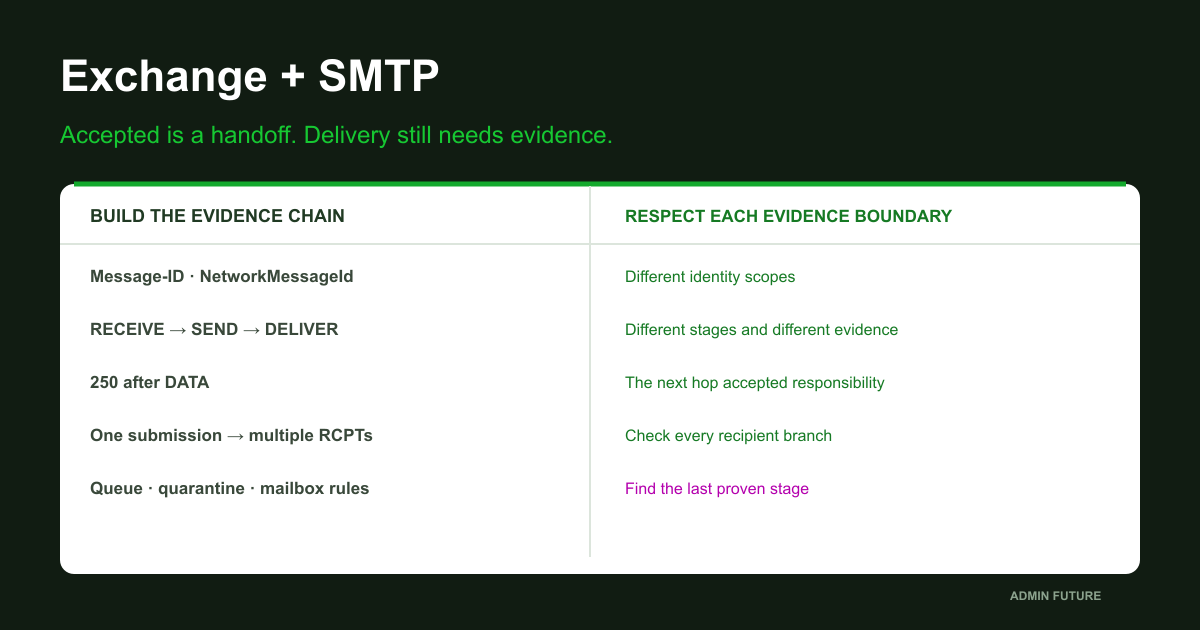
The naive check is simple: there is a 250 response, therefore delivery succeeded. SMTP returns successful responses at several stages, however. A reply to RCPT TO accepts a particular recipient at that stage. It does not acknowledge the message body. A successful EHLO says even less about the contract.
We need the transaction’s completion: after the message content is transferred with DATA, the receiving side returns its final successful response. That hop accepts responsibility for further processing for the accepted recipient set. It may be an intermediate gateway rather than the mailbox server. This distinction follows the SMTP responsibility model in RFC 5321.
There is an awkward boundary case too. The receiver may accept the content while the sender never sees the final reply because the connection breaks. A retry can then produce a duplicate. A sender-side timeout does not invariably establish receiver-side nonacceptance; investigate both ends of that transaction.
Do not immediately resend the real contract. If it is already quarantined, another copy complicates correlation. If it was delivered, a repeat may trigger a business action twice. First establish which component completed the handoff and for which RCPTs. Then decide whether a harmless test is necessary. This is why the table distinguishes the observed event from the conclusion we would like to draw from it.
| Observation | Evidence established | Still unknown |
|---|---|---|
| Sent Items copy | The client saved a sent copy | Which next hop accepted the original |
| 250 after DATA | The hop accepted the message for accepted RCPTs | Whether the final mailbox received it |
| SEND / SMTP | Exchange handed it to the next SMTP hop | What that hop did next |
| DELIVER / STOREDRIVER | Exchange recorded local mailbox delivery | Its current folder and whether a person saw it |
Preparation: logs do not exist merely because we now need them
Before searching, inspect the Exchange version, relevant transport servers, tracking configuration and available retention window. Querying EX01 does not automatically query EX02. Edge, a third-party gateway and a cloud segment each require their own evidence and permissions. The explicit server list in the example describes the teaching route; build the real list from topology and observed traffic.
# Exchange Management Shell, Windows PowerShell 5.1.
# Replace EX01 / EX02 with the servers on the actual route.
$Servers = @('EX01','EX02')
Get-ExchangeServer | Select-Object Name,AdminDisplayVersion,ServerRole
foreach ($Server in $Servers) {
    Get-TransportService -Identity $Server -ErrorAction Stop |
        Format-List Name,MessageTrackingLogEnabled,MessageTrackingLogPath,
        MessageTrackingLogMaxAge,MessageTrackingLogMaxDirectorySize,
        SendProtocolLogPath,ReceiveProtocolLogPath
}
Get-Service MSExchangeTransportLogSearch | Select-Object Name,Status
Get-TimeZone | Select-Object Id,DisplayName
Get-Date -Format o
The service check is local: Get-Service without a remote parameter does not inspect all listed servers. Check search availability on every relevant node. An access error or stopped Transport Log Search service is not evidence that the mail event never happened. Use the permissions required for the investigation rather than handing out Organization Management merely to perform one search.
Raw tracking and SMTP logs use UTC. Establish the actual time context of Start/End and shell output, particularly with remote sessions. The examples construct DateTime values explicitly to avoid day/month parsing ambiguity. Never append Z to a local timestamp without converting it. Validate your interpretation with a known test message and its original UTC log record.
Start with a small interval and widen it deliberately. A narrow window can miss a delay; an excessively broad one makes correlation harder. Expired retention cannot be repaired by enabling logging today: that only helps future events. Microsoft documents the search prerequisites and dependencies.
Level 2. Find the message and retain search failures
Search for the complete Message-ID, including angle brackets if present in the original. Preserve the name of the queried server. ClientHostname and ServerHostname describe the transport event; they do not replace information about where our export was obtained.
# Run in EMS on an Exchange server in the incident's time zone.
# Sample names and date must be replaced. Start with a narrow window.
$Servers = @('EX01','EX02')
$Start = [datetime]::new(2026,10,26,9,55,0)
$End = [datetime]::new(2026,10,26,10,15,0)
$MessageId = '<invoice-20261026-01@example.com>'
$Rows = @()
$Failures = @()
foreach ($Server in $Servers) {
    try {
        $Rows += @(Get-MessageTrackingLog -Server $Server -Start $Start -End $End -MessageId $MessageId -ResultSize Unlimited -ErrorAction Stop |
            Select-Object @{Name='QueriedServer';Expression={$Server}},*)
    } catch {
        $Failures += [pscustomobject]@{Server=$Server;Error=$_.Exception.Message}
    }
}
$Rows | Sort-Object Timestamp,QueriedServer |
    Format-Table Timestamp,QueriedServer,EventId,Source,Recipients -Wrap
$Failures | Format-Table -Wrap
# Empty rows plus failed servers is incomplete evidence, not "not received".
The resulting rows are not yet a reconstructed route. Sorting helps readability, but clocks can disagree and different servers record different sides of a transfer. Establish meaning and linkage before calculating latency. A negative one-second “delay” is a reason to verify time synchronization, not evidence of a new SMTP acceleration mechanism.
The Failures collection is important. If EX02 could not be queried, “the message was found nowhere” is not a valid conclusion. Say: “No matches on EX01 in this window; EX02 remains unexamined because the query failed.” This is less dramatic but tells the next administrator what remains to be done.
Without the original identifier, use addresses and a time window to obtain candidates:
# Alternative when the Message-ID is not yet available.
# Reuse $Servers, $Start and $End from the previous block.
$Candidates = foreach ($Server in $Servers) {
    Get-MessageTrackingLog -Server $Server -Start $Start -End $End -Sender 'sender@example.com' -Recipients 'finance@example.net' -ResultSize Unlimited -ErrorAction Stop |
        Select-Object @{Name='QueriedServer';Expression={$Server}},Timestamp,EventId,MessageId,NetworkMessageId,Recipients,MessageSubject
}
$Candidates | Sort-Object Timestamp | Format-Table -Wrap
# Confirm the candidate with original headers. Then search by exact Message-ID.
A matching subject does not select the right candidate automatically. When several sends exist, compare original headers and confirm the identifier. ResultSize Unlimited removes the default result-count cap, but cannot restore expired logs or bypass search conditions. Do not start with a month-long organization-wide scan. Supported parameters and their applicability are described in Get-MessageTrackingLog reference.
Three identifiers and the multiple-recipient trap
Keep three identity scopes separate. Message-ID connects the original message across systems while intervening processing preserves it. NetworkMessageId helps follow related Exchange copies. InternalMessageId belongs to processing on a particular server; it is not a universal number to reuse across every node.
After confirming an Exchange branch, expand the search using its NetworkMessageId. Deliberately omit the single-recipient filter here: it could conceal group expansion and related branches.
# Reuse $Rows, $Servers, $Start and $End from the exact-ID search.
$NetworkIds = @($Rows | Where-Object { $_.NetworkMessageId } |
    Select-Object -ExpandProperty NetworkMessageId -Unique)
if ($NetworkIds.Count -ne 1) {
    throw 'Select one confirmed message lineage; do not merge unrelated IDs.'
}
$NetworkId = [string]$NetworkIds[0]
$Lineage = foreach ($Server in $Servers) {
    Get-MessageTrackingLog -Server $Server -Start $Start -End $End -NetworkMessageId $NetworkId -ResultSize Unlimited -ErrorAction Stop |
        Select-Object @{Name='QueriedServer';Expression={$Server}},*
}
$Lineage | Sort-Object Timestamp,QueriedServer |
    Format-List Timestamp,QueriedServer,EventId,Source,MessageId,
        InternalMessageId,NetworkMessageId,Recipients,RecipientStatus,
        RelatedRecipientAddress,Reference,ConnectorId,SourceContext
The count check prevents accidentally merging several lineages. Multiple identifiers are a reason to select the confirmed object, not to remove the guard. With message regeneration, the route may become a graph: original message, new notification and redirected copy. Establish relationships using the records of the component performing that transformation.
For a group, track the actual expanded recipients. For redirection, retain both the original and new destination. Interpret Reference according to the event type instead of assuming that it always contains the same kind of identifier. Preserve Recipients and RecipientStatus together: their positions correspond. Flattening either array to its first value can turn one recipient’s success into a misleading result for everyone.
In our case, audit@example.com stays inside and finance@example.net leaves through GW01. Both routes are legitimate, but they need separate conclusions. Microsoft’s tracking-field and event reference provides a dictionary; the reconstructed route comes from the combined evidence.
Read events as transitions, not reassuring words
A small vocabulary is enough for the first pass. RECEIVE identifies transport receipt, SEND a subsequent handoff, and DELIVER local mailbox delivery. DEFER indicates delay and FAIL a failure. Read EventId together with Source, the recipient and diagnostic fields, rather than interpreting the name alone.
The shortcut “there is a SEND, close the ticket” fails in our route: EX01 sending to the gateway is not final external delivery. Likewise, RECEIVE on EX02 does not establish a write into the intended mailbox. We need the sequence for the particular branch.
Group expansion, redirection and message splitting explain why one input produces multiple records. Transport-redundancy records should not be presented as additional deliveries to a person. If an event records a drop, investigate its reason and responsible component. The word DROP alone does not establish that antispam detected malware.
Our teaching timeline now says that EX01 accepted the message, the internal branch reached EX02 and ended in DELIVER, and the external branch has a SEND toward GW01. This is already progress. General submission is no longer the main uncertainty and the internal outcome is established, but the external recipient’s fate remains unknown.
Record that explicitly. Replace “mail works” with “delivery is recorded for audit; handoff to GW01 is established for finance; the next stage is not yet known.” This statement separates the two recipients and gives the next level of investigation an exact starting point.
Queues: a snapshot of now, not the message history
Before inspecting SMTP, check whether our transport still holds the affected copy. Queues describe current state; tracking describes events. Neither replaces the other. An empty queue an hour later is compatible with successful handoff, expiration, removal, quarantine elsewhere and several other outcomes.
# Current state only; execute on the transport server holding the message.
$Server = 'EX01'
$MessageId = '<invoice-20261026-01@example.com>'
Get-Queue -Server $Server -ErrorAction Stop |
    Select-Object Identity,Status,MessageCount,DeliveryType,NextHopDomain,LastError
# Server-side exact filter. Escape quotes before interpolating the identifier.
$SafeId = $MessageId.Replace("'","''")
Get-Message -Server $Server -Filter "InternetMessageId -eq '$SafeId'" -IncludeRecipientInfo -ResultSize Unlimited -ErrorAction Stop |
    Format-List Identity,InternetMessageId,Status,DateReceived,ExpirationTime,
        FromAddress,Recipients,LastError,RetryCount
The queue filter uses InternetMessageId, the queue-object property, rather than the tracking cmdlet’s MessageId parameter. Small naming differences matter when adapting commands between tools. See Get-Message for queries and the queue documentation for transport behavior.
When a matching object exists, preserve Identity, recipients, LastError, timestamps and the next hop. Retry together with a DNS, TLS or remote rejection error guides the next check. The displayed error describes an observed attempt, not necessarily the entire message lifetime. Proving repeated failures needs multiple observations or historical records.
Do not use Remove-Message, broad Retry-Queue operations or Mail.que reconstruction as investigative shortcuts. They change the state and may destroy useful evidence. In our example, the exact message is no longer queued on EX01 but its SEND record remains. That does not establish final delivery. It directs us to the handoff log for GW01 while leaving unrelated messages untouched.
Level 3. Reconstruct the SMTP session through its final reply
Tracking describes the transition Exchange recorded. A protocol log exposes the conversation with the neighboring hop. Busy log files interleave connections, so use session-id and sequence-number while checking local-endpoint, remote-endpoint and connector-id. One SMTP session can carry several transactions; identifying the session alone does not identify the message.
Find the actual log path for the relevant transport service. Front End and Hub are separate stages. For EX01 sending to the gateway, inspect SMTP Send on the actual source node, rather than opening the first SmtpReceive folder you find. Fields and paths are documented in protocol logging.
If logging was absent, enabling it only helps the next approved test. Warning: Verbose produces additional records and storage activity, and logs reveal addresses and infrastructure details. Limit the change to one verified connector, record its original value, and check space and retention. The example starts with WhatIf. An administrator performs the actual change after approval and then restores the captured level.
# Change only a reviewed, explicit on-premises Send connector.
# For an EdgeSync-subscribed Edge, manage the organization configuration.
$ConnectorName = 'To-Mail-Gateway'
$Saved = @(Get-SendConnector -Identity $ConnectorName -ErrorAction Stop)
if ($Saved.Count -ne 1 -or [string]$Saved[0].Name -ne $ConnectorName) {
    throw 'The exact connector was not resolved.'
}
$Before = [string]$Saved[0].ProtocolLoggingLevel
# Record $Before in the change ticket BEFORE enabling logging.
$Saved[0] | Format-List Identity,SourceTransportServers,ProtocolLoggingLevel
Set-SendConnector -Identity $Saved[0].Identity -ProtocolLoggingLevel Verbose -WhatIf
# After approval, remove -WhatIf for this connector only.
# Send one harmless test; inspect the actual source server's protocol log.
# Rollback in this same session, using the captured original value:
# Set-SendConnector -Identity $Saved[0].Identity -ProtocolLoggingLevel $Before
# Get-SendConnector -Identity $Saved[0].Identity | Format-List Identity,ProtocolLoggingLevel
Verify that real records appear for that connector, not merely that its setting says Verbose. An EdgeSync-subscribed Edge requires coordination with organizational configuration, rather than blind local edits. See Configure protocol logging for scope and syntax.
# Run locally on the source Exchange server with access to its log directory.
# Select ONE copied log file around the incident; do not scan the whole disk.
$Path = 'C:\Incident\SEND2026102607-1.log'
if (-not (Test-Path -LiteralPath $Path -PathType Leaf)) { throw 'Log file missing.' }
$Lines = @(Get-Content -LiteralPath $Path -ErrorAction Stop)
$Header = $Lines | Where-Object { $_ -like '#Fields:*' } | Select-Object -First 1
if (-not $Header) { throw 'Exchange CSV #Fields header missing.' }
$Fields = ($Header -replace '^#Fields:\s*','').Split(',')
$Events = @($Lines | Where-Object { $_ -and -not $_.StartsWith('#') } |
    ConvertFrom-Csv -Header $Fields)
$Events | Group-Object 'session-id' | Select-Object Name,Count
# Replace this with a session identified by endpoints and the transaction window.
$SessionId = 'REPLACE_WITH_SESSION_ID'
$Events | Where-Object { $_.'session-id' -eq $SessionId } |
    Sort-Object @{Expression={[long]$_.'sequence-number'}} |
    Format-Table 'date-time','sequence-number',event,data,context -Wrap
This parser reads one copied Exchange CSV, not Postfix or arbitrary gateway logs. Within the confirmed transaction, locate MAIL FROM, RCPT TO, DATA completion and the peer’s reply. Protocol logging is not a message-body archive; absence of a complete Message-ID in it is not proof that the message was absent. Correlate time, endpoints, context and available local references.
Level 4. The gateway accepted it. What happened next?
In our example, GW01 returned a successful response after DATA. This is strong handoff evidence, but its scope ends at the gateway. Ask its administrator for records using Message-ID, exact RCPT, UTC window, EX01’s address, the receiving interface and any gateway-local identifier included in the reply.
Do not assume an antispam gateway must immediately relay every accepted copy. It may queue analysis, hold the message under a policy or quarantine it. Inspect the object, engine decision, policy, decision time and subsequent action. “No virus detected” answers only one question; another control may have held the message. A healthy scanning engine also says nothing about this particular object’s outcome.
Our model gateway maps acceptance to Q-1842 and quarantine under an attachment policy. This identifier is invented for the diagram; actual formats depend on the product. No downstream MX handoff for finance appears in the examined window. We have located the route’s stopping point and can explain it, but still cannot claim delivery.
Quarantine release is a separate approved action after security review. Preserve the original decision and release identifier: the product may generate a new copy with a new trace. If the gateway instead handed the message to an external server, obtain that transaction’s evidence and continue on the receiving side. An external MX answering ping is no substitute for this check.

DELIVER exists but the user sees nothing: change the investigation scope
Return to internal recipient audit. Suppose that user also reports a missing message even though the branch ends in DELIVER. This is a different question. Mailbox delivery does not mean the item must still be in the Inbox, that the client is synchronized, or that a person read it.
With the owner’s authorization, inspect the mailbox in the web client without a restrictive view: confirm the account, consider shared mailboxes, and check other folders, archive and deleted items. Compare that result with Outlook. If the web client shows the message and Outlook does not, transport is no longer the leading suspect; examine client views and synchronization.
Next inspect current rules and forwarding:
# Read-only inspection; requires the corresponding Exchange RBAC permissions.
$Mailbox = 'audit@example.com'
Get-Mailbox -Identity $Mailbox -ErrorAction Stop |
    Format-List PrimarySmtpAddress,RecipientTypeDetails,Database,
        ForwardingAddress,ForwardingSmtpAddress,DeliverToMailboxAndForward
Get-InboxRule -Mailbox $Mailbox -IncludeHidden -ErrorAction Stop |
    Format-List Identity,Name,Enabled,Priority,Description,
        MoveToFolder,DeleteMessage,RedirectTo,ForwardTo,
        ForwardAsAttachmentTo,StopProcessingRules
# Do not disable/delete rules merely because they exist.
# Compare with the incident time and approved mailbox behavior.
A hidden rule is not automatically evidence of intrusion; legitimate system mechanisms can be hidden too. Investigate a suspicious action’s origin, purpose and time context. Current settings also do not prove that the same configuration existed during the incident. Historical conclusions need available audit records with appropriate scope and retention. Missing historical auditing cannot be created retrospectively.
Rule properties and IncludeHidden are documented in Get-InboxRule. These commands only inspect state. Disabling all rules or deleting a client profile destroys that state before its significance is understood. Unauthorized forwarding becomes a separate security investigation involving evidence preservation and access containment, rather than merely a mail convenience issue.
Join the chain: facts, conclusions and missing evidence
Our teaching incident now has a testable explanation. The table uses illustrative UTC times, not measured Exchange latencies. It does not replace source records; it shows which conclusions those records would support.
| UTC time | Node | Recipient / action | Conclusion |
|---|---|---|---|
| 07:00:01 | EX01 | finance and audit: RECEIVE | Transport ingress established |
| 07:00:03 | EX02 | audit: DELIVER | Internal branch delivered |
| 07:00:04 | EX01 → GW01 | finance: SEND, final 250 | Gateway accepted external branch |
| 07:00:06 | GW01 | finance: quarantine Q-1842 | No downstream SMTP handoff |
| 07:25:00 | GW01 | Administrator inspection | Message located; not yet released |
Fact: the internal branch has a delivery event. Fact: the gateway accepted the external branch and linked it to quarantine. Conclusion: the finance branch stopped at GW01’s policy processing rather than Outlook submission. Until an authorized release and subsequent route are confirmed, external delivery remains unfinished.
Consider a different outcome: EX01 has SEND but the gateway logs have expired. The conclusion must be shorter: “Handoff to GW01 is established; the subsequent outcome cannot be determined from available evidence.” There is insufficient data. This is an accurate boundary, not an investigative failure. Better retention can help next time; confidence cannot reconstruct missing records.
A third branch: our gateway recorded a timeout while the receiver found acceptance. Correlate that record with our attempt and examine retries rather than deleting “duplicates” by subject. A fourth: no quarantine exists, but a downstream queue contains the exact object with a TLS error. Revise the working hypothesis and the next question. An early suspicion of antispam must not survive contradictory evidence.
A useful timeline supports these alternative outcomes. It is not designed so that every possible result confirms the administrator’s original theory. That makes it reusable across products and easier to review when another team challenges the conclusion.
Preserve evidence and hand over a precise next question
A Format-Table screenshot is not an adequate evidence export: display formatting can truncate fields. Save original objects separately from the compact timeline, along with the queried servers, interval and query errors. A small export takes minutes and can prevent a colleague trying to recollect records after retention has expired.
# Reuse $Rows and $Failures from the exact-ID search.
# Supply a NEW directory in an approved, access-controlled incident location.
$Out = 'C:\Incident\Mail-20261026-001'
if (Test-Path -LiteralPath $Out) { throw 'Use a new evidence directory.' }
$null = New-Item -ItemType Directory -Path $Out -ErrorAction Stop
$Rows | Export-Clixml -LiteralPath (Join-Path $Out 'tracking-raw.xml') -Depth 8
$Rows | Sort-Object Timestamp,QueriedServer |
    Select-Object Timestamp,QueriedServer,EventId,Source,MessageId,
        NetworkMessageId,InternalMessageId,ConnectorId,
        @{Name='Recipients';Expression={$_.Recipients -join ';'}},
        @{Name='RecipientStatus';Expression={$_.RecipientStatus -join ';'}},
        @{Name='Reference';Expression={$_.Reference -join ';'}} |
    Export-Csv -LiteralPath (Join-Path $Out 'timeline.csv') -NoTypeInformation -Encoding UTF8
$Failures | Export-Clixml -LiteralPath (Join-Path $Out 'query-failures.xml')
[pscustomobject]@{CollectedAt=(Get-Date -Format o);TimeZone=(Get-TimeZone).Id;Start=$Start;End=$End;Servers=$Servers} |
    ConvertTo-Json -Depth 4 | Set-Content -LiteralPath (Join-Path $Out 'scope.json') -Encoding UTF8
Get-ChildItem -LiteralPath $Out -File | Get-FileHash -Algorithm SHA256 |
    Export-Csv -LiteralPath (Join-Path $Out 'sha256.csv') -NoTypeInformation -Encoding UTF8
The example directory must be inside a previously approved, access-controlled location. New-Item does not secure it automatically. Exports contain addresses and internal names; sanitize them before sharing publicly. SHA256 helps detect changes to the collected copy, but does not authenticate the original system or replace evidence-handling procedures.
Preserve raw protocol logs and gateway records separately, recording filenames, time zone, source node and coverage. The CSV simplifies some arrays for readability while XML retains more original structure. Neither is a complete mail-system archive. If opening exports in a spreadsheet, import untrusted text as text rather than executable formulas.
A useful handover says: “GW01 accepted this Message-ID for finance@example.net from EX01 during this UTC window. Please provide the local object ID, filtering decision and next SMTP outcome. Our proven boundary is GW01’s final successful response.” It does not require the contract body, passwords or every message in the organization. Request the minimum evidence needed to establish the next transition, and explicitly state any servers or intervals that remain unexamined.
Validate safely: one test message, several independent outcomes
Prepare the investigation before a real contract disappears. Use approved test mailboxes, create a harmless message with a unique subject marker and submit it through the normal authorized client. Preserve the actual Message-ID from the resulting original. The unique subject helps discovery but does not replace the identifier.
- Validate the internal route: servers visible in tracking, recipient delivery outcome, and agreement between your time interpretation and the raw log.
- Validate approved external delivery: correlate your SEND, the gateway reply, downstream acceptance and presence in the test mailbox.
- If the gateway supports a safe quarantine test policy, scope it only to approved test identities. Do not introduce a malicious attachment to make the experiment realistic.
- For two recipients, record two outcomes. A DELIVER for one must not automatically mark the other successful.
- Restore temporary logging and test-policy settings using the recorded rollback plan. Verify actual state afterward and preserve the result.
| Test | Required evidence | Insufficient result |
|---|---|---|
| Internal test | Recipient branch ends in DELIVER | SUBMIT alone |
| Authorized external test | SEND + receiving-side acceptance + test mailbox visibility | Gateway 250 alone |
| Approved quarantine test | Object ID + reason + recipient branch | Antispam service is Running |
| Two-recipient message | Separate outcome for each RCPT | One SEND declared universal delivery |
| Logging gap | Gap recorded; conclusion limited | Empty search treated as absence proof |
Do not test duplicate delivery using a real payment instruction, stop transport, or release suspicious objects broadly. Harmless messages and bounded policies are sufficient. The article’s commands were checked against documentation; that is not execution in your Exchange environment. Before operational use, verify RBAC, version, time context and search load with a pilot interval.
A successful test produces a short procedure: who retains each log, how to obtain the original, how gateway IDs map to Exchange, and who owns the next segment. This is more valuable than another general check that port 25 is open.
What should remain after the investigation?
We moved from the user’s “sent” claim to a confirmed handoff, separated recipient outcomes and followed the chain to quarantine or a mailbox. The essential discipline is precise wording. A missing client item, an empty queue and a successful SMTP handoff answer different questions.
The key point is simple: every acknowledgment has a boundary; an investigation advances when the next evidence source continues the same chain. Do not call a gateway a mailbox. If evidence ends there, record the gap. If the mailbox received the message, move the investigation to its subsequent handling.
Thank you for reading. I hope this procedure helps resolve mail incidents with an explanation that can be verified, rather than an agreement between tired administrators. When retention and identifier mappings are agreed beforehand, even a multi-product route becomes manageable.
- Where does observability most often end in your mail system: the client, gateway, cloud segment or post-delivery actions?
- How do you correlate objects after quarantine release, redirection or message regeneration by a third-party filter?
- Can you distinguish “never accepted” from “the relevant log has expired” today, and what supports the answer?
Share nonconfidential scenarios in the comments, without private headers or addresses. Another worthwhile investigation is Exchange deliberately refusing new mail because of resource pressure: the server is running, but transport is protecting itself. That is a separate story about back pressure and the consequences of disabling its safeguards.