In this article
02:17. Another administrator appears on the server
Accounting works normally in the morning. The overnight backup succeeded, the application service is running, and antivirus reports no detections. While reviewing network activity, however, an administrator notices an unfamiliar process. Its name resembles a support tool, and a recognized publisher signed the file. The temptation is to close the finding: the contractor probably installed it.
The contractor says it is not theirs. Internal support says the same. Meanwhile, the program maintains an external connection. The central uncertainty is no longer whether the executable is counterfeit. It is who gained the ability to control the server through a genuine tool?
This is a fictional composite teaching scenario, not a particular customer’s incident. Times are illustrative. We will not launch the discovered agent, connect to an unfamiliar console or reproduce a malicious deployment. Instead, we will investigate process, file, launch mechanism, configuration, management authority and actions.
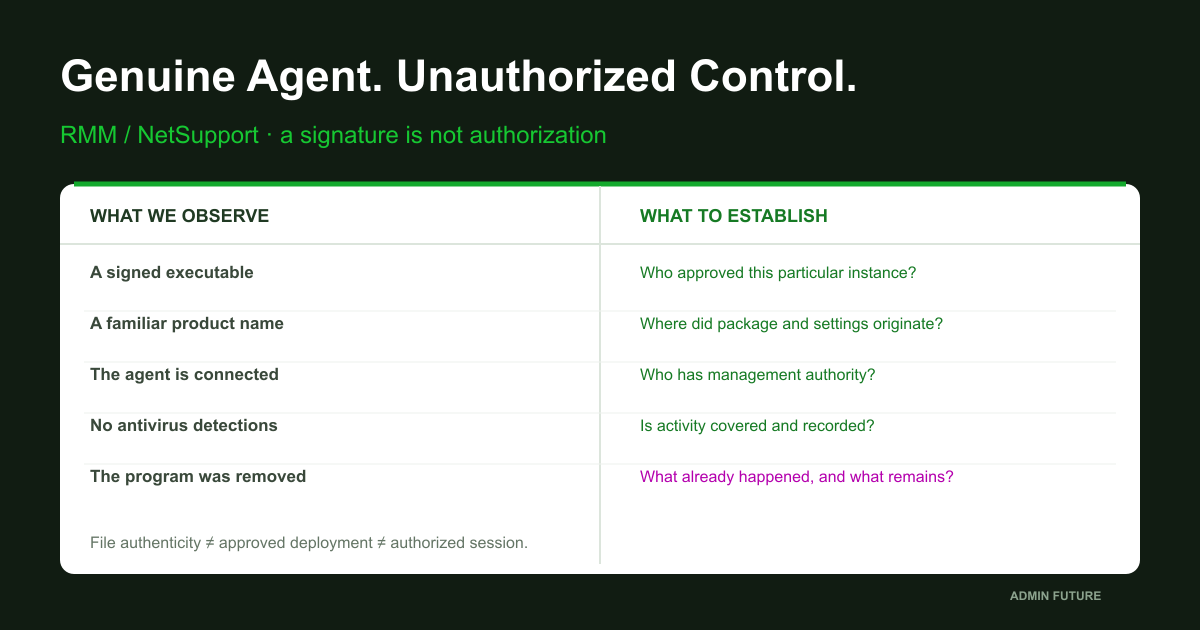
Keep three assertions separate: “the file is genuine,” “the organization approves the program,” and “this session is authorized.” Establishing the first does not establish the other two.
The October context: what BI.ZONE reported
In its October 15, 2026 report on Insolent Hyena, renamed Insolent Werewolf by the researchers, BI.ZONE mentions attackers deploying NetSupport Manager. Phishing and ClickFix are discussed separately among initial-access methods. This does not mean every NetSupport deployment followed one identical chain.
The report provides a recent example of legitimate remote-access software being abused. The investigation below is an independent administrative method, not a reproduction of all BI.ZONE findings or an allegation that the software manufacturer was compromised.
Do not confuse a tool’s category with permission to use it. RMM and remote administration benefit support teams. But a useful capability does not validate the intent of whoever enabled it. The same file-transfer function can deliver an approved update or unauthorized material. Evidence and context establish the difference.
Antivirus silence is not authorization
Antivirus need not classify every support-tool installation as malicious: the organization may officially use it. The opposite universal claim is also wrong—these tools are not inherently invisible to security products. Detection depends on product, configuration, telemetry and behavior. The headline describes a symptom, not guaranteed attacker stealth.
Verify the premise itself: is endpoint protection running, updating and forwarding events, and does monitoring cover this software? An empty dashboard after collection failed is not the same as no detections on a functioning endpoint. Even healthy protection does not replace an inventory of authorized administrative channels.
The distinction between useful remote access and abuse is addressed in CISA’s remote-access security guidance. Our practical conclusion is specific: investigate deployment provenance, management authority and permitted actions, not merely executable reputation.
Three checks instead of one “signed” label
Authenticity establishes which file you are examining. Authorization establishes who approved this particular installation on this server. Management attribution establishes which principal could initiate sessions and commands. The questions are related, but none automatically answers the others.
In the teaching case, publisher and version look ordinary. Yet there is no work request, the resource owner does not recognize the agent, and its configuration differs from the company baseline. That warrants investigation. Until a session and action are established, however, do not report that the database was definitely downloaded.
Build the chain: provenance → execution → configuration → management → action → consequence. Investigate who could alter that chain after deployment, too. Yesterday’s approved agent can have different settings or a compromised management account today.
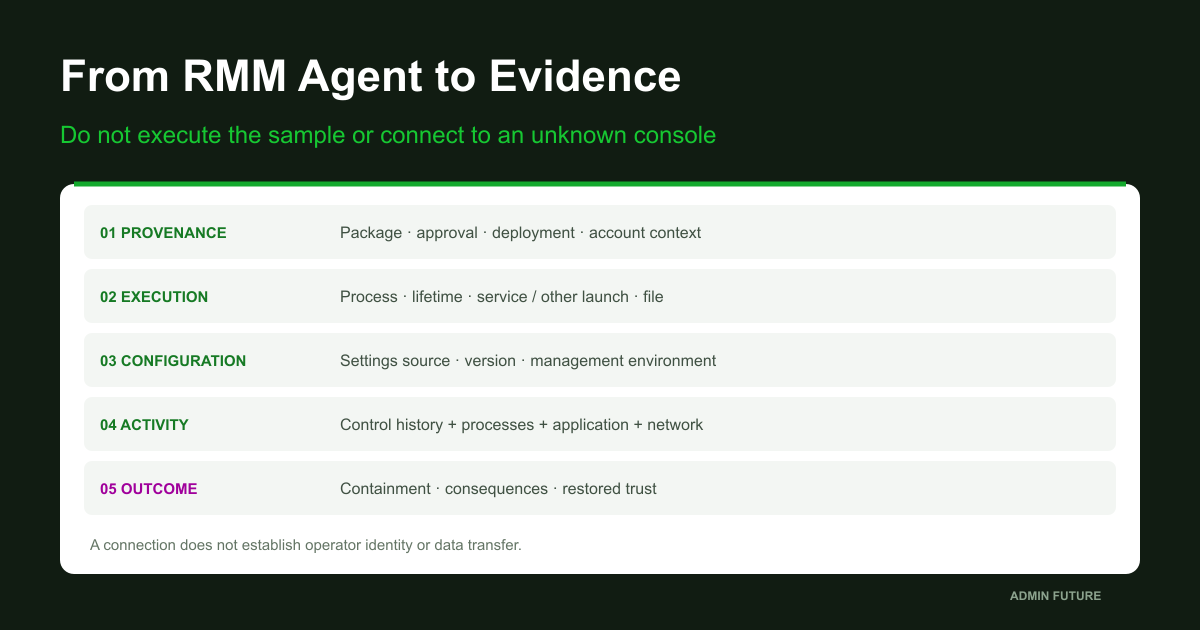
A management server is not the person behind the screen
Product architectures differ. An agent may connect to an organizational server, a vendor service or a connectivity relay; direct patterns also exist. Do not impose a SaaS-tenant model on every product. For NetSupport, establish the actual Client, Control and Connectivity Server/Gateway roles in the deployed version.
A connection address may belong to a relay rather than the operator’s computer. A familiar cloud IP does not establish authorized control. Conversely, an unfamiliar address may be an approved new support location. You need owner confirmation and a match to approved configuration, not attribution by IP geography.
Compare the device identity, management environment, permitted groups or keys and operator accounts using the product’s actual concepts. A shared access key or connection identifier is not personal attribution by itself. Establish human activity through available management history and target-side evidence.
Before restarting: preserve context and avoid activation
During active destruction, approved containment outranks perfect collection. When time permits, record the process and lifetime, current connections, service or other persistence, original files and settings, logs and protection status before changes. Record host, UTC time, source and limitations for every observation.
Do not open the agent to test it, connect to its unfamiliar management server or launch a configurator against the original instance. Those actions can change artifacts or activate unwanted communication. Analyze preserved copies as data in a separate environment. Do not submit internal configuration or logs to public analysis services without explicit authorization.
Do not make service deletion your first command. Interrupting control can be necessary, but deletion does not replace a containment decision and can destroy context. Establish independent emergency access: an unfamiliar tool sometimes turns out to be the only remaining administrative route.
Process identity: establish what is actually running
Start with a PID from an actual observation, not a presumed filename from an article. Names can change. An approved installation and an unauthorized copy can coexist, so “we use that product” does not resolve a particular finding.
# Local selected Windows host, approved read. Use the PID from an actual observation.
$ObservedPid = 0
if ($ObservedPid -le 0) { throw 'Set the observed PID; do not use the automatic $PID variable.' }
$Process = Get-CimInstance Win32_Process -Filter "ProcessId=$ObservedPid" -ErrorAction Stop
if (-not $Process) { throw 'Process absent: use historical telemetry, not a guessed replacement PID.' }
$Process | Select-Object Name,ProcessId,ParentProcessId,CreationDate,ExecutablePath,CommandLine
$Owner = Invoke-CimMethod -InputObject $Process -MethodName GetOwner -ErrorAction Stop
if ($Owner.ReturnValue -ne 0) { Write-Warning ('GetOwner failed: ' + $Owner.ReturnValue) }
$Owner | Select-Object ReturnValue,Domain,User
Get-CimInstance Win32_Process -Filter "ProcessId=$($Process.ParentProcessId)" -ErrorAction Stop |
    Select-Object Name,ProcessId,CreationDate,ExecutablePath
# Snapshot only: a parent PID may have been reused; this is not a historical process tree.
# Command lines can contain secrets. Restrict output, do not paste it into public tickets.
# Does not launch, stop, debug or reconnect to the selected program.
A current parent PID is not a historical process tree. The parent may have ended and its number been reused. Investigate history through process-creation telemetry, lifetime and a durable identifier where available. A system agent’s current owner may be a system account; that is not the name of the person who installed it.
CommandLine helps identify parameters and configuration, but can contain secrets. A read failure, empty path or unsuccessful GetOwner is a visibility limitation or process characteristic—not proof that the program is absent or the operator anonymous.
A service is only one way to survive user logoff
For a service-based agent, record the exact name, command line, startup mode and account context. No service does not exonerate the host: user execution, scheduled tasks and portable copies are possible. Searching for the word NetSupport is not a complete remote-access inventory.
# Exact observed service name. A portable/user-mode agent may have no service.
$ObservedServiceName = 'REPLACE_EXACT_OBSERVED_SERVICE_NAME'
if ($ObservedServiceName -like 'REPLACE_*') { throw 'Set the observed service name.' }
$Services = @(Get-CimInstance Win32_Service -ErrorAction Stop |
    Where-Object Name -eq $ObservedServiceName)
if ($Services.Count -ne 1) { throw 'Service absent or ambiguous; inspect other launch mechanisms.' }
$Services | Select-Object Name,DisplayName,State,StartMode,StartName,ProcessId,PathName
# PathName is a command line, NOT automatically the executable's literal file path.
# A service account is not proof of who originally installed or authorized the agent.
# No Win32_Product query, installer repair, service restart or startup changes.
A service’s PathName is a launch string, not necessarily a plain executable path. Do not pass the entire string to signature verification or execute it. Relate it to the observed process and select the confirmed file separately. Automatic describes today’s startup setting, not when the agent first appeared.
Do not use Win32_Product for this initial investigation. Microsoft documents package-consistency checks associated with such queries. Diagnostics should not silently become installer repair. An installed-program inventory also misses portable copies.
A signature describes a file, not authority to control it
Record the selected file’s hash, path, version and Authenticode information. Get-AuthenticodeSignature returns signature information; interpret it in the verification system’s trust context. An unavailable revocation check is not a confirmed counterfeit.
# Exact observed local executable path; do not pass the service command line.
$ObservedFile = 'REPLACE_FULL_LOCAL_EXECUTABLE_PATH'
if ($ObservedFile -like 'REPLACE_*' -or $ObservedFile -notmatch '^[A-Za-z]:\\') {
    throw 'Set the verified local drive path to the selected executable.'
}
$File = Get-Item -LiteralPath $ObservedFile -ErrorAction Stop
if ($File.PSIsContainer) { throw 'Select one file, not a directory.' }
$File | Select-Object FullName,Length,CreationTimeUtc,LastWriteTimeUtc
Get-FileHash -LiteralPath $ObservedFile -Algorithm SHA256 -ErrorAction Stop
$Signature = Get-AuthenticodeSignature -LiteralPath $ObservedFile -ErrorAction Stop
$Signature | Select-Object Status,StatusMessage,SignatureType
$Signature.SignerCertificate | Select-Object Subject,Issuer,Thumbprint,NotBefore,NotAfter
$File.VersionInfo | Select-Object CompanyName,ProductName,FileVersion,OriginalFilename
# Reads file metadata/signature; does not execute it. Version strings are not trusted identity.
# Signature trust/revocation evaluation can depend on local policy, time and PKI connectivity.
# A valid signature does NOT approve the installation, configuration or remote operator.
Valid does not mean “installed by our support team.” A particular file is signed—not every neighboring module, configuration setting or operator action. If loaded-component tampering is suspected, investigate the relevant telemetry. The main executable’s signature cannot establish the integrity of the entire process. Do not reproduce suspicious module loading to test that hypothesis.
Comparison with an approved deployment package is more useful than an isolated reputation score. Yet an identical executable can use unauthorized configuration. File timestamps help orient an investigation; copying, updates and other operations prevent treating them as proof of installation time.
Configuration: whose interests does the genuine agent serve?
Inspect management destinations, available profiles and details that map this instance to an approved environment. Do not print secrets into a broadly shared transcript. First preserve metadata, hash and permissions for the confirmed artifact; examine contents in a restricted copy.
# One confirmed configuration artifact, not a recursive search for every secret.
$ConfigPath = 'REPLACE_VERIFIED_LOCAL_CONFIGURATION_FILE'
if ($ConfigPath -like 'REPLACE_*' -or $ConfigPath -notmatch '^[A-Za-z]:\\') {
    throw 'Set the verified local configuration file path.'
}
$ConfigFile = Get-Item -LiteralPath $ConfigPath -ErrorAction Stop
if ($ConfigFile.PSIsContainer) { throw 'Select one configuration file.' }
$ConfigFile | Select-Object FullName,Length,CreationTimeUtc,LastWriteTimeUtc
Get-FileHash -LiteralPath $ConfigPath -Algorithm SHA256 -ErrorAction Stop
Get-Acl -LiteralPath $ConfigPath -ErrorAction Stop | Select-Object Owner,Sddl
# Contents intentionally not printed: configuration can contain management keys/secrets.
# Preserve original bytes in approved evidence storage and analyze a copy as data.
# A matching filename is not proof this is the active configuration; inspect version/policy.
# Do not launch a configurator, save the file, recompute vendor checksums or redeploy it.
For NetSupport, Client32.ini is not the only possible name. Vendor documentation describes the move to Client32u.ini starting with v12.50. Installed version and actual paths matter more than a universal directory example. A familiar filename does not establish that the process reads it.
The owner must approve the specific configuration and management scope, not merely the product name. If yesterday’s approved connectivity server differs from today’s active destination, that is a separate change even when the executable hash is unchanged.
The local INI may not have the final say
NetSupport documents obtaining Gateway settings from client configuration or the registry, commonly through Group Policy. A repaired local file therefore does not establish repaired effective state. Settings may return through an authorized deployment system that itself needs investigation.
Establish configuration sources and precedence for the installed version: deployment package, local configuration, policy and launch arguments. Do not assume a registry value is active merely because it exists. Use the documented model and available evidence from the actual instance.
Do not edit the original file to make the finding look correct. A vendor configurator can update checksums and multiple artifacts together. That is intervention. Preserve state first; remediation needs a separately approved supported method, owner and verification that old configuration no longer returns.
Network evidence: connected to what—and controlled by whom?
Relate a TCP snapshot to the verified process identity. Get-NetTCPConnection describes current connections and listeners, not overnight history. Communication may occur through another process; establish that separately rather than attributing all host traffic to one agent.
# Local live TCP snapshot for the actual observed process. No connection to the remote endpoint.
$ObservedPid = 0
if ($ObservedPid -le 0) { throw 'Set the currently verified PID.' }
$Before = Get-CimInstance Win32_Process -Filter "ProcessId=$ObservedPid" -ErrorAction Stop
if (-not $Before -or -not $Before.CreationDate) { throw 'Process identity/lifetime unavailable.' }
$Before | Select-Object Name,ProcessId,CreationDate,ExecutablePath
try {
    Get-NetTCPConnection -OwningProcess $ObservedPid -ErrorAction Stop |
        Select-Object LocalAddress,LocalPort,RemoteAddress,RemotePort,State,CreationTime,OwningProcess
} catch {
    Write-Warning ('No matching connections OR query failure: ' + $_.Exception.Message)
}
$After = Get-CimInstance Win32_Process -Filter "ProcessId=$ObservedPid" -ErrorAction Stop
if (-not $After -or $After.CreationDate -ne $Before.CreationDate) {
    Write-Warning 'Process ended or PID was reused during capture. Do not merge this as one identity.'
}
# Does not show historic/terminated/UDP connections or identify a human behind a relay.
# No DNS lookup, HTTP request, login, scan or callback to an unfamiliar management server.
A remote IP and port are transport observations. They do not establish the operator, session contents or database transfer. Correlate EDR, DNS, proxy, network and available management records for history. NAT, a shared relay or a proxy can prevent one local snapshot from identifying the final operator.
Do not visit the unfamiliar destination merely to see what opens. External infrastructure investigation needs separate authorization and a suitable environment. This article does not require such contact: compare destinations already observed with the approved management environment first.
Who installed it? SYSTEM is not a person’s name
For services, investigate System/7045 and, with suitable auditing, Security/4697. MSI and deployment-system history can help. But a portable copy may not use an installer, and service registration may occur after file delivery. Missing one event does not establish that installation never occurred.
A system context may represent a deployment agent. Trace the console-side job: creator, package, targets and approval. “SYSTEM installed it” is not sufficient attribution. Nor does one domain-account record justify blaming a person; someone else may have used that identity.
Investigate package delivery, file creation, launch command and subsequent registration. Where 4688 is available, account for command-line policy and event version. Host, process lifetime and security context must align. A matching directory-creation date does not replace that analysis.
Phishing and ClickFix: separate delivery from subsequent control
ClickFix creates a false need to fix or verify something, then steers the person into an OS action rather than ordinary browser verification. Microsoft analyzes the technique as social engineering. We do not reproduce its delivery commands or pages.
The first evidence may be on an employee workstation rather than the server running the agent. Server deployment needs a separate explanation: which privileges, logon or deployment mechanism enabled that continuation? “There was ClickFix” does not explain a SYSTEM process on another computer by itself.
Preserve the message and headers, permitted browser/security history, file and available execution chain. Do not ask the user to repeat the sequence on a working device. Prevention includes a clear support route and a rule against executing a website’s proposed “fix.” That complements privilege restriction rather than replacing it.
Operator actions: remote GUI control need not spawn a shell
Remote control is not limited to launching PowerShell. An operator can open an application and act through its interface. No child cmd.exe or script therefore does not establish inactivity. Conversely, a child process alone does not prove malicious intent: approved support also runs diagnostics.
Investigate available product-side connection/session history, then correlate files, processes, application activity and database records. A file-transfer record, if supported and previously enabled, is not proof that all data was transferred. Establish logging capability and retention for the actual version and settings rather than promising universal RMM telemetry.
With prior configuration, Sysmon can provide process, file and network observations. It does not decide maliciousness for the investigator. Module-load and network telemetry should not be enabled fleet-wide during an incident without assessing volume and impact.
An evidence table: fact, hypothesis and next source
In the teaching case, we have a genuine program, an unconfirmed installation and different configuration. Those observations justify response under the established procedure, but do not establish every attacker action. A table prevents possibilities from becoming reported facts.
| Observation | What is established | What remains unknown |
|---|---|---|
| Valid signature | Verification result for one file | Who approved deployment and control |
| Service / process exists | Observed launch mechanism / execution | Original installer and all past runs |
| Different Gateway in configuration | Contents of the selected artifact | Whether active, who changed it and when |
| TCP connection exists | Current transport connection by a process | Operator, commands and transferred data |
| No detections / child shell | Those observations absent from this selection | Absence of unauthorized control |
| Owner does not recognize agent | Approval remains unconfirmed | Complete entry chain and consequences |
Owner approval of deployment still leaves possible compromise of the management account to investigate. No approval requires investigating provenance and consequences. A third possibility is a forgotten contract and ownerless agent. That is an access-governance failure even when malicious intent has not been established.
Log collection: a bounded selection, not a universal detector
Save the block as Get-RmmIncident.ps1. It reads existing local Windows logs over a positive window of no more than 30 minutes. Security requires suitable privileges. An absent Sysmon channel or disabled auditing remains a visibility limitation, not a reason to automatically install collection software.
# Save as Get-RmmIncident.ps1. Local existing Windows logs; no agents installed or auditing changed.
[CmdletBinding()]
param(
    [Parameter(Mandatory=$true)][datetimeoffset]$Start,
    [Parameter(Mandatory=$true)][datetimeoffset]$End,
    [ValidateRange(10,2000)][int]$MaxEventsPerLog=500
)
if ($End -le $Start -or ($End-$Start).TotalMinutes -gt 30) {
    throw 'Use a positive incident window of at most 30 minutes.'
}
$Specs = @(
    @{Log='Security';IDs=@(1102,4624,4648,4688,4697,4698,4702)},
    @{Log='System';IDs=@(104,7045)},
    @{Log='Application';IDs=@();Provider='MsiInstaller'},
    @{Log='Microsoft-Windows-Sysmon/Operational';IDs=@(1,3,7,11,22)},
    @{Log='Microsoft-Windows-PowerShell/Operational';IDs=@(4103,4104)},
    @{Log='Microsoft-Windows-Windows Defender/Operational';IDs=@()}
)
foreach ($Spec in $Specs) {
    try {
        $Info = Get-WinEvent -ListLog $Spec.Log -ErrorAction Stop
        if (-not $Info.IsEnabled) { Write-Warning ('DISABLED: ' + $Spec.Log); continue }
        $Filter = @{LogName=$Spec.Log;StartTime=$Start.LocalDateTime;EndTime=$End.LocalDateTime}
        if ($Spec.IDs.Count -gt 0) { $Filter.Id=$Spec.IDs }
        if ($Spec.ContainsKey('Provider')) { $Filter.ProviderName=$Spec.Provider }
        $Events = @(Get-WinEvent -FilterHashtable $Filter -MaxEvents $MaxEventsPerLog -ErrorAction Stop)
        if ($Events.Count -ge $MaxEventsPerLog) {
            Write-Warning ('CAPPED: ' + $Spec.Log + '. Narrow the window or acquire separately.')
        }
        foreach ($Event in $Events) {
            [pscustomobject]@{
                Computer=$Event.MachineName;Log=$Event.LogName;Provider=$Event.ProviderName
                Id=$Event.Id;RecordId=$Event.RecordId
                TimeUtc=$Event.TimeCreated.ToUniversalTime().ToString('o');Xml=$Event.ToXml()
            }
        }
    } catch {
        Write-Warning ($Spec.Log + ': no matching records OR read failure; inspect: ' + $_.Exception.Message)
    }
}
# No matching records, missing channels and truncation are coverage limits, NOT a clean result.
# Sysmon/module/network/script events require prior configuration; do not enable them fleet-wide here.
# This selection is not a full forensic image. RMM, proxy, DNS and deployment-console logs are separate.
A CAPPED warning requires narrower adjacent windows or approved acquisition of complete logs. Do not infer no execution from the most recent 500 records in a busy channel. No records may reflect configuration, retention or query failure.
The selection does not include every RMM, mail, proxy or deployment-console log. Obtain those separately from their owners. UTC time and original XML aid correlation, but a local Logon ID does not become a global identifier for a person on another machine.
Preserve artifacts and the limits of confidence
Set the actual window with UTC offsets and an existing restricted case directory. Scripts and results may contain secrets. Even a management-server name can reveal nonpublic architecture, so a shared chat is not an appropriate repository for raw output.
# One selected host and restricted existing case directory. Replace all placeholders.
$CollectorPath = 'REPLACE_FULL_PATH_TO_Get-RmmIncident.ps1'
$CaseDirectory = 'REPLACE_EXISTING_RESTRICTED_CASE_DIRECTORY'
$StartText = 'REPLACE_START_ISO8601_WITH_UTC_OFFSET'
$EndText = 'REPLACE_END_ISO8601_WITH_UTC_OFFSET'
if (@($CollectorPath,$CaseDirectory,$StartText,$EndText) -match 'REPLACE_') {
    throw 'Set the reviewed script, restricted directory and exact incident window.'
}
if (-not (Test-Path -LiteralPath $CollectorPath -PathType Leaf)) { throw 'Collector missing.' }
if (-not (Test-Path -LiteralPath $CaseDirectory -PathType Container)) { throw 'Case directory missing.' }
$Rows = @(& $CollectorPath -Start ([datetimeoffset]::Parse($StartText)) -End ([datetimeoffset]::Parse($EndText)) -MaxEventsPerLog 500)
if ($Rows.Count -eq 0) { throw 'No records collected. Review warnings; do not report a clean host.' }
$CaseFile = Join-Path $CaseDirectory ('RMM-events-' + [guid]::NewGuid().ToString('N') + '.clixml')
$Rows | Export-Clixml -LiteralPath $CaseFile -NoClobber -Encoding UTF8 -ErrorAction Stop
Get-FileHash -LiteralPath $CaseFile -Algorithm SHA256
# Protect original XML: command lines and scripts may contain secrets or personal information.
# Preserve collection warnings separately. CLIXML is not native EVTX or tamper-proof storage.
# No execution-policy bypass, malware upload, event-log clearing or remediation included.
CLIXML containing event XML is a useful working copy, not native EVTX or a forensic image. Acquire native logs through approved export, such as wevtutil, without clearing them. A hash detects changes relative to the captured file; it does not establish that the source was uncompromised before acquisition.
The PowerShell blocks received static review. They were not executed in a Windows laboratory during article preparation. Validate compatibility on an authorized pilot first. No article commands were run on customer servers, stopped agents or changed security controls.
A timeline instead of a plausible-sounding story
In the teaching case, an overnight connection is observed first. Later, installation evidence appears from the previous day. The first connection you saw is not necessarily the first control session: earlier telemetry may be missing. Likewise, the BI.ZONE report’s publication date says nothing about deployment time on your host.
| Teaching stage, not actual events | Evidence to seek | Limitation |
|---|---|---|
| Package delivery | Message / source / deployment record | May be a different host from the server |
| Execution and installation | Process history, MSI / service / task | SYSTEM does not identify a person |
| Configuration delivery | File / policy / original package | Current contents do not establish historical contents |
| Connection and control | Process + network + available control history | Relay is not the final operator |
| Action and consequence | Files / application / database / protection | Connection does not prove exfiltration |
Test alternatives: approved maintenance, migration of the organization’s Gateway or redeployment of an old package. Confirmation must address the instance, configuration, time and action. “We sometimes use that software” does not explain a particular session. If coverage is inadequate, state that conclusion rather than completing an imagined attack chain.
Containment: stop unauthorized control from continuing
When control is unauthorized or malicious actions are established, use the incident-response procedure. Options may include restricting the selected host’s connectivity, interrupting the established channel and controls in a management console actually owned by the organization. Active harm must not wait for perfect collection.
Blocking one shared IP can disrupt approved services; deleting the only agent can remove emergency access. Assess scope and dependencies, assign an operator and maintain an independent route. Do not log into someone else’s console or try a discovered key. Neither is required to establish that your organization did not authorize the control.
Do not rely solely on the server’s own firewall if an intruder may hold administrator privileges there. Important enforcement must sit outside that authority. Stopping a process also does not prove that an established connection, second copy and every restart mechanism are gone. Verification must match the chosen measure.
Why uninstalling the agent is insufficient
The remote tool may have been the entrance, a follow-on capability or one of several channels. Removal leaves questions: which actions occurred, whether accounts or tasks appeared, whether application settings changed and whether secrets were exposed. Deleting an installer does not revoke stolen authority.
If your own management environment was compromised, investigate its operators, roles, history and other managed endpoints. An agent from an unauthorized environment, however, does not automatically establish compromise of the approved support platform. Determine scope from evidence. Rebuilding a host from trusted state depends on privileges obtained and investigation coverage.
NIST SP 800-61r3 provides incident-response and recovery context. A practical record needs an accountable decision maker, recovery criteria, checks for redeployment and remaining unknowns. “The EXE is gone” is just one item in that record.
Detect unauthorized access without banning support
Define an approved tool profile: owner, installation targets, package/version, management environment, configuration source, operator authority and revocation process. Publisher-only approval is too broad: a genuine agent with unauthorized settings may remain formally allowed.
Useful signals include a new unapproved server instance, execution from an unusual location, a changed management destination, a new service or an unconfirmed deployment job. No single signal provides a final verdict. Each finding should identify the host, process, path, observed change, review owner and evidence source.
Do not exclude an entire product directory merely because support needs the tool. Investigate the particular object and rule behind a false positive. Equally, do not make administrators invent bypasses for every maintenance task: the approved path must work, be documented and be usable enough that people follow it.
Application control: approving an EXE is not the entire policy
App Control for Business provides execution-policy controls. Start with an approved pilot and observation, accounting for application dependencies. Enforcing an untested policy across production servers can interrupt authorized maintenance.
Execution control addresses part of the problem, not ownership of the management side. An allowed program still needs controlled configuration, delivery and access capabilities. Paths, hashes, publishers and versions behave differently during updates; select rules for sustainable operation rather than promising one permanent hash for an entire estate.
Approved software also requires maintenance. NetSupport’s December 2025 advisory discusses component fixes and Gateway keys/policies. That is a dated advisory, not a timeless assertion of the latest release. Check current guidance for the complete deployed combination before updating, and follow supported replacement procedures if a key was exposed.
Acceptance: prove more than the approved channel exists
On a pilot resource, test an approved action, the correct management environment and visible results. Then revoke selected access through an approved procedure and separately test new login, existing sessions and redeployment of agent/settings. No foreign agent or harmful command is needed: use your own test configuration and a harmless operation.
This complements the contractor-access boundary design. That article addresses routes and authority; this one investigates a parallel management channel that may not depend on the VPN at all. They are different questions about the same protected environment.
A useful audit delivers more than a list of executables containing “remote”: confirmed channels, accountable owners, verified settings, observable actions and working revocation. That is more valuable than a promise that antivirus catches everything. It can be accepted through tests and reviewed again after an update or provider change.
The conclusion and primary sources
A legitimate program is not malicious merely because its name is unfamiliar—and not authorized merely because its signature is valid. Connect this instance to an approved owner, management authority and actual activity. Without that connection, the investigation is incomplete.
In the opening scenario, the most dangerous response would be closing the finding because the publisher is familiar. An equally unhelpful response would be deleting every remote-access tool and leaving the organization without support. The practical route is to preserve context, establish authority, constrain unauthorized control and verify a return to trusted state.
Primary sources: BI.ZONE on Insolent Hyena/Werewolf, Microsoft on ClickFix, NetSupport on Client32u.ini, NetSupport Gateway configuration and NetSupport security maintenance. Windows, event, application-control and response documentation is linked beside the relevant discussion.
Material reviewed October 21, 2026. Cover and diagram are original Admin Future illustrations, not captures of infrastructure investigated by BI.ZONE. Commands are diagnostic; production-change decisions require separate authority and risk assessment.