In this article
“They can reach only one server”
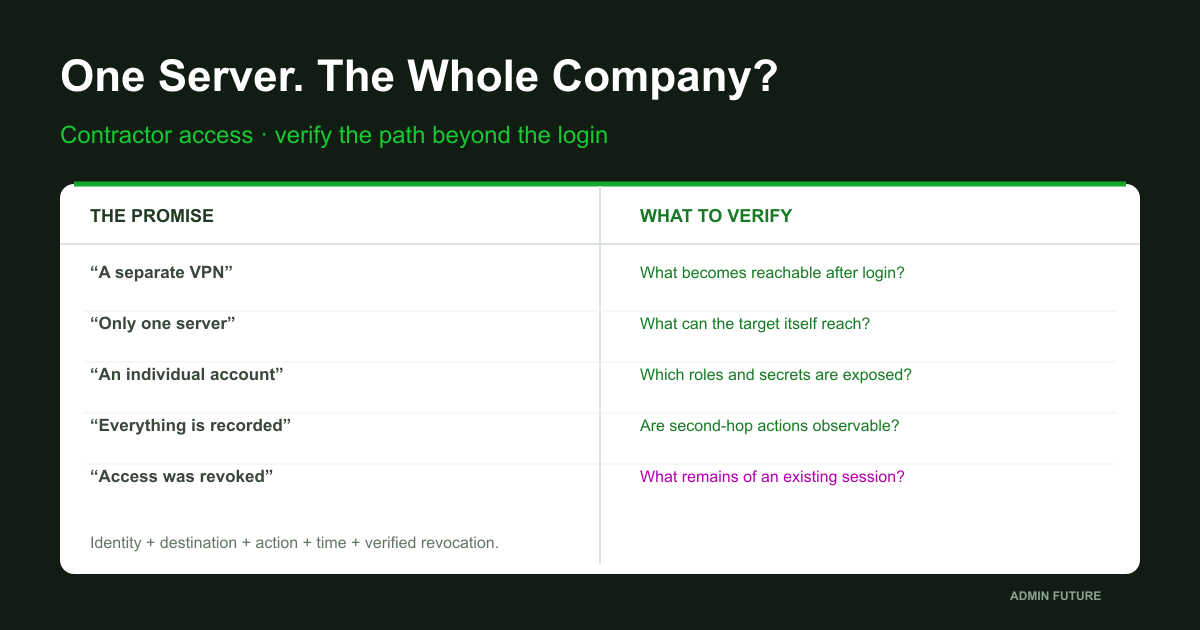
A contractor spends the evening repairing an accounting-system integration. They have a VPN, an individual account and an application-server address. The following morning, the director asks how serious a reported compromise of that service provider could be. The answer sounds reassuring: “Not very. They can reach only one server.”
An approved test starts with the contractor’s connection. Indeed, neither the file server nor the database is directly reachable from the technician’s laptop. Inside the application server, however, the picture changes: neighboring systems are reachable, configuration files contain service secrets, and update privileges permit changes to executable components. The entrance was narrow. The route beyond it was not.
This is a fictional composite teaching scenario, not an account of a particular customer’s incident. Role names are illustrative; no conclusions are drawn about an actual organization’s infrastructure. We will design access around limits that can be tested before connection, inside the authorized session, from the managed host and after revocation.
The central question is: what becomes possible after a successful login? A green MFA indicator answers a different question. It helps establish who passed an entrance check; it does not automatically determine what that session may do next.
Why this matters: what BI.ZONE reported
In its September 3, 2026 publication, BI.ZONE described Feral Wolf attacks against Russian organizations during May–August. Reported entry vectors included contractor infrastructure, corporate-software vulnerabilities and 1C misconfiguration. These are multiple vectors, not necessarily sequential steps of one universal attack.
We use the publication to establish the relevance of the risk. The access architecture and tests below are independent engineering proposals, not a reconstruction of a particular victim’s network. The report does not establish that every 1C maintenance engagement is unsafe or that every provider was compromised in the same way.
A more useful starting point is to abandon “reputable company means trustworthy session.” Providers have their own people, devices, secrets and updates, which the customer does not fully control. Access restrictions should therefore remain meaningful when an authorized technician is compromised, not merely when a random outsider attempts to connect.
Start with an operation, not a VPN
“Server access” is too vague for an engineering requirement. Does the technician need to restart one service, read a log, install an application release or change a SQL job? Those operations need different authority and carry different risks. Read-only diagnostics and full OS administration cannot honestly promise the same isolation.
Create a work record: customer-side owner, individual technician, task, target resource, interface, permitted actions, time window, file-transfer method and completion criteria. Identify prohibited destinations separately: domain administration, hypervisors, backup repositories and other customers’ systems. This is not a polite request to avoid them; it is a requirement for enforceable controls.
If an update genuinely requires administrator privileges, explicitly accept the temporary trust placed in that host and verify its state afterward. For routine diagnostics, seek a smaller role or constrained operation. “The vendor requires Domain Admin” starts a requirements investigation; it does not finish the justification.
Three boundaries: network, identity and action
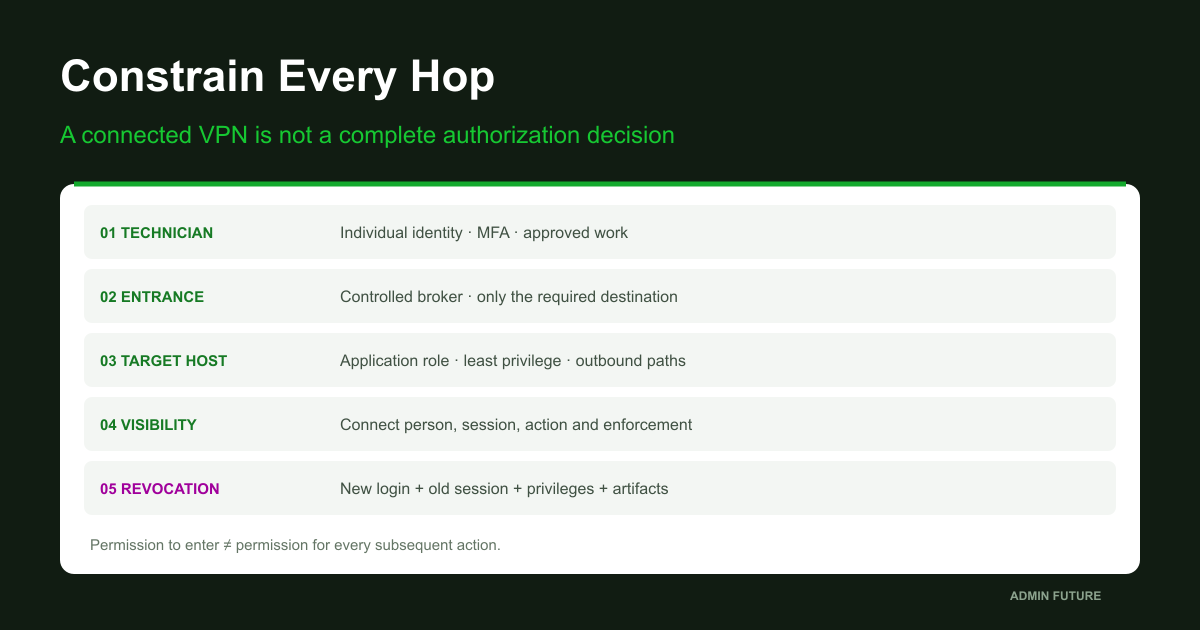
Treat access as an intersection of permissions. The network permits a particular connection. Authentication accepts an identity and connection conditions. The application or operating system authorizes an action. If one boundary is too broad, the other two do not always compensate: an open SQL port does not authorize database changes, but a stolen application password can make that connection sufficient.
NIST SP 800-207 provides a useful architectural foundation: being on an internal network must not automatically establish trust. For this design, the practical rule is that connecting to the organization does not place the entire organization at the session’s disposal.
Add time: permission needs a beginning and an end, not merely an owner. Add observability: the customer must be able to establish which resource was accessed and which actions occurred. Without those dimensions, a supposedly limited maintenance role can become a permanent back door through years of ordinary service work.
An individual person, not a shared vendor-admin
A shared account is convenient until the first question about who performed an action. Several engineers know its password, the provider stores it in a password manager, and the last employee to leave may never appear in your ticket. Individual identity is not cosmetic: it enables revoking one technician and relating activity to an approved assignment.
Distinguish the entrance-gateway identity, the jump-host account and the target-resource role. An access-management system may map them, but that mapping must be documented. The application’s service account is a separate identity; its permanent secret should not become the contractor’s interactive login credential.
Enable MFA at a controlled entrance using the selected solution’s supported mechanisms, and verify it actually applies. Protection against a stolen password does not guarantee protection against a compromised authenticated device. If a shared duty team blindly approves the second factor, individual accountability remains weak.
During testing, capture the selected session’s actual context rather than substituting your own administrative token. whoami helps establish that starting point.
# Read the actual selected Windows session; do not run as a different administrator.
Get-Date -Format o
[System.Security.Principal.WindowsIdentity]::GetCurrent().Name
whoami.exe /user
whoami.exe /groups
whoami.exe /priv
# Token snapshot, not every effective application permission or historical identity.
# Group changes do not retroactively reconstruct an already issued logon token.
# Protect SIDs, memberships and internal account names in the case record.
Do not turn the vendor laptop into an internal workstation
A network VPN grants some degree of connectivity. Establish which routes and destinations are actually available, not merely the connection profile’s name. Client-side route restrictions can help usability, but are not an independent security boundary: enforcement belongs on a controlled component the client cannot reconfigure.
Put contractor ingress in a separate zone. Allow only the required path to a broker or published interface. Direct production connectivity should not emerge from a broad “VPN to LAN” rule. Check return routes, NAT, IPv6 and alternative resource addresses. A hostname restriction is ineffective if a direct path remains through another address.
Do not copy a universal “domain ports” list into production from an article. DNS, time, certificate validation and authentication may genuinely be dependencies of the chosen design. Identify them and permit them deliberately. Breaking Kerberos and then restoring broad connectivity for convenience is not a successful isolation design.
Record the current configuration separately at each hop. Get-NetRoute does not establish a firewall authorization decision.
# Selected client, jump host OR target: record which one this is.
$env:COMPUTERNAME
Get-Date -Format o
Get-NetIPConfiguration -ErrorAction Stop |
    Select-Object InterfaceAlias,InterfaceIndex,IPv4Address,IPv6Address,IPv4DefaultGateway,IPv6DefaultGateway
Get-NetRoute -AddressFamily IPv4 -ErrorAction Stop |
    Select-Object DestinationPrefix,NextHop,InterfaceIndex,RouteMetric
Get-NetRoute -AddressFamily IPv6 -ErrorAction Stop |
    Select-Object DestinationPrefix,NextHop,InterfaceIndex,RouteMetric
# Local routing visibility only: not a firewall, proxy, identity or authorization verdict.
# No route changes, VPN disconnects or probes of other systems in this block.
A jump host is a gateway, not a warehouse of privileges
An intermediate host provides a controlled continuation of work: identity, constrained destinations, observation and session duration. It should not become a general administrative workstation shared by contractors and domain administrators, with saved hypervisor credentials and access to all backups.
Separate trust zones. A dedicated host should contain only necessary maintenance tools and permitted egress. Email, casual browsing and privileged internal administration create unnecessary intersections. Patching and protecting the intermediary are the infrastructure owner’s responsibility, not optional work postponed until after the project.
The physical presence of a jump host proves little. If the target remains directly reachable, the broker can be bypassed. If an arbitrary shell on the intermediary has broad outbound connectivity, the server menu does not constrain OS-level actions. An enforceable boundary must exist independently of a polite interface.
RD Gateway: connection approval and destination approval differ
For RDP, distinguish RD CAP and RD RAP: connection conditions and permitted resources. Successful gateway authentication should not automatically expose every machine. Inspect actual user groups, resource lists, policy evaluation and competing broader permissions.
RD Gateway is not an interactive jump desktop. It transports RDP to an authorized destination; it does not stop the destination Windows server from connecting to its neighbors. Those access patterns need different diagrams and acceptance tests. Do not collapse them into one box labeled “secure gateway.”
Also examine RDP redirection: local drives, clipboard, devices and file movement. Permit only what the workflow needs. A disabled clipboard, however, does not prevent copying through another available program or channel. Secondary connections and data movement need additional controls rather than one client setting.
SSH: disabling forwarding does not disable network access
OpenSSH provides controls for forwarding, allowed destinations and commands. But the sshd_config manual explicitly warns that disabling built-in forwarding does not create complete isolation when arbitrary shell access remains. Users can run their own programs using the connectivity available to them. You do not need to demonstrate a production bypass to account for it in the threat model.
Distinguish a transit-only SSH broker without arbitrary OS access from a full administrative session. The former needs genuinely constrained operations and verified key/certificate behavior. The latter needs host protection and enforced network boundaries. A user with root on the intermediary is not meaningfully confined by PermitOpen alone.
An sshd -T test with connection parameters shows configuration evaluation, including matching Match blocks, without changing the service. Use the source address as seen by that server after NAT; account for the running daemon’s launch options and key restrictions. OpenBSD-current documentation does not guarantee every option exists in the deployed Linux release.
# On the selected Linux SSH server, in an approved administrative shell.
# Set the actual daemon path/config and the connection parameters AS SEEN BY THIS SERVER.
ContractorSshd='/REPLACE/ACTUAL/sshd'
ContractorConfig='/REPLACE/ACTUAL/sshd_config'
ContractorUser='REPLACE_ACCOUNT'
ContractorSourceIp='REPLACE_SOURCE_IP'
ContractorSourceHost='REPLACE_RESOLVED_SOURCE_HOST'
ContractorLocalIp='REPLACE_SERVER_IP'
ContractorLocalPort='REPLACE_SSH_PORT'
case "$ContractorSshd $ContractorConfig $ContractorUser $ContractorSourceIp $ContractorSourceHost $ContractorLocalIp $ContractorLocalPort" in
  *REPLACE*) printf '%s\n' 'Replace every placeholder with verified values.' >&2; exit 1 ;;
esac
[ -x "$ContractorSshd" ] && [ -f "$ContractorConfig" ] || exit 1
"$ContractorSshd" -T -f "$ContractorConfig" -C "user=$ContractorUser,addr=$ContractorSourceIp,host=$ContractorSourceHost,laddr=$ContractorLocalIp,lport=$ContractorLocalPort"
# Extended configuration test only: does not start/reload the daemon or create a tunnel.
# Inspect forwarding, permitopen/permitlisten, forcecommand and authentication settings.
# Account/key restrictions and the running daemon's actual startup options also matter.
The second hop: what the application server itself can reach
This is where our teaching design initially fails. The contractor laptop reaches only the intermediary; the intermediary reaches only the application server. But that server resides in a flat production segment. Its address can reach neighboring management interfaces. The permitted destination has become a convenient new origin.
Build a separate outbound dependency map for the target: database, licensing, DNS, authentication, file exchange, updates and monitoring. Every exception needs a purpose and owner. Protect virtualization management, backups and domain administration particularly carefully. Application maintenance must not automatically inherit those routes and privileges.
There is a subtle limitation: source-IP rules do not distinguish an interactive contractor from the legitimate service on the same machine. If SQL transport is allowed for the application server, the network may admit the same transport from another process there. Database authorization, secret handling and execution constraints remain essential. Segmentation reduces reachability; it does not replace application authorization.
If the contractor has full target-administrator privileges, the target’s local firewall cannot be the only barrier: the operator can change host configuration. Put the important boundary outside their control and test alternative network interfaces separately. Otherwise segmentation exists only while the managed server’s administrator agrees to obey it.
Application permissions can be stronger than they look
Not belonging to local Administrators does not establish harmless permissions. Replacing a service executable, changing its configuration, uploading executable application code or controlling a database job can cross the intended boundary. Examine the entire authorized operation, including the identity under which subsequent execution occurs.
An application’s connection secret should not grant control of the whole database engine merely because that simplified installation. A contractor servicing one database should not automatically receive access to every database, SQL sysadmin or neighboring systems’ backups. Any exception needs separate approval, scope and duration.
On Windows, direct local-administrator membership and RDS-session inventory provide a useful starting point. Get-LocalGroupMember does not automatically resolve every nested domain group or application role. An authorized internal administrator performs this check on the selected member server; it is not a contractor’s self-certification.
# Selected Windows member server, approved read. Not for domain controllers.
$System = Get-CimInstance Win32_ComputerSystem -ErrorAction Stop
if ($System.DomainRole -in @(4,5)) { throw 'Domain controller: use a separately scoped AD review.' }
$Administrators = Get-LocalGroup -SID 'S-1-5-32-544' -ErrorAction Stop
Get-LocalGroupMember -Group $Administrators.Name -ErrorAction Stop |
    Select-Object Name,SID,ObjectClass,PrincipalSource
quser.exe
if ($LASTEXITCODE -ne 0) { Write-Warning ('quser failed: ' + $LASTEXITCODE) }
# Current direct members and RDS sessions only. Expand nested groups separately.
# This does not enumerate application roles, saved secrets, all processes or persistence.
# Does not remove members, disconnect sessions or log anyone off.
Do not leave your own keys on a lower-trust host
A particularly damaging mistake happens after contractor access has been limited: an internal privileged administrator signs into the same managed server and exposes more valuable credentials there. Authority over one host then intersects with privileges the contractor never originally possessed. Separating administrative workstations and trust tiers matters more than the portal’s appearance.
RDP has credential-protection mechanisms, but “enable Remote Credential Guard across the whole path” is not a universal prescription. Microsoft documents limitations, including lack of support through RD Gateway and Connection Broker. Validate compatibility with the actual architecture instead of assembling a diagram from product-feature names.
For SSH, examine agent forwarding and agent-socket access separately; do not store permanent private keys on a shared jump host. For applications, identify where secrets reside and who can read them. Hiding a password from an operator does not establish that a privileged user on the target cannot use a secret available to the system.
Temporary rights: more than a ticket must expire
A temporary grant must disappear technically, not only close in a service desk. Define its start, end, approver, group or role, permitted operation and emergency-revocation owner. A permanent VPN plus a calendar appointment does not become just-in-time access by itself.
For recurring narrow operations, consider a constrained administrative interface. JEA, for example, can reduce permanent administrator membership, but requires reviewing commands, parameters, functions and RunAs behavior. A broad program-launch capability or permission to modify sensitive files can defeat the intended boundary. One “universally safe endpoint” for everybody is not the answer.
Full administration of a host is a stronger trust grant. If someone can install a service or persistent execution mechanism, expiring group membership does not undo the action. Privileged windows therefore need post-work checks and sometimes restoration from a verified state. An automatic timer is valuable; it is not a time machine.
File transfer needs its own controlled workflow
A contractor often genuinely needs to bring an update and take away a small diagnostic log. If that workflow is not designed, personal email, cloud drives, temporary web servers and “five-minute” shares appear. A prohibition without a workable alternative tends to move activity into a less observable channel.
Create an inbound staging process: known sender, expected package, signature or provenance checks, content inspection, approval and controlled promotion into production. A hash establishes consistency with the compared sample, not package safety. Where practical, test an update on an instance without production secrets first.
The data owner prepares outgoing diagnostics: minimal content, removal of unnecessary secrets and personal information, approved destination and retention. Encrypted transport does not determine who may receive which data. Agree sensitive-data requirements separately; this article is not a legal compliance assessment.
A login log is the beginning of the story
Evidence comes from multiple hops: entrance gateway, intermediary, target, application and network enforcement. Record the individual identity, resource, time, approved role, result and work reference. If a broker uses a technical account downstream, retain its mapping to the original technician; otherwise every engineer becomes one user at the target.
With suitable auditing, 4624 records creation of a Windows logon session. It does not enumerate all actions. 4779 describes a disconnected terminal session, not necessarily a logged-off user. Interpret logon type and channel within the actual connection path.
Session video helps but does not replace application audit or background-process telemetry. It may not show a service’s network requests, an automated task or file movement through another channel. Protect recordings and logs, restrict access, and agree notice and retention. The administrator of a managed host must not be the sole custodian of the history of their own activity.
A useful local Windows event collection
Save the following as Get-ContractorEvents.ps1. It reads already configured channels on a selected Windows host. An absent Gateway channel on an ordinary server is possible and does not justify installing that role. Security requires appropriate permissions. Linux, VPN and PAM use separate product-specific evidence sources.
# Save as Get-ContractorEvents.ps1. Local Windows logs already enabled; no configuration changes.
[CmdletBinding()]
param(
    [Parameter(Mandatory=$true)][datetimeoffset]$Start,
    [Parameter(Mandatory=$true)][datetimeoffset]$End,
    [ValidateRange(10,2000)][int]$MaxEventsPerLog=500
)
if ($End -le $Start -or ($End-$Start).TotalMinutes -gt 30) { throw 'Use a positive window of at most 30 minutes.' }
$Specs = @(
    @{Log='Security';IDs=@(4624,4625,4634,4647,4648,4688,4778,4779)},
    @{Log='Microsoft-Windows-TerminalServices-Gateway/Operational';IDs=@()},
    @{Log='Microsoft-Windows-TerminalServices-LocalSessionManager/Operational';IDs=@()},
    @{Log='Microsoft-Windows-PowerShell/Operational';IDs=@()}
)
foreach ($Spec in $Specs) {
    try {
        $Info = Get-WinEvent -ListLog $Spec.Log -ErrorAction Stop
        if (-not $Info.IsEnabled) { Write-Warning ('DISABLED: ' + $Spec.Log); continue }
        $Filter = @{LogName=$Spec.Log;StartTime=$Start.LocalDateTime;EndTime=$End.LocalDateTime}
        if ($Spec.IDs.Count -gt 0) { $Filter.Id=$Spec.IDs }
        $Events = @(Get-WinEvent -FilterHashtable $Filter -MaxEvents $MaxEventsPerLog -ErrorAction Stop)
        if ($Events.Count -ge $MaxEventsPerLog) { Write-Warning ('CAPPED: ' + $Spec.Log + '. Narrow the window or acquire separately.') }
        foreach ($Event in $Events) {
            [pscustomobject]@{Computer=$Event.MachineName;Log=$Event.LogName;Id=$Event.Id;RecordId=$Event.RecordId;TimeUtc=$Event.TimeCreated.ToUniversalTime().ToString('o');Xml=$Event.ToXml()}
        }
    } catch {
        Write-Warning ($Spec.Log + ': no matching records OR read failure; inspect: ' + $_.Exception.Message)
    }
}
# Run locally on approved relevant Windows hops; Linux/VPN/PAM logs are separate sources.
# XML can contain sensitive commands. Preserve warnings, provenance and restricted storage.
# Missing events are not proof of no access. Logon IDs are not global cross-host identifiers.
Invoke it with real -Start and -End datetime values containing UTC offsets, not vague “this morning” boundaries. The window is at most 30 minutes, with a default cap of 500 events per channel. A CAPPED warning requires smaller adjacent windows or a separately approved export. Preserve original XML and errors in restricted case storage.
Missing records do not establish absence of access. Clock alignment, collection, auditing, clearing and retention affect coverage. Matching Logon IDs on different computers do not automatically connect users. During an incident, evidence gathering must not delay approved containment of active harm.
An acceptance matrix: permitted does not mean everything works
Before enabling access, define a test matrix. Every row needs an origin, identity or role, destination, transport, action, time and expected outcome. Include negative cases explicitly; otherwise acceptance proves only that the technician can work, not that the technician is constrained.
| Origin and role | Test | Expected result |
|---|---|---|
| Contractor client | Approved broker during the work window | Individual authentication and a record |
| Contractor client | Direct target path bypassing the broker | Denial at the controlled boundary |
| Intermediary / technician role | Required operation on the selected application | Works without unnecessary authority |
| Managed host | Approved prohibited control destination | Denial corroborated by enforcement logs |
| Application / technician role | Safe out-of-scope action on a test resource | Application denial, not merely TCP |
| After revocation | New login, old session and previous operation | Separate result for every case |
Separate transport and application outcomes. An open TCP port does not establish permission to read a database. A closed one does not establish that the intended deny rule worked: the service might simply not be listening. Use an approved safe control destination, establish its health from an authorized vantage point and correlate the denial with enforcement logs. Arbitrary production-network scanning is not an acceptance test.
Testing selected TCP paths without scanning subnets
The following script tests only an approved list of 1–12 IP/port pairs. These are active TCP checks, so authorize the destinations and test window beforehand. Expecting a denial does not authorize testing an arbitrary system. Purpose-approved control listeners are preferable for sensitive segments.
Use a semicolon-delimited CSV with four columns: EndpointIp;Port;ExpectedTransport;Purpose. Supply an approved literal IP, approved TCP port, Open or Closed expectation, and test purpose. Validate DNS names separately at the application layer: this script deliberately uses literal addresses rather than implicitly selecting one of several DNS results.
# Save as Test-ContractorBoundary.ps1. Windows PowerShell 5.1.
# Sends TCP connection tests ONLY to 1-12 explicitly approved IP/port pairs.
[CmdletBinding()]
param(
    [Parameter(Mandatory=$true)][string]$MatrixPath,
    [Parameter(Mandatory=$true)][string]$ApprovalReference,
    [Parameter(Mandatory=$true)][string]$VantagePoint
)
if (@($MatrixPath,$ApprovalReference,$VantagePoint) -match 'REPLACE_') {
    throw 'Replace all placeholders with approved values.'
}
if ([string]::IsNullOrWhiteSpace($ApprovalReference) -or [string]::IsNullOrWhiteSpace($VantagePoint)) {
    throw 'Record the approval and actual vantage point.'
}
$Tests = @(Import-Csv -LiteralPath $MatrixPath -Delimiter ';' -Encoding UTF8 -ErrorAction Stop)
if ($Tests.Count -lt 1 -or $Tests.Count -gt 12) { throw 'Use 1-12 approved rows, not a subnet scan.' }
# Validate ALL rows before sending ANY probe. Literal IPs avoid implicit multi-address testing.
foreach ($Test in $Tests) {
    $ParsedIp = $null
    $ParsedPort = 0
    if (-not [System.Net.IPAddress]::TryParse($Test.EndpointIp,[ref]$ParsedIp)) { throw 'EndpointIp must be a literal approved IP.' }
    if ($Test.Port -notmatch '^\d{1,5}$' -or -not [int]::TryParse($Test.Port,[ref]$ParsedPort)) { throw 'Invalid port.' }
    if ($ParsedPort -lt 1 -or $ParsedPort -gt 65535) { throw 'Port outside 1-65535.' }
    if ($Test.ExpectedTransport -notin @('Open','Closed')) { throw 'ExpectedTransport must be Open or Closed.' }
    if ([string]::IsNullOrWhiteSpace($Test.Purpose)) { throw 'Each row needs an approved purpose.' }
}
foreach ($Test in $Tests) {
    try {
        $Result = Test-NetConnection -ComputerName $Test.EndpointIp -Port ([int]$Test.Port) -InformationLevel Detailed -ErrorAction Stop
        $Verdict = 'CONSISTENT_ONLY'
        if ($Result.TcpTestSucceeded -and $Test.ExpectedTransport -eq 'Closed') { $Verdict='UNEXPECTED_OPEN' }
        if (-not $Result.TcpTestSucceeded -and $Test.ExpectedTransport -eq 'Open') { $Verdict='NO_CONNECTION_EXPECTED_OPEN' }
        if ($Result.TcpTestSucceeded -and $Test.ExpectedTransport -eq 'Open') { $Verdict='TCP_OPEN_APP_UNTESTED' }
        [pscustomobject]@{
            TimeUtc=[datetime]::UtcNow.ToString('o');Computer=$env:COMPUTERNAME
            Identity=[System.Security.Principal.WindowsIdentity]::GetCurrent().Name
            VantagePoint=$VantagePoint;Approval=$ApprovalReference;Purpose=$Test.Purpose
            Destination=$Test.EndpointIp;Port=[int]$Test.Port;Expected=$Test.ExpectedTransport
            SourceAddress=[string]$Result.SourceAddress;InterfaceAlias=$Result.InterfaceAlias
            TcpConnected=[bool]$Result.TcpTestSucceeded;Verdict=$Verdict;Error=$null
        }
    } catch {
        [pscustomobject]@{
            TimeUtc=[datetime]::UtcNow.ToString('o');Computer=$env:COMPUTERNAME
            Identity=[System.Security.Principal.WindowsIdentity]::GetCurrent().Name
            VantagePoint=$VantagePoint;Approval=$ApprovalReference;Purpose=$Test.Purpose
            Destination=$Test.EndpointIp;Port=[int]$Test.Port;Expected=$Test.ExpectedTransport
            SourceAddress=$null;InterfaceAlias=$null;TcpConnected=$null
            Verdict='PROBE_ERROR';Error=$_.Exception.Message
        }
    }
}
# A failed TCP connection does not prove a firewall denied it: correlate enforcement logs.
# No login attempts, password tests, application requests, UDP probes or exploit payloads.
# OS connection timeouts apply; do not treat a slow probe as an application incident.
The underlying command is Test-NetConnection. Investigate UNEXPECTED_OPEN. CONSISTENT_ONLY means no TCP connection was established when Closed was expected, not that an ACL was proven correct. TCP_OPEN_APP_UNTESTED leaves application-role verification outstanding. PROBE_ERROR cannot become a successful denial.
The script does not test UDP, authenticate, enter passwords or send application requests. OS connection timeouts apply; it is not a high-speed scanner. Use a separately approved matrix at each hop, not one shared list that attempts everything from everywhere.
Repeat from the correct vantage point and preserve results
Test from three distinct positions: contractor client, intermediary and managed host. Each has its own traffic origin and enforcement rules. If a constrained operator cannot run diagnostics, internal staff can test in an approved equivalent context while documenting the difference. Do not silently attribute an administrator laptop’s result to the contractor session.
# CSV columns: EndpointIp;Port;ExpectedTransport;Purpose
# Fill rows with actual approved literal IPs, ports and Open/Closed expectations.
$ProbeScript = 'REPLACE_FULL_PATH_TO_Test-ContractorBoundary.ps1'
$MatrixPath = 'REPLACE_APPROVED_MATRIX_CSV_PATH'
$CaseDirectory = 'REPLACE_EXISTING_RESTRICTED_CASE_DIRECTORY'
$ApprovalReference = 'REPLACE_CHANGE_OR_TEST_APPROVAL'
$VantagePoint = 'REPLACE_CLIENT_JUMP_OR_TARGET_AND_PHASE'
if (@($ProbeScript,$MatrixPath,$CaseDirectory,$ApprovalReference,$VantagePoint) -match 'REPLACE_') {
    throw 'Set the reviewed script, approved matrix, case directory, approval and vantage point.'
}
if (-not (Test-Path -LiteralPath $ProbeScript -PathType Leaf)) { throw 'Reviewed probe script missing.' }
if (-not (Test-Path -LiteralPath $MatrixPath -PathType Leaf)) { throw 'Approved matrix missing.' }
if (-not (Test-Path -LiteralPath $CaseDirectory -PathType Container)) { throw 'Restricted case directory missing.' }
$ReportPath = Join-Path $CaseDirectory ('Boundary-' + [guid]::NewGuid().ToString('N') + '.clixml')
$Report = @(& $ProbeScript -MatrixPath $MatrixPath -ApprovalReference $ApprovalReference -VantagePoint $VantagePoint)
if ($Report.Count -eq 0) { throw 'No results. Inspect errors; do not report success.' }
$Report | Export-Clixml -LiteralPath $ReportPath -NoClobber -Encoding UTF8 -ErrorAction Stop
$Report | Format-Table Destination,Port,Expected,TcpConnected,Verdict -AutoSize
Get-FileHash -LiteralPath $ReportPath -Algorithm SHA256
# Repeat approved cases at each authorized vantage point and after revocation.
# Application authorization and existing-session tests are separate manual acceptance cases.
Preserve more than a table: rule version, health of permitted services, actual post-NAT addresses, time, identity and the corresponding enforcement record. On a multi-user terminal host, the network may see one shared source IP. Prove individual restrictions at an appropriate layer rather than promising them through a single firewall rule.
The diagnostic blocks received static review. They were not executed in a Windows/AD or Linux laboratory during article preparation. Validate the deployed OS version and an authorized pilot first. The Bash block is intended for Bash and PowerShell for the relevant Windows environment; no examples were run against a customer’s infrastructure.
Revocation has four separate switches
The work is complete and the ticket says closed. Now separately verify new connections, existing sessions, temporary privileges and artifacts created during maintenance. Those four states need not change through one portal action.
Removing group membership may not alter an existing logon token. Certificate expiry must not be assumed to terminate an established connection immediately without verification. Changing a stateful rule also requires testing what happens to existing flows. Behavior depends on gateway, OS and protocol; establish it experimentally rather than declaring “rights removed.”
In RDS, disconnection differs from logoff. quser helps identify session state. Logging off can stop user processes and lose unsaved data. That is why no bulk termination command is supplied: identify the exact session, assess consequences and approve the action. Logoff does not remove installed services or other possible persistence.
Close the temporary role, revoke issued authenticators through supported mechanisms, inspect active sessions and review the approved artifact scope. If a permanent secret was disclosed, assess rotation. One password change does not restore trust in a host after confirmed compromise.
Exercise “the contractor was compromised” without a real compromise
Schedule a drill: an approved test technician has ordinary authorized access, while an internal administrator acts as the responder. No malware, secret theft or real production business documents are required. A harmless operation in a test context and approved network controls are enough.
The responder invokes the normal revocation procedure. Then test fresh authentication, reconnection, the already open session, target transport and the previously permitted operation. Check whether monitoring records the denial and whether an operator can map it to the person and work request. Time from decision to verified cessation is useful only if the tested access types are explicitly listed.
| Exercise phase | Action | Evidence to preserve |
|---|---|---|
| Before revocation | Approved login and a harmless operation | Technician, role, session, target, log |
| Responder decision | Approved revocation of selected access | Time, exact scope, accountable operator |
| After the decision | Test a fresh login | Denial and enforcement reason |
| After the decision | Test the already open session | Survives / ends / needs another control |
| Completion | Test prior operation and parallel routes | Actual boundary and remaining unknowns |
“The VPN disconnected; we did not check the rest” is not completed acceptance. A failure caused only by a stopped application does not prove the boundary either. Repeat the controlled case after remediation instead of burying the exception in the test record.
Forgotten RMM and parallel entrances
A VPN review does not cover every remote channel. A server may retain a maintenance agent that connects outward to an external broker. Its session need not depend on your VPN account. Inventory approved RMM tools, owners, updates, access groups and revocation procedures as part of the project.
The same applies to an application admin portal, separate SSH key, API token or database technical user. Discovery does not authorize deleting everything immediately. Establish purpose and dependencies, then approve removal of unnecessary paths. Removing a legitimate agent without analysis can eliminate the only emergency access route.
Check separation between customers as well. A provider’s shared portal must not require your organization to trust access into other organizations; secrets and destinations need separation. Being able to revoke one customer environment without disrupting the rest distinguishes managed access from one password used everywhere.
Deploy without stopping maintenance
Start with one application and one operation. Preserve current rules and configuration using supported mechanisms, confirm independent emergency access and approve a window. Do not close the old path before validating the new one, but do not leave broad transitional access without an owner and expiry: such temporary modes easily outlive their projects.
The pilot must pass positive, negative and revocation tests. Validate real application dependencies, not merely desktop login. Then retire the old route separately and demonstrate that it no longer works. Add resources in small groups while retaining rollback for the particular change, not an automatic return to unrestricted access for everybody.
Deliver a role record, hop diagram, permission matrix, acceptance evidence, revocation procedure and review owner. NIST’s telework and remote-access guidance provides useful background; choose specific tools according to requirements, support and operational capability. VPN, PAM and ZTNA are mechanisms, not completed acceptance results.
What a finished system looks like—and where to verify details
A finished design does not promise that a contractor cannot be compromised. It establishes bounded consequences, observable actions and a tested way to stop access. Full administration of one host remains substantial trust in that host; an honest architecture does not hide that risk behind a gateway’s attractive name.
The practical outcome is specific: an individual technician is known; required work is permitted; unrelated destinations are constrained; the second hop is tested; history survives; and revocation covers existing sessions and granted authority. If any item lacks evidence, it remains project work—not a wording problem in the report.
To examine your own design, begin with one contractor and one critical application. An audit is useful when it delivers an agreed matrix, a working pilot and verified revocation rather than only a recommendation list. That outcome can be measured and accepted again after infrastructure changes.
Primary sources: BI.ZONE on Feral Wolf, NIST SP 800-207, NIST SP 800-46r2, Microsoft RD Gateway, OpenSSH sshd_config and JEA security considerations. Command and event documentation is linked in the relevant sections. Material reviewed October 21, 2026. Illustrations are original Admin Future diagrams, not images of a victim network from the research.