In this article
02:15. The job succeeded—and that is the problem
The on-call administrator sees an ordinary overnight operation: application maintenance completed successfully. The employee has a limited sudoers entry, no root password and no administrative group membership. On paper, access looks controlled. Yet a system service launches a script from a directory that employee can modify.
This is a fictional composite case. We will not replace the script, create a privileged shell or test an attack in production. Instead, reconstruct the trust chain: who can change the inputs, who executes their contents, when execution occurs and which restrictions apply at each stage.
The finding may involve neither a systemd vulnerability nor a stolen password. The system faithfully follows a configuration that quietly turned application maintenance into control over privileged code. Seeing it requires treating the assigned role as only part of the authority model.
Changing a program is a form of authority
Consider two authorized operations. One edits a report template consumed strictly as data. The other edits a script executed by root overnight. Both look like write permission in a filesystem listing. Their consequences depend on the consumer: format, interpreter, read time and process authority.
“They only have access to the application directory” therefore says little without asking who trusts that directory’s contents. When a more privileged process consumes a component as code, maintenance crosses a boundary. The impact depends on accessible resources, namespaces, capabilities and mandatory policy, not UID alone.
That is not proof of abuse. An available capability and an actual incident are different findings. Establish the trust path first; investigate its historical use separately.
Map execution, not merely files
The initial diagram seems simple: unit → ExecStart → script. Ten minutes later it includes an interpreter, an imported library, a parameter file, a plugin directory, a current symlink, a helper executable and a separate ExecStartPre command. Each edge means something different: execute, import, parse options or select another path.
Record four facts for each node: who can modify it, who consumes it, how its path is selected and when it is opened. Add a fifth column for collection limits: unread code, unknown ACLs, missing history or an unexamined namespace.

Extracting the first path from ExecStart does not complete an audit. Programs can select modules at runtime, and shell scripts can include other files. Build the trust graph from configuration and application behavior, not one reassuring command line.
Select one service and the correct manager
Start with the exact name of one approved system service, not the per-user systemctl –user manager. Do not substitute a wildcard or combine evidence from independent hosts. For a template instance, use the actual instantiated name, not only the template containing @.
# Bash on the approved Linux host; one SYSTEM service, not systemctl --user.
unit='REPLACE_EXACT_SERVICE.service'
if [[ "$unit" == REPLACE_* || "$unit" != *.service || "$unit" == -* || "$unit" == *[!a-zA-Z0-9_.@:-]* ]]; then
    printf '%s\n' 'Set one exact, simple service name; no patterns.' >&2
    return 1 2>/dev/null || exit 1
fi
systemctl --version
date --utc --iso-8601=seconds
systemctl --system show "$unit" --no-pager \
    --property=Id,LoadState,ActiveState,SubState,FragmentPath,DropInPaths,NeedDaemonReload,MainPID,ControlGroup
# Read-only. Do not daemon-reload/restart merely to make two views agree.
# Preserve the same approved Bash session for later unit-based blocks.
LoadState=not-found means an incorrect target or unavailable configuration, not a safe service. FragmentPath identifies the main definition and DropInPaths its additions. Record state before inspecting configuration. Do not run daemon-reload merely to remove a warning: that changes manager state.
The examples target Bash on Linux with GNU/util-linux tools and ACL-reading utilities installed. Do not elevate automatically. If evidence is inaccessible, document the gap and arrange approved diagnostic access.
Disk files, manager configuration and the running process
In the case, a colleague opens a unit in an editor and sees User=appsvc. That looks reassuring, but it is one document. Drop-ins, the manager’s loaded configuration and an already-running process may represent different moments. They are three observations, not one fact.
# Unit content and command arguments may contain secrets: local restricted review only.
if [[ -z "$unit" || "$unit" == REPLACE_* ]]; then
    printf '%s\n' 'Run the unit-selection block first.' >&2
    return 1 2>/dev/null || exit 1
fi
systemctl --system cat "$unit" --no-pager
systemctl --system show "$unit" --no-pager \
    --property=User,Group,SupplementaryGroups,DynamicUser,WorkingDirectory,RootDirectory,RootImage,EnvironmentFiles \
    --property=ExecCondition,ExecStartPre,ExecStart,ExecStartPost,ExecReload,ExecStop,ExecStopPost \
    --property=NoNewPrivileges,CapabilityBoundingSet,AmbientCapabilities,ProtectSystem,ReadWritePaths,PrivateTmp
# No Environment= dump and no EnvironmentFile sourcing.
# cat = files on disk; show = manager properties; neither reconstructs all past executions.
# Missing properties/version limitations are collection gaps, not a safe verdict.
The systemctl manual explains that cat displays backing files, which can differ from the manager’s understanding after un-reloaded changes. show exposes manager properties, not the complete execution history. NeedDaemonReload is a reason to preserve a discrepancy before correcting it.
Units and command arguments can contain secrets. Inspect them in an approved restricted environment rather than posting the entire output. We deliberately avoid dumping Environment or /proc/environ. Diagnostic collection needs a sensitivity boundary too.
Why User= is not the whole answer
For an ordinary system service, absent an explicit User= or dynamic identity, execution normally defaults to root. A per-user manager follows a different model. Even an explicit service identity does not finish the review: inspect every lifecycle command, its prefixes and subsequent transitions inside the program.
Do not overlook ExecCondition, ExecStartPre, ExecStartPost, ExecReload, ExecStop or ExecStopPost. On versions supporting + and ! prefixes, these alter how certain restrictions apply to individual commands. Their semantics differ; plus is not an unconditional bypass of every operating-system policy. Consult the installed systemd.service manual.
In the scenario, the team discovers it was discussing the main application process while overnight maintenance belongs to a separate system service. Trusted configuration instructs a more privileged identity to consume a mutable component. The mistake was an incomplete launch map, not merely one User= line. Versioned systemd.service reference.
Inspect the live process without collecting its secrets
When the service is running, compare configuration with its current main process. Relevant /proc/PID/status fields include UID/GID, supplementary groups, capabilities, NoNewPrivs and Seccomp. This is a present-time observation, not an account of every child or completed process.
# Main process only, at collection time; helpers and short-lived stages need separate evidence.
if [[ -z "$unit" || "$unit" == REPLACE_* ]]; then
    printf '%s\n' 'Select the service first.' >&2
    return 1 2>/dev/null || exit 1
fi
service_pid=$(systemctl --system show "$unit" --property=MainPID --value) || {
    return 1 2>/dev/null || exit 1
}
if [[ "$service_pid" =~ ^[1-9][0-9]*$ && -r "/proc/$service_pid/status" ]]; then
    ps -p "$service_pid" -o pid,ppid,lstart,user,group,comm
    awk '/^(Name|Pid|PPid|Uid|Gid|Groups|CapInh|CapPrm|CapEff|CapBnd|CapAmb|NoNewPrivs|Seccomp):/' "/proc/$service_pid/status"
    readlink -- "/proc/$service_pid/exe"
    readlink -- "/proc/$service_pid/cwd"
else
    printf '%s\n' 'No readable live MainPID: inspect lifecycle and permissions; not proof of safety.'
fi
# PID reuse/process exit can race this snapshot. Re-check unit/PID/time before correlating.
# No /proc/environ or command-line secret collection, no tracing or process execution.
MainPID=0 for a completed oneshot does not mean its commands never ran. A short preparation stage may disappear before inspection. A PID can exit or be reused between queries, so correlation requires timing and renewed unit association.
Uid/Gid contain multiple identifiers, and capabilities have distinct sets. Do not reduce them to “nonzero UID means no authority”. Consult proc_pid_status. Restrictions also do not describe all business data the process legitimately accesses.
ExecStart does not promise shell semantics
Another wrong turn appears when an administrator reads ExecStart as if it were a terminal command. systemd has its own parsing rules. Do not assume shell pipes, redirections or expansions without checking. Once an interpreter is explicitly invoked, examine that interpreter’s rules separately.
For a script, both the interpreter and the files it includes matter. An executable and text consumed by an interpreter are different control objects. A missing executable bit on the text does not prove it cannot be interpreted when a trusted process explicitly supplies it as input.
Review relative-name resolution, working directories and helper lookup. Do not execute an unfamiliar script simply to request help or version information: those arguments do not guarantee harmless behavior. Inspect the source or an approved artifact statically. systemd.service command rules; execve and interpreters.
An included file can matter more than the entry point
The main script belongs to root and appears unmodifiable by the employee. It is tempting to stop there. But it imports a shared library from the application directory. That content is read later in the importing process’s context. A protected wrapper does not make mutable imported code trustworthy.
Apply the same reasoning to plugins, startup hooks, command-bearing configuration and application-selected paths. A queue-size setting is not equivalent to code; selecting a module or command creates a different influence. Examine application semantics rather than label every writable configuration file an immediate root compromise.
Never source an EnvironmentFile merely to parse it. systemd uses a particular environment-file format, not necessarily a shell program. EnvironmentFile does not itself mean the text is executed. Risk depends on how the consumer uses the resulting values. Do not copy its secrets into the report.
Why root ownership and mode 0644 are not enough
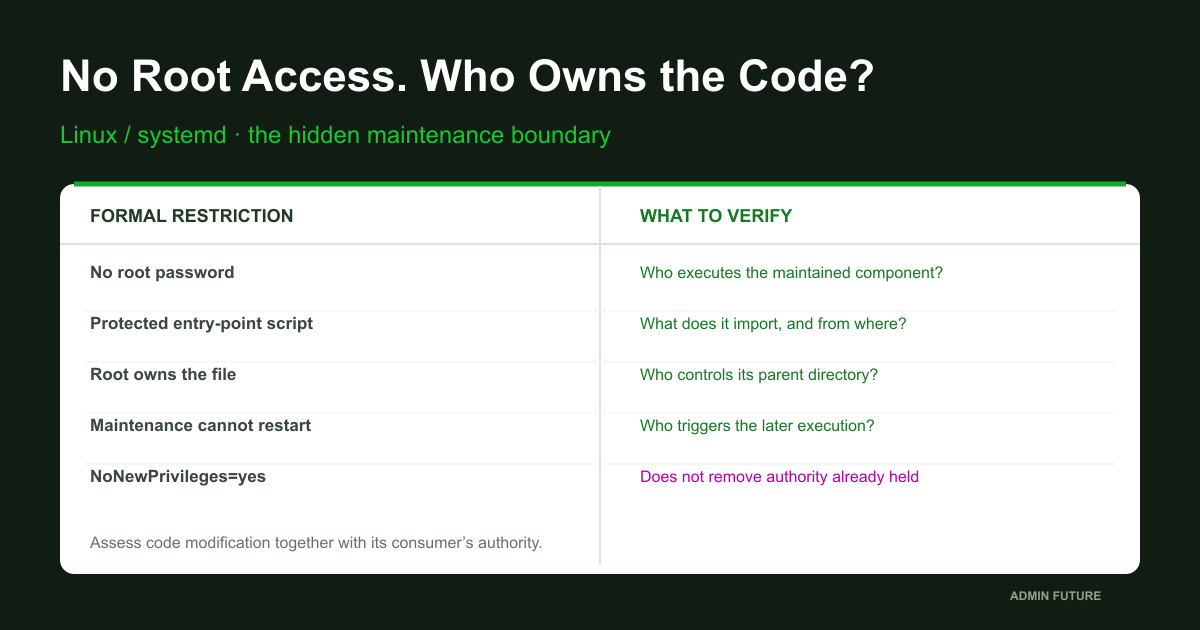
A colleague points to stat: root owns the file, and the group cannot write it. Yet its path traverses a directory controlled by the maintenance group. Changing an existing file’s bytes and changing a directory’s name binding are different capabilities. Assess both.
Renaming and removal generally depend on write and search permission on parent directories rather than permission to write the file contents. Sticky directories, ACLs, mount options, immutable attributes and mandatory policies can affect the outcome. One mode value is therefore not proof that replacement will succeed. rename restrictions.
In the teaching case, the relevant scope is not all of /opt but a specific managed release and its selection path. That matters for remediation too: recursive ownership changes can break the application while leaving another mutable trust input untouched.
Symlinks, current and every path component
A current symlink makes release selection convenient. But if a less-trusted identity controls its destination and root later trusts the path, release selection belongs to the privileged execution chain. The question is not only who controls the final file, but who chooses it.
namei -l displays path components and symlink transitions. Inspect ACLs along both the original chain and the resolved destination. realpath alone is insufficient because canonicalization can hide the directory controlling the original link. namei; Linux path resolution.
Namespace context matters as well. RootDirectory, RootImage and bind mounts can make the same textual path refer to a different object for the service. The collector below inspects the auditor’s filesystem view; it must not automatically be equated with the service’s view.
A group in the directory is not necessarily a live session
Inspect the actual maintenance identity rather than only the file owner. id queries account information from available databases. An existing session can retain an older supplementary-group list. Removing directory membership alone therefore does not prove every running process has lost access.
# This queries account databases. It does NOT impersonate the maintenance identity.
maintenance_account='REPLACE_APPROVED_MAINTENANCE_ACCOUNT'
if [[ "$maintenance_account" == REPLACE_* || "$maintenance_account" == -* || -z "$maintenance_account" ]]; then
    printf '%s\n' 'Set the exact approved maintenance account.' >&2
    return 1 2>/dev/null || exit 1
fi
id -- "$maintenance_account"
getent passwd "$maintenance_account"
# Existing sessions may retain older supplementary groups.
# Compare with the actual approved session, ACLs and applicable MAC policy.
# Do not run application scripts as this user or as root to test a hypothesis.
For POSIX ACLs, account for named entries and the effective-permission mask. A default ACL defines initial permissions for newly created objects, not an extra grant for every existing file. getfacl is more useful than guessing from an ls plus sign, but it still needs identity and full-path context. acl(5).
Do not test writability as root and attribute the result to an employee. Even an approved test identity represents one current context, not every delegation path or historical permission.
A metadata collector for explicitly selected paths
The standalone Bash script below is audit-paths.sh. Save it in a trusted working directory and supply one to twelve reviewed absolute paths: the unit, a drop-in, script, library or configuration. It does not search the entire disk, read application scripts or execute the inspected application.
#!/usr/bin/env bash
# audit-paths.sh: metadata-only review of 1..12 explicitly approved existing paths.
# Usage: bash audit-paths.sh /absolute/reviewed/path [another/path ...]
# No recursive search, source/eval, file modification, service operation or impersonation.
set -u
if (( $# < 1 || $# > 12 )); then
    printf '%s\n' 'Provide 1..12 explicit approved absolute paths.' >&2
    exit 2
fi
for tool in namei realpath stat getfacl dirname; do
    command -v "$tool" >/dev/null 2>&1 || { printf 'Missing tool: %s\n' "$tool" >&2; exit 2; }
done
result=0
for target in "$@"; do
    if [[ "$target" != /* || "$target" == *$'\n'* || "/$target/" == */../* || "/$target/" == */./* ]]; then
        printf 'Rejected path: %q\n' "$target" >&2
        result=1
        continue
    fi
    printf '\nPATH %q\n' "$target"
    if ! resolved=$(realpath -e -- "$target"); then
        printf '%s\n' 'Unresolved/inaccessible: collection gap.' >&2
        result=1
        continue
    fi
    namei -l -- "$target" || result=1
    printf 'RESOLVED %q\n' "$resolved"
    # Inspect both the lexical chain and canonical chain, including their parent ACLs.
    for chain in "$target" "$resolved"; do
        cursor=$chain
        while :; do
            printf 'OBJECT %q\n' "$cursor"
            stat --format='mode=%A uid=%u gid=%g inode=%i type=%F name=%N' -- "$cursor" || result=1
            getfacl --absolute-names -- "$cursor" || result=1
            [[ "$cursor" == / ]] && break
            cursor=$(dirname -- "$cursor") || { result=1; break; }
        done
    done
done
printf '\n%s\n' 'Metadata snapshot only; no effective-access or exploitability verdict.'
exit "$result"
It prints metadata and parent-directory ACLs for both the original and canonical paths. Objects must exist and be readable. Collection errors produce a nonzero exit code, not a green verdict. Repeated parent entries are expected. It does not recursively enumerate large directories, although long or remote paths still require operational judgment.
This is neither an exploitation scanner nor an effective-access calculator for an employee. It does not automatically evaluate mount namespaces, mandatory policy, file attributes, network-filesystem semantics or future replacement races. Use it as a reproducible starting point for manual analysis, not a security certificate.
Write a finding somebody else can verify
Do not report “the employee obtained root” based solely on a writable directory. A strong finding connects a specific object, modification authority, a privileged consumer and a reachable read time. If an element is unknown, record a limit or hypothesis rather than an established transition.
| Observation | What to establish | What it does not prove |
|---|---|---|
| Root owns the file | Whole-path control, ACLs, replacement limits | The employee cannot alter consumed content |
| Write permission exists | Identity, groups, ACLs, actual context | Automatic root execution |
| A privileged stage exists | Which inputs it consumes as code | Consumption of this mutable object |
| A launch trigger exists | A reachable consumption time | Historical abuse |
| NoNewPrivs is set | Authority already held by the process | Trusted code provenance |
For this model, the conclusion can be precise: a trusted overnight process, in an established execution context, consumes code from a maintenance-controlled area, and the reviewed restrictions do not sever that path. That establishes a trust-boundary problem. Whether somebody used the capability remains a separate investigation.
Why NoNewPrivileges does not repair this design
The name sounds like a promise: no new privileges. The mechanism prevents certain gains of authority through execve. It does not demote an already privileged process or make loaded code trustworthy. When the process already holds relevant access, preventing further elevation may leave the central risk unchanged. Kernel documentation.
Both observations can therefore be true: NoNewPrivileges is set, and less-trusted content runs with the service’s existing authority. There is no contradiction; the control addresses a different transition.
Examine the operation prevented by a setting, not its reassuring name. NoNewPrivs in proc confirms a flag for one process, not safe provenance for every module and script it consumes.
Read-only for the service is not read-only for the maintainer
ProtectSystem and ReadOnlyPaths restrict filesystem views for service processes. They do not automatically prevent another host identity from changing the underlying code. If an external authorized writer can update a consumed component, blocking service-side writes is not equivalent to blocking outside modification.
ReadWritePaths, capabilities, IPC and accessible mounts belong in the model too. A write restriction is not a ban on reading secrets or requesting privileged operations through a socket. Harmful behavior may fit entirely inside the permitted scope; damaging the application’s own data is significant.
Sandboxing limits consequences; code provenance is a separate boundary. Combine them rather than substitute one for the other. Check precise semantics and availability against systemd.exec for the installed version and kernel capabilities.
systemd-analyze scores settings, not code trust
The tool is useful for systematically reviewing isolation settings. Its exposure score does not answer who can change an imported library or who approved a release. A good score does not make a mutable script trusted; a poor one does not itself prove exploitation.
# Review only the selected service; no hardening changes are applied.
if [[ -z "$unit" || "$unit" == REPLACE_* ]]; then
    printf '%s\n' 'Select the exact service first.' >&2
    return 1 2>/dev/null || exit 1
fi
systemd-analyze security --no-pager "$unit"
# Exposure score describes assessed unit settings, not code provenance or compromise.
# Do not add every suggested restriction or change ownership recursively on production.
# Verify local man pages: unsupported directives must not be assumed active.
The systemd-analyze documentation limits the analysis to systemd mechanisms. IPC access and protection implemented within the application require separate review. Use the result to form questions and a pilot plan, not to chase zero at any operational cost.
If a suggested restriction conflicts with updates, backup or startup, solve the engineering problem. Do not silently remove protection, but do not break the workload for a score either. First identify the service’s actual duties and legitimate writable areas.
Why denying restart may not close the path
A common objection is that the employee cannot restart the service, so changed content cannot run. Activation may instead occur through a timer, boot, another component or later approved maintenance. Some applications also reread modules or configuration without a full restart.
Establish the trigger and consumption time separately. Do not assume a timer activates a same-named service: Unit= can select another target. Timer behavior for an already active service also affects the timeline. systemd.timer.
Lacking immediate activation rights can reduce control over timing without eliminating trust in mutable code. In the scenario, the overnight schedule turns today’s write access into later execution. Establishing that dependency requires no malicious replacement demonstration.
History: a launch may be visible while a write is not
Build a timeline of release modification, path selection, consumption and stage completion. The journal helps establish lifecycle events; it is not automatically a complete audit of filesystem activity. A successful status does not establish the historical bytes consumed.
# Explicit unit and UTC incident window. Journal output may contain secrets.
incident_start='REPLACE_UTC_START'
incident_end='REPLACE_UTC_END'
if [[ -z "$unit" || "$unit" == REPLACE_* || "$incident_start" == REPLACE_* || "$incident_end" == REPLACE_* ]]; then
    printf '%s\n' 'Set the selected unit and approved time window.' >&2
    return 1 2>/dev/null || exit 1
fi
# Example timestamp FORMAT only: YYYY-MM-DD HH:MM:SS UTC. Replace with actual boundaries.
journalctl --system --unit="$unit" --since="$incident_start" --until="$incident_end" \
    --utc --no-pager --output=short-iso-precise --lines=200
systemctl --system show "$unit" --no-pager --property=TriggeredBy,Triggers,Result,ExecMainCode,ExecMainStatus
# At most 200 matching records displayed: missing older matches are NOT absence of activity.
# Inspect actual timer/path/socket units from TriggeredBy; do not assume a same-name timer.
# Journal absence does not reconstruct past file writes or every executed helper.
The example shows only the last 200 matching records. A complete approved investigation needs an appropriate acquisition scope; silence in this selection is not exoneration. Correlate available audit records, deployment/CI history, version control and independently retained logs. Enabling an audit source today does not recreate yesterday’s events.
Current mtime, ownership and hashes do not establish authorship or previous contents. Even a matching release hash does not answer whether a different path was consumed earlier. State missing evidence explicitly.
Start remediation by separating code from data
The goal is not to prohibit all maintenance. The employee has a legitimate job. Routine data, uploads, logs and temporary files should not automatically become code for a more privileged stage. Separate required writable areas from the trusted executable components consumed by privileged processes.
A release-promotion boundary helps: lower-privilege preparation, artifact review and controlled publication into a protected location. Review must cover content, dependencies and stability between verification and use. A signature adds little if the same identity can replace the verifier or decide what counts as trusted.
Running the application without root can substantially reduce the boundary crossing. If a short privileged stage is necessary, narrow its duties and inputs separately. There is no universal drop-in for every application: verified requirements must drive the design, not a fashionable flag collection.
Change planning without recursive ownership surgery
Before changing anything, record exact paths, ownership, ACLs, mount context, release selection and rollback. Agree a window with the application owner. Identify required writes: cache, queues, sockets, lock files, logs, temporary space and updates. Otherwise hardening can become a business outage.
| Stage | Validation | Acceptance condition |
|---|---|---|
| Baseline | Unit + drop-ins + paths + ACLs | Exact scope and restricted records |
| Pilot | One component and nonsensitive copy | Approved roles and rollback |
| Design change | Separate trusted code from writable data | No blanket recursive permission changes |
| Positive test | Startup, maintenance, backup/recovery | Useful operation still works |
| Negative test | Trusted code outside maintenance control | No payload or production replacement |
| Next release | Repeat execution-chain review | Deployment does not recreate the risk |
Change one pilot component, then separately verify legitimate maintenance and the restriction on modifying trusted code. Recursive ACL repair is not a substitute for understanding. Production changes require approval, configuration backup and workable rollback; none of these changes is performed by the article’s commands.
Prove the fix without a malicious script
Use a nonsensitive test copy to validate an allowed-action matrix. The maintenance identity can change legitimate operational data. Trusted units, drop-ins, interpreters, scripts, imports and release-selection paths remain outside its control. Normal startup, update, shutdown and recovery still work.
Proving denial does not require writing a probe into production. Metadata, permission analysis and approved negative tests in an isolated environment can validate the boundary without a payload. Any functional test should define identity, object, expected denial and observation method beforehand.
Test another release cycle as well. Fixes often disappear when deployment recreates a directory with the old group or default ACL. The delivery process must reproduce the protection rather than rely on an administrator remembering a manual repair.
How the overnight story ends
The employee was never given root. The investigation nevertheless finds control over content trusted by a more privileged process. This is operationally significant: authority comes not only from passwords and sudo but from relationships between mutable components and their consumers.
The teaching case identifies the issue without modifying any file. It establishes a privileged consumer, the read path, less-trusted control and a reachable execution point. It does not declare historical abuse proven; that requires its own timeline.
A useful Linux application assessment delivers an execution-chain map, established writable scopes, collection limits and a pilot remediation plan. Start with one critical service and the actual maintenance workflow. That is more informative than checking once again that sudoers contains no ALL entry.
Sources and honest limitations
Documentation checked on 22 October 2026. Online latest currently describes systemd 262; that does not mean your server runs that version. Check systemctl –version and local manuals, including distribution patches. Unsupported settings and unavailable properties cannot silently count as active protection.
Core references: systemd.exec, systemd.unit, systemd.service 252, getfacl. Other primary references accompany the relevant explanations. This is an original trust-model analysis, not instructions for exploiting somebody else’s server.
All seven blocks received static Bash syntax checks. The systemd and ACL commands were not validated against a complete Linux lab with the target service. Begin with an approved pilot. The examples do not change ACLs, execute inspected code, restart services or install audit rules. Incomplete collection remains incomplete collection, not proof of security.