The firewall rule that opened more than it should have
The task was to open access to an internal service for just one floor of the office — 30 machines, the range 192.168.10.192–223. The firewall rule got written as 192.168.10.192/24 instead of 192.168.10.192/27 — one digit, and that digit is exactly the difference between “30 machines on one floor” and “the entire /24, including guest Wi-Fi and accounting in the next wing.” Whoever wrote the rule knew perfectly well what an IP address is. The problem wasn’t knowledge — it was speed: they couldn’t work out the mask in their head fast enough, so they grabbed whatever was closest at hand.
This article isn’t about what an IP address is (you already know). It’s about one trick that lets you tell /27 from /24 in your head in seconds, instead of a trip to a subnet calculator. And about VLSM — how to carve several differently sized networks out of one block without wasting addresses.
A mask is just “where the network ends”
An IP address is 32 bits. A subnet mask is also 32 bits, and its only job is to say how many bits on the left belong to the network and how many bits on the right are left for hosts. Writing /26 is literally that number: 26 network bits, 6 host bits. 255.255.255.192 is the same mask, just written in decimal, octet by octet.
You can convert CIDR to decimal via binary, but that means holding eight powers of two in your head every single time. There’s a shorter way.
The magic number: the only formula you actually need
Take the last “interesting” octet of the mask (the one that isn’t 0 or 255) and subtract it from 256. That gives you the block size — the step at which networks follow one after another. Everything else is just plugging numbers in.
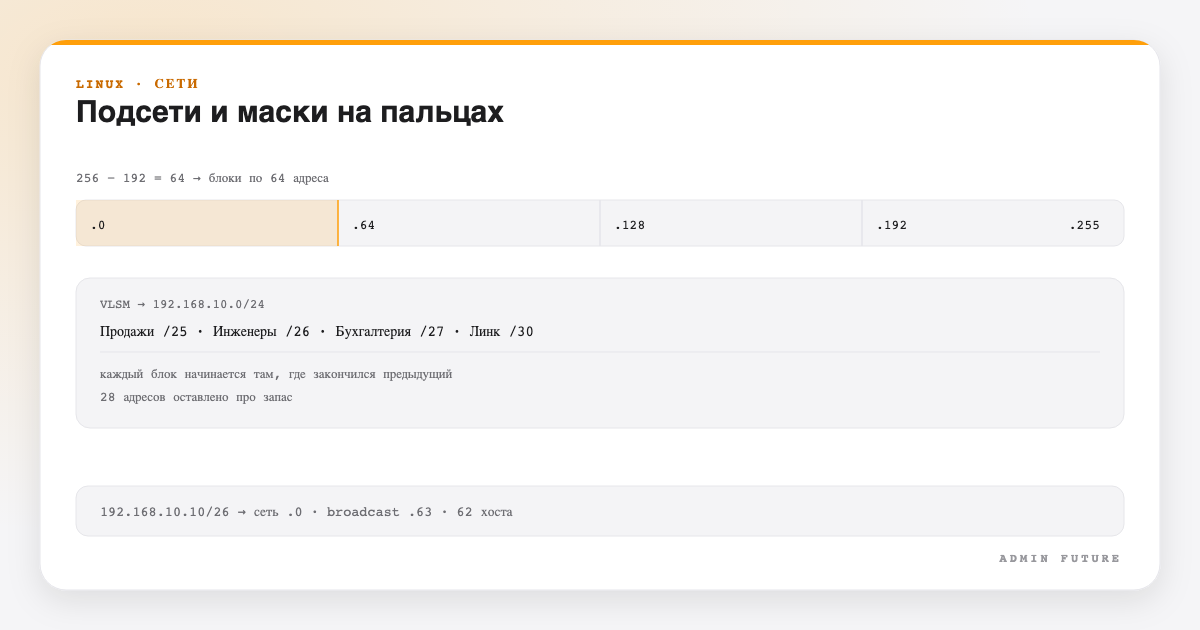
Example: mask 255.255.255.192. The interesting octet is 192. 256 − 192 = 64. So networks come in blocks of 64 addresses: 0, 64, 128, 192. Whatever host address you’re handed — 192.168.1.10, 192.168.1.75, 192.168.1.201 — round it down to the nearest multiple of 64, and that’s the network address. 10 → 0. 75 → 64. 201 → 192. The broadcast address is 1 less than the next boundary: for network .0 that’s 63, for .64 that’s 127, and so on.
That’s the entire trick. No tables, no bits written out in columns — one subtraction and one rounding step.
💡 3-second sanity check: 192.168.1.10/26 — mask 192, block 64, 10 rounds down to 0 → network 192.168.1.0, broadcast 192.168.1.63. You can verify the exact same thing without doing it in your head, using the subnet calculator — handy when the cost of a mistake outweighs a second of mental math.
A cheat sheet for all eight masks
Eight lines worth keeping in your head instead of looking up every time — the mask, the block size, and the number of actually usable hosts (the network address and broadcast don’t count, hence minus 2 everywhere):
CIDR   Mask               Block  Usable hosts
/25    255.255.255.128    128    126
/26    255.255.255.192     64     62
/27    255.255.255.224     32     30
/28    255.255.255.240     16     14
/29    255.255.255.248      8      6
/30    255.255.255.252      4      2   (classic for point-to-point)
/31    255.255.255.254      2      2   (RFC 3021 — both addresses, no broadcast)
/32    255.255.255.255      1      1   (a single host)
The formula for usable hosts is 2^(32 − CIDR) − 2. The two subtracted addresses are the network address (the first address in the block) and the broadcast address (the last) — neither gets assigned to an interface. The exception is /31: by the same logic already covered in the article on WinRM for a two-point link, both addresses in the block get used as hosts — a broadcast address simply isn’t needed there by the protocol.
VLSM: carving one network into differently sized pieces
The classic (non-VLSM) beginner mistake is handing every department the same /24 “because it’s simpler.” Say you have the network 192.168.10.0/24 (254 addresses) and four real requirements:
- Sales — 100 hosts
- Engineering — 50 hosts
- Accounting — 20 hosts
- A link between two routers — 2 hosts
VLSM (Variable Length Subnet Masking) is just the rule “start with the biggest requirement and carve out blocks one after another, with no gaps.” Allocate in order, largest to smallest:
Sales:          100 hosts → needs a block ≥102 → /25 (126 hosts)
              192.168.10.0/25      addresses .0–.127,   broadcast .127

Engineering:     50 hosts → needs a block ≥52  → /26 (62 hosts)
              192.168.10.128/26    addresses .128–.191, broadcast .191

Accounting:      20 hosts → needs a block ≥22  → /27 (30 hosts)
              192.168.10.192/27    addresses .192–.223, broadcast .223

Link:             2 hosts → needs a block ≥4   → /30 (2 hosts)
              192.168.10.224/30    addresses .224–.227, broadcast .227

Left over: 192.168.10.228 – 192.168.10.255 (28 addresses in reserve)
Each next block starts exactly where the previous one ended — that’s the entire mechanics of VLSM, nothing beyond the magic number from the previous section. Note that 28 addresses were left unused on purpose — headroom for Accounting to grow or for another link, not because the math didn’t add up.
⚠️ A common beginner mistake with VLSM: carving from smallest to largest. If you start with the link (/30) and Accounting (/27), leaving Sales (/25) for last, a 128-address block simply won’t fit into whatever scraps of space are left, and you’ll have to redo the whole thing. Always go from the largest requirement to the smallest.
How to double-check yourself without leaving the terminal
Mental math is great for speed, but not for changes that actually matter. Three ways to double-check before you hit “Apply”:
Bash
# The ipcalc utility ships in almost every distro (apt/dnf install ipcalc)
ipcalc 192.168.10.128/26

# Check the current interface addressing on Linux
ip -4 addr show

# The same thing on Windows
Get-NetIPAddress -AddressFamily IPv4
And if you need to run through several options quickly without opening a terminal — the site has a subnet calculator: enter an IP/CIDR or IP/mask and get the network, broadcast, host range and host count, including correct handling of /31 and /32.
Conclusion
One subtraction from 256 and rounding down — that’s the entire mental toolkit needed for 90% of everyday subnetting tasks. VLSM on top of that isn’t a separate discipline, it’s the same trick applied in sequence, largest requirement to smallest. The rest is practice: the more often you do the math in your head and check it against a tool, the faster it stops being a separate task and just becomes part of how you read any IP address at a glance.
Tags: #networking #ipv4 #subnets #sysadmin
Want to become tomorrow’s architect instead of just an admin? This article is only the tip of the iceberg. On our Telegram channel “Admin Future” we publish systems-thinking guides, ready-to-use scripts, AI tips, and checklists every day that you won’t find on Google. We don’t just post commands — we’re building a knowledge library for people who want to grow from admin to architect. Subscribe and become the expert in the room: Admin Future