In this article
It Worked Yesterday. Today the Domain Does Not Recognize It
Hello, colleagues. I am Maksim, a systems administrator. A user starts a computer and gets a domain trust error instead of a desktop. Nearby colleagues can work. Internet access is available. The computer is still visible in Active Directory. Someone proposes the familiar sequence: move it to a workgroup, restart, and join it again.
That can restore access. It can also create a second incident: the new join fails, nobody has verified local administrative access, and the user needs the machine immediately. I prefer to establish which identity the computer presents, which controller it reaches, and where communication fails before changing membership.
Our continuing teaching scenario uses WS-23 in corp.example.com and controllers dc-a and dc-b. The workstation was restored from an image overnight. Names and events are invented; this is not a customer incident report. Restoration is a hypothesis to investigate, not a conclusion we have already proved. We will build an evidence trail, select a bounded repair and identify conditions that require us to stop.
Commands target elevated Windows PowerShell 5.1. Directory queries need RSAT ActiveDirectory; an installed tool does not provide authorization. Domain controllers receive their own branch: calling something a server does not identify the correct procedure. Expect practical commands, diagrams and explicit limits rather than a universal reset recipe.
One Error Message, Several Different Investigations
A report of lost trust can hide an unreachable controller, inconsistent machine-account state, a deleted object, or an unrelated access failure. Microsoft documents secure-channel failures on member workstations and servers separately. The dialog is a useful symptom, not a repair decision. Microsoft troubleshooting guidance.
Record the exact message, computer, timestamp, sign-in method and scope. Is a new domain-user console logon failing? Does RDP fail? Or does an existing desktop session lack access to one folder? The last case might simply involve permissions. Trust between two domains is another mechanism; repairing one computer is not a generic inter-domain trust repair.
In our scenario, a new sign-in fails on WS-23. A colleague still working in an existing session elsewhere does not test WS-23. Establish approved local administrative and console access first. Without independent access, I would not start changes expecting a restart to somehow make domain authentication available.
| Observation | First inspection | Still unknown |
|---|---|---|
| No controller discovered | DNS, routes, service availability | Whether the machine secret matches |
| Channel returns False | Role, explicit DC, object and events | Whether one repair is appropriate |
| Test throws an exception | Error details, privileges, service and path | Channel state remains unknown |
| True but a folder fails | Fresh logon, identity and resource permissions | Whether trust is involved at all |
| Controllers give different results | Repeatability, object and replication | The cause of the difference |
The investigation has five levels: establish machine role, check the path to AD, compare specific controllers, choose a bounded change, and verify the user workflow. Each level must reduce uncertainty. Running another command that changes another setting does not strengthen the evidence. Keep a small incident record so the next administrator can distinguish observations from the actions already attempted.
What the Computer Must Prove to the Domain
A domain computer has its own account, such as WS-23$. The user supplies a user password; the computer has its own trust state. They are different identities. Changing the user password does not necessarily repair the machine channel. Likewise, a successful channel repair does not grant missing access permissions to the user.
Keep three elements in the model: local computer state, its AD object, and the controller currently handling the exchange. The directory is distributed. Seeing corp.example.com does not mean every request at every moment reaches the same copy of the data. This leads to a useful question: does an observation describe the whole domain or one particular controller?

An object with the expected name in Active Directory Users and Computers does not complete identity verification. Delete and recreate an account, and its name may match while SID and ObjectGUID differ. Before resetting an account, establish which object exists, when it appeared and what changed.
We do not need to extract the machine secret or print it into logs. The investigation needs exchange outcomes, role information, object metadata and a timeline. Collecting passwords for comparison adds unnecessary secret handling and is outside the downloadable kit. Microsoft on secure-channel problems.
Level 1: Identify the Machine Before Selecting a Repair
A workstation or member server belongs to the domain; a domain controller serves the directory. That distinction already makes a universal repair command unsafe. Win32_ComputerSystem identifies the local role: DomainRole 1 and 3 are members, while 4 and 5 are controllers. Legacy Backup and Primary labels in the WMI enumeration do not describe a modern AD design with one master controller and passive backups. Microsoft class reference.
# On the affected computer, elevated Windows PowerShell 5.1.
$ErrorActionPreference='Stop'
Get-CimInstance Win32_ComputerSystem -ErrorAction Stop |
    Select-Object Name,Domain,PartOfDomain,DomainRole
Get-Service Netlogon -ErrorAction Stop | Select-Object Name,Status
# DomainRole: 1=member workstation, 3=member server, 4/5=DC.
# STOP the member-repair procedure for roles 4 and 5.
WS-23 should report PartOfDomain=True and role 1. A workgroup result sends us toward membership-change history. Role 4 or 5 sends us directly to the DC branch. A missing or stopped Netlogon service requires investigation; this inspection does not start it or change its startup settings.
The tempting shortcut is to paste a repair into whichever administrative console is open. That can test the wrong machine: a local check on a jump server does not describe a user’s workstation. Start the record with the name actually returned by CIM and identify where every command ran.
Cached domain sign-in is another trap. It may provide a desktop without a current controller validation. That desktop is an opportunity to collect evidence, not a certificate of domain health. Microsoft on cached logon.
Level 2: Separate the Path to AD from the Machine Password
WS-23 was restored from an image. An outdated password is an attractive explanation, but the image might also restore an obsolete DNS server, route or controller address. Inspect current networking and controller discovery first. DC Locator uses DNS information and selection parameters; a working public resolver does not replace internal AD name resolution. Microsoft DC Locator guidance.
# Read-only requests, on the affected member. Enter your actual values.
$ErrorActionPreference='Stop'
$domain=Read-Host 'DNS domain name (example: corp.example.com)'
$dc=Read-Host 'Selected DC FQDN (example: dc-a.corp.example.com)'
Get-DnsClientServerAddress
Resolve-DnsName -Name ('_ldap._tcp.dc._msdcs.'+$domain) -Type SRV -ErrorAction Stop
Resolve-DnsName -Name $dc -ErrorAction Stop
nltest.exe "/dsgetdc:$domain"
$discoveryCode=$LASTEXITCODE
if($discoveryCode -ne 0){throw "DC discovery failed: $discoveryCode"}
Test-NetConnection -ComputerName $dc -Port 135 -InformationLevel Detailed
Test-NetConnection -ComputerName $dc -Port 445 -InformationLevel Detailed
w32tm.exe /query /status
$timeCode=$LASTEXITCODE
if($timeCode -ne 0){Write-Warning "Time-service query failed: $timeCode"}
# Open ports are preliminary evidence, not a complete RPC/Kerberos test.
Supply actual values. SRV answers should list expected controllers, the selected DC name should resolve correctly, and discovery should complete without an error. Successful TCP probes on 135 and 445 establish only those connections, not the entire RPC, Kerberos or filtering path. A w32tm status query describes the time service; it does not compare the computer clock against every controller.
If a name points somewhere wrong or the controller is unreachable, fix the demonstrated network fault under its own approved change plan. Substituting a public DNS resolver or disabling the entire firewall replaces the original failure with another configuration and destroys a useful baseline.
Repeat the original test after correcting the path. If trust works without changing the computer account, the secret-mismatch hypothesis was unnecessary. That is a valuable outcome: identity remained intact and the actual dependency can now be monitored. Troubleshooting controller location.
Level 3: Test a Chosen Controller and Preserve Distinct Outcomes
On a member computer, Test-ComputerSecureChannel checks the channel; Server selects a controller explicitly. The cmdlet is unsuitable for DCs and can report misleading failures there. Repair changes the nature of the operation, so the collector intentionally omits it. Windows PowerShell 5.1 reference.
#requires -Version 5.1
[CmdletBinding()]
param(
    [Parameter(Mandatory=$true)]
    [ValidatePattern('^[A-Za-z0-9][A-Za-z0-9.-]*\.[A-Za-z][A-Za-z0-9.-]*$')]
    [string]$ServerFqdn
)
$ErrorActionPreference='Stop'
$cs=Get-CimInstance -ClassName Win32_ComputerSystem -ErrorAction Stop
$result=[ordered]@{
    TimeUtc=[DateTime]::UtcNow.ToString('o'); ComputerName=[string]$cs.Name
    Domain=[string]$cs.Domain; DomainRole=[int]$cs.DomainRole
    PartOfDomain=[bool]$cs.PartOfDomain; RequestedDC=$ServerFqdn
    Status='NotTested'; ChannelHealthy=$null; ErrorId=$null; ErrorMessage=$null
}
if([int]$cs.DomainRole -in @(4,5)) {
    $result.Status='DomainControllerUnsupported'
} elseif(-not $cs.PartOfDomain -or [int]$cs.DomainRole -notin @(1,3)) {
    $result.Status='NotDomainMember'
} else {
    try {
        $healthy=Test-ComputerSecureChannel -Server $ServerFqdn -ErrorAction Stop
        if($healthy -isnot [bool]) { throw 'Unexpected non-Boolean channel result' }
        $result.ChannelHealthy=$healthy
        if($healthy) { $result.Status='HealthyAtRequestedDC' }
        else { $result.Status='ChannelTestFalse' }
    } catch {
        $result.Status='TestError'
        $result.ErrorId=$_.FullyQualifiedErrorId
        $result.ErrorMessage=$_.Exception.Message
    }
}
[pscustomobject]$result
# No password reset, Repair, sc_verify, rejoin, reboot or AD writes.
# The object, not the PowerShell process exit code, carries the diagnostic outcome.
Save it as Get-MemberChannelReport.ps1 and run it locally with the selected DC FQDN. Pipe the object to ConvertTo-Json or Export-Csv if an incident record is needed. The collector creates no files itself and prints no passwords. Computer names and error details remain internal infrastructure information; sanitize them before sharing.
We preserve three different outcomes: HealthyAtRequestedDC, ChannelTestFalse and TestError. An exception leaves ChannelHealthy null. An unavailable service or insufficient permission must not become a Boolean assertion that the password is wrong. A PowerShell process that successfully prints a TestError object has not successfully tested the channel.
Run it separately against dc-a and dc-b on WS-23, recording timestamps. Each result belongs to one request. Connectivity or replication might change between requests, so reproduce a difference and correlate events before declaring a controller faulty. This procedure does not scan every workstation or automatically reset anything after the first False.
The Legacy Command Where Verify Can Also Mean Change
Choose Nltest switches by documented behavior, not their English names. Microsoft describes /sc_query as the state of the channel when last used. If the channel fails, /sc_verify can remove it and establish another one. It therefore does not belong in a collector advertised as making no changes. /sc_reset is also a change operation. Nltest reference.

# On a member computer. Query, do not repair.
$domain=Read-Host 'DNS domain name'
nltest.exe "/sc_query:$domain"
$queryCode=$LASTEXITCODE
"NativeExitCode=$queryCode"
# sc_query reports the last-used channel state, not a new full health proof.
# Do NOT substitute /sc_verify: it can rebuild a failed channel.
# LOGONSERVER describes the logon context; it is not a pinned test target.
$env:LOGONSERVER
Capture LASTEXITCODE immediately after a native program; another native invocation can replace it. Even a zero exit code from a query does not establish a fresh successful exchange with every controller. Understand the reported state before deciding which additional test is needed.
LOGONSERVER is not a substitute for an explicit Server argument either. It concerns the logon context. Seeing dc-a there does not justify labeling every later result as a dc-a test. Our incident table records execution host, requested operation, explicitly selected controller and outcome separately.
This looks excessively precise until two administrators claim to have tested the same thing and report opposite answers. Reconstructing context often reveals a different machine, cached state or an intervening repair. A short command timeline saves more time than another blind rejoin.
One Controller Accepts the Computer and Another Does Not
Suppose repeat tests return True at dc-a and False at dc-b with connectivity available. That is an observation, not a proven cause. My next hypothesis concerns directory state or the request path. First check whether both controllers see the same object, whether it is enabled, and whether its identifiers match. Query from a trusted administrative workstation without changing it.
# Trusted admin workstation with RSAT ActiveDirectory; read-only.
$ErrorActionPreference='Stop'
Import-Module ActiveDirectory -ErrorAction Stop
$computer=Read-Host 'Exact affected computer name (example: WS-23)'
$dcA=Read-Host 'First DC FQDN'
$dcB=Read-Host 'Second DC FQDN'
foreach($server in @($dcA,$dcB)) {
    $obj=Get-ADComputer -Identity $computer -Server $server -Properties Enabled,PasswordLastSet,whenCreated -ErrorAction Stop
    [pscustomobject]@{ReadFrom=$server;Name=$obj.Name;SID=[string]$obj.SID
        ObjectGUID=[string]$obj.ObjectGUID;Enabled=$obj.Enabled
        PasswordLastSet=$obj.PasswordLastSet;WhenCreated=$obj.whenCreated
        DistinguishedName=$obj.DistinguishedName}
}
# Timestamps do not reveal the secret or prove equality with the local secret.
PasswordLastSet is metadata, not the secret or a comparison with local state. Matching timestamps are not cryptographic proof of consistency. Different SID or ObjectGUID values under the expected name require investigation of deletion, recreation and replication. Get-ADComputer reference.
Do not repair against every controller in succession. Repeated resets add new changes to the original inconsistency. An AD administrator should inspect replication, the relevant directory partition and the timeline first. A successful last-attempt status is useful only with its timestamp, partners and tested partitions. AD replication troubleshooting.
The immediate conclusion is deliberately narrower: controller-specific behavior is reproducible, and a member repair is not yet justified. That is a complete diagnostic result. It helps prevent a workstation fix from masking an infrastructure problem that reaches another ten users tomorrow.
The Image Restored the Past on Only One Side
Return to WS-23, but change the evidence: both controllers consistently show the same enabled object, connectivity checks pass, and channel tests return False at both. The restore record supplies a timestamp. We now have grounds to investigate inconsistent local and domain state, although another change has not been ruled out.
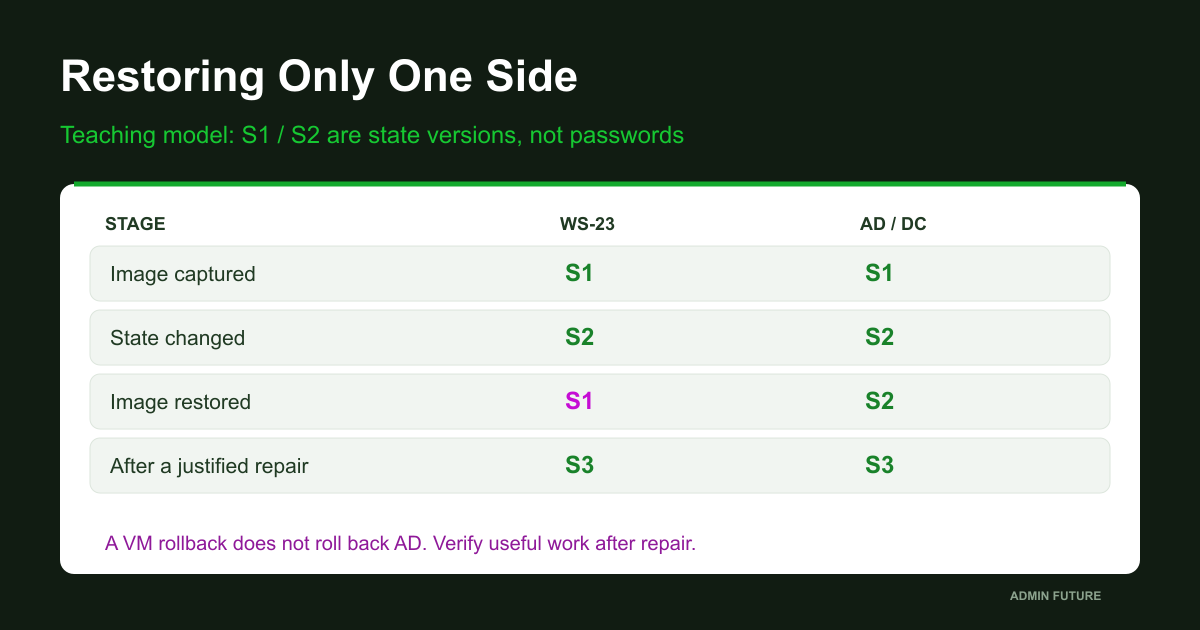
Diagram labels S1 and S2 represent versions of state, not actual passwords. Local state and AD agree when the image is made. State later changes. Restoring the image rolls back the local side; the directory does not necessarily roll back with it. Reapplying that image can therefore reproduce the incident. Microsoft includes restoration and machine-password changes among investigation scenarios, but the outcome depends on actual history. Trust-failure scenarios.
Another tempting explanation says a computer was offline for over thirty days, so its password expired. The default machine-password change interval is indeed 30 days, and the domain member initiates the change. That does not establish automatic trust destruction on day 31 for a powered-off machine. Investigate actual changes rather than substituting time since last use for evidence. Machine-password age policy.
Do not disable rotation to accommodate images. Improve restoration and deployment: unique identity, no simultaneous copies of one domain machine, controlled restores and subsequent verification. Starting an old clone beside the live original is not a clean diagnostic experiment; both machines would claim the same identity.
Collect the Timeline Before Repairing It
The incident timeline spans client Netlogon events, selected-controller events, directory changes, image restoration and networking changes. Start with a bounded window around the first failed sign-in. No events does not mean no problem: retention may differ, the relevant record may be older, or the query may have failed.
# On the affected computer. Keep full records; limit the time window.
$ErrorActionPreference='Stop'
$start=(Get-Date).AddHours(-6)
Get-WinEvent -FilterHashtable @{LogName='System';ProviderName='NETLOGON';StartTime=$start} -MaxEvents 100 -ErrorAction Stop |
    Select-Object TimeCreated,Id,RecordId,MachineName,Message
# No matching events is not proof of health. A query error is not an empty log.
# Correlate with selected-DC logs, image restore and directory changes.
Preserve complete records rather than event numbers alone. Timestamp, RecordId, machine and message help connect a request to a controller. Compare time zones and time sources from a trusted administrative workstation. Two records showing 09:15 may describe different instants. Export original logs only to an appropriately restricted incident location under the applicable retention policy.
For WS-23, the timeline would include image restoration, first boot, first failed sign-in, dc-a and dc-b tests, object inspection, approved repair and subsequent checks. Record observations rather than inserting an invented cause. “False observed at 09:20” is more accurate than “the password broke at 09:20”; the underlying change may have occurred earlier.
If dozens of machines fail together, repairing one endpoint is at most a temporary workaround. Investigate common dependencies: a restored controller, site connectivity, DNS changes, image deployment or directory actions. Evidence of unauthorized account changes calls for incident response and evidence preservation. Restoring access does not explain the origin of the change.
Level 4: Choose the Smallest Justified Change
Before repair, establish independent local access, confirmed member role, a reachable writable controller and an understood directory state. Use an account authorized for the particular object; habitually choosing Domain Admins is not a procedural requirement. Validate delegated permissions against your access model.
The blunt approach resets the object in AD Users and Computers and waits to see what happens. A directory-side action alone does not establish a coordinated change on the workstation. Another temptation is to run every reset command in sequence. Afterward, it becomes impossible to explain which operation was necessary or what changed between attempts.
| Option | Changes | Selection condition |
|---|---|---|
| Fix DNS / connectivity | A network dependency under its own plan | Demonstrated reachability fault |
| Member channel Repair | Secure-channel state | Known object, agreed controller and authorization |
| Directory-side account reset | Directory-side state | Not automatically a coordinated client repair |
| Rejoin | Membership and related dependencies | Separate access, rights and acceptance plan |
| DC recovery | Part of the identity service | Dedicated procedure after AD diagnosis |
We choose one mechanism: member-channel repair against an explicitly selected controller. Reset-ComputerMachinePassword is a separate supported machine-password operation, not an obligatory second step after Repair. Evaluate its purpose and context separately. Reset-ComputerMachinePassword reference.
Warning: actual repair changes local and directory trust state. There is no universal undo button. Restoring an older image afterward can recreate inconsistency. Arrange console and verified local access, preserve evidence, approve a change window and define subsequent recovery steps. A VM snapshot is not a coordinated rollback of both sides of domain interaction.
A deleted object, unknown replacement identity or replication problem needs its own resolution. This repair must not become a mechanism for suppressing symptoms while the established failure branch remains unexplained.
A Guarded Repair Script, Not a Magic Button
Here is the complete Repair-MemberChannelGuarded.ps1. Its default checks local role, name and domain, then returns PlanOnly. OtherDCsVerified=False is intentional: the script cannot claim to verify the entire directory. Execute with WhatIf shows the proposed action without requesting credentials or repairing anything. That tests a branch, not whether a real change would succeed.
#requires -Version 5.1
[CmdletBinding(SupportsShouldProcess=$true,ConfirmImpact='High')]
param(
    [Parameter(Mandatory=$true)][ValidateNotNullOrEmpty()][string]$ExpectedComputerName,
    [Parameter(Mandatory=$true)][ValidateNotNullOrEmpty()][string]$ExpectedDomain,
    [Parameter(Mandatory=$true)]
    [ValidatePattern('^[A-Za-z0-9][A-Za-z0-9.-]*\.[A-Za-z][A-Za-z0-9.-]*$')]
    [string]$ServerFqdn,
    [switch]$Execute
)
$ErrorActionPreference='Stop'
$cs=Get-CimInstance -ClassName Win32_ComputerSystem -ErrorAction Stop
if(-not $cs.PartOfDomain -or [int]$cs.DomainRole -notin @(1,3)) {
    throw 'Only a domain member workstation/server is supported; never a DC'
}
if($cs.Name -ine $ExpectedComputerName -or $cs.Domain -ine $ExpectedDomain) {
    throw 'Local computer/domain differs from the explicitly expected target'
}
$record=[ordered]@{
    TimeUtc=[DateTime]::UtcNow.ToString('o'); ComputerName=$cs.Name
    Domain=$cs.Domain; RequestedDC=$ServerFqdn; Status='PlanOnly'
    HealthyAfter=$null; OtherDCsVerified=$false
}
if(-not $Execute) { [pscustomobject]$record; return }
if(-not $PSCmdlet.ShouldProcess(
    "$($cs.Name) in $($cs.Domain), DC=$ServerFqdn",
    'Repair the member computer secure channel; changes local/AD trust state'
)) { $record.Status='NotExecuted'; [pscustomobject]$record; return }

# Require RSAT/ActiveDirectory locally; this script never installs features.
Import-Module ActiveDirectory -ErrorAction Stop
$credential=Get-Credential -Message 'Authorized account for this computer object; no plaintext password'
if($null -eq $credential) { throw 'No credential supplied' }
$domain=Get-ADDomain -Server $ServerFqdn -Credential $credential -ErrorAction Stop
$dc=Get-ADDomainController -Identity $ServerFqdn -Server $ServerFqdn -Credential $credential -ErrorAction Stop
if($domain.DNSRoot -ine $ExpectedDomain -or $dc.Domain -ine $ExpectedDomain -or
   $dc.HostName -ine $ServerFqdn -or $dc.IsReadOnly -ne $false) {
    throw 'A matching writable DC in the expected domain is required'
}
$before=Test-ComputerSecureChannel -Server $ServerFqdn -ErrorAction Stop
if($before -isnot [bool]) { throw 'Unexpected pre-test result' }
if($before) {
    $record.Status='AlreadyHealthyAtRequestedDC'; $record.HealthyAfter=$true
    [pscustomobject]$record; return
}
$changed=Test-ComputerSecureChannel -Repair -Server $ServerFqdn -Credential $credential -Confirm:$false -ErrorAction Stop
if($changed -isnot [bool] -or -not $changed) { throw 'Repair did not report success; stop, do not chain resets' }
$after=Test-ComputerSecureChannel -Server $ServerFqdn -ErrorAction Stop
if($after -isnot [bool] -or -not $after) { throw 'Fresh test against the same DC did not pass' }
$record.Status='RepairedAtRequestedDC'; $record.HealthyAfter=$true
[pscustomobject]$record
# Still verify replication, fresh domain logon and required business operations.
After explicit approval, the script requires ActiveDirectory, requests PSCredential, reads the chosen controller and validates domain, FQDN and writable status. An exception or mismatch stops processing. A machine without RSAT cannot use this guarded repair as written; the script neither installs features nor skips validation. An alternative approved process is possible, but silently removing safeguards produces a different tool. Get-ADDomainController reference.
A successful pre-test returns AlreadyHealthyAtRequestedDC without a reset. Otherwise a False result permits one Repair and a fresh test against the same DC. Any failure stops the sequence. There is no fallback rejoin, automatic restart or neighboring-machine repair. Failure to reach the AD Web Services required by ActiveDirectory is not a reason to weaken firewall policy.
# Run locally on the affected MEMBER, after reviewing downloaded source.
# Replace every example value. Default: plan only, no credential prompt.
$target=@{ExpectedComputerName='WS-23';ExpectedDomain='corp.example.com'
    ServerFqdn='dc-a.corp.example.com'}
.\Repair-MemberChannelGuarded.ps1 @target
.\Repair-MemberChannelGuarded.ps1 @target -Execute -WhatIf
# Only after approval, independent local access and DC/replication checks:
# .\Repair-MemberChannelGuarded.ps1 @target -Execute -Confirm
# The last line is intentionally a COMMENT, not an automatic next action.
.\Get-MemberChannelReport.ps1 -ServerFqdn $target.ServerFqdn | Format-List *
Run it on the affected member itself. The real-change invocation is deliberately commented out. Credentials are entered interactively rather than supplied as plaintext arguments or saved to a file. Do not send an entire session containing internal diagnostic details to a public paste service.
Why a Domain Controller Needs a Different Procedure
On a domain controller, the affected machine is part of the identity service itself. Authentication and replication roles make consequences broader than one desktop. False from an unsuitable cmdlet does not prove a broken controller. Neither script above calls Test-ComputerSecureChannel for roles 4 and 5.
First identify the affected controller, healthy available partners, directory events and replication evidence. These commands provide bounded inspection from an administrative workstation, not an attempt to force recovery by running every replication action.
# Trusted admin workstation with AD DS/RSAT tools. DC diagnostics only.
$dc=Read-Host 'Affected DC FQDN'
repadmin.exe /showrepl $dc
$replicationCode=$LASTEXITCODE
"ReplicationCommandExitCode=$replicationCode"
dcdiag.exe "/s:$dc" /test:Advertising /v
$advertisingCode=$LASTEXITCODE
"AdvertisingCommandExitCode=$advertisingCode"
# Read the individual results. Exit codes alone do not establish AD health.
# No /syncall, resetpwd, service stops, demotion or reboot here.
Advertising checks its own scope, and showrepl reports inbound replication relationships. Together they do not certify all of AD. Inspect individual outcomes, last-success timestamps and relevant partitions. Preserve evidence and investigate specific error codes before making changes.
Microsoft supplies a separate DC password-reset procedure using Netdom.exe. It includes conditions concerning KDC, tickets, a partner controller and service restoration. Extracting one resetpwd command into a universal server script would be a dangerous simplification. Apply the complete procedure to an established case with prepared recovery. Microsoft DC procedure.
If a controller was restored from a snapshot, investigate the recovery method and VM-Generation ID support. Virtualized-controller safeguards address particular restoration problems; their presence does not make arbitrary old images safe or replace AD backups. Virtualized DC architecture.
When Rejoining Still Belongs in the Recovery Plan
Leaving for a workgroup is not forbidden forever. It simply should not be the automatic first response to every trust error. Rejoining may belong to an approved recovery if membership is already gone, an object is lost or that supported path is deliberately chosen. Before changing anything, establish which computer object will be used and what depends on its identity.
Verify independent local access, downtime, post-restart management, domain-dependent services and tasks, and permissions granted to the computer account. Preserve an inventory and a plan to restore required functions. Do not delete the user profile as an extra cleanup step. An empty desktop after a change does not prove that previous data vanished; it requires its own investigation.
Existing-account reuse is also subject to domain-join hardening. Do not assume a familiar name and administrator password are enough. Investigate ownership, trusted principals, policy and Netsetup.log when reuse fails. Do not bypass protection with arbitrary registry recipes or delete a live object merely to make joining succeed. Microsoft account-reuse guidance.
The distinction is practical: an intentional rejoin has a purpose, mapped dependencies and acceptance criteria. An emergency ritual merely discards the initial state. Once a targeted repair restores communication while preserving membership, another rejoin is not needed to complete a familiar checklist.
Level 5: True Is an Intermediate Result; the User Still Needs to Work
After repair, WS-23 passes at dc-a. That is success for one test, not final acceptance. Save a post-change report and test the other controller with actual replication state and topology in mind. A recurring difference sends us back to directory and networking investigation, not another password rotation.
Verify a new domain sign-in with controller connectivity established, rather than relying only on an existing or cached session. Perform the user’s real authorized operation: reach a working resource and start the required application. For a server, add an owner-verified service check. An application authorization failure after a healthy channel may have a separate cause and should not automatically trigger another trust repair.
| Check | Expected evidence | Boundary |
|---|---|---|
| Role and expected target | Member role 1/3; name and domain match | Does not prove channel health |
| PlanOnly / WhatIf | No Repair and no credential prompt | Does not prove a real change would succeed |
| Post-repair check at same DC | Fresh HealthyAtRequestedDC report | Other controllers remain unchecked |
| Other DC after replication assessment | Consistent result and current metadata | Account for timing and topology |
| New domain sign-in | Verified online logon | Do not substitute an old session |
| Useful operation | Resource and application work as intended identity | Does not audit every service |
A closed incident needs at least four records: observations before change, the reason for the chosen action, what changed against which DC, and acceptance evidence. In our teaching scenario, a defensible conclusion is that image restoration was followed by reproducible failures against consistent controllers, and one repair at the chosen writable DC restored testing and a new working sign-in. That is stronger than a vague successful restart and more honest than treating PasswordLastSet as proof of causality.
Review the process that produced the incident: why an old image was used, how domain-machine identity was handled and who accepted the restore. Otherwise, a useful repair recipe coexists with a deployment process that keeps generating incidents.
The Kit, Safe Testing and the Point to Remember
Download the RU/EN PowerShell kit: collector, guarded repair, two guides, primary-source list and acceptance tables. Extract and review the source first, then verify the downloaded archive hash through your normal process. Do not globally relax ExecutionPolicy to run it; follow your organization’s script-review and approval policy.
A safe lab uses a separate test domain, backups and independent access. Start with a healthy member: expect True without modification. Check PlanOnly and WhatIf: neither should request credentials or invoke repair. Exercise wrong-name, wrong-domain, workgroup and both DC-role guards. Do not deliberately break production trust for a demonstration. An image-restore exercise belongs only in an isolated environment with all copies accounted for and a complete lab-recovery plan.
Validation boundary: the published kit passed syntax parsing and branch tests with mocked system calls on local PowerShell 7. No live Windows/AD lab was used for that validation. Actual repair, delegated rights, networking and behavior on your Windows version require a separate pilot. Parsing and an injected exception are not an executed domain repair.
We moved from an error dialog through machine role, selected controller, evidence and a bounded change. First establish which relationship failed and with which controller; then repair the demonstrated fault while preserving identity where possible. Rejoining remains a tool rather than a mandatory ritual.
Thank you for reading. Three questions for colleagues:
- How have you investigated controller-specific results, and what was the eventual cause?
- Which computer-account dependency surprised you during a rejoin?
- How do you accept a restored machine so the next image does not recreate the failure?
A useful next step is to turn this investigation into a short recovery card for the on-call administrator: AD ownership, verified local access and the actual dependencies of that machine.