In this article
An Empty List, a Full Volume and a Dangerous Idea
Hello, colleagues. I am Maksim, a systems administrator. Imagine the morning: backup reports success, accounting is using 1C, and the Hyper-V host is running out of space. Several AVHDX files sit beside the VM. Hyper-V Manager shows no checkpoints. The apparent solution is to remove the leftovers.
That is where housekeeping can become loss of the database’s latest changes. An empty checkpoint list describes the management view. It does not establish that the attached virtual disk no longer depends on differencing files. First find where the running VM actually gets its data.
We will establish the VM and host, identify its attached disk, follow parent relationships, correlate the chain with backup activity, and select a supported recovery route. The kit includes a read-only PowerShell function, a disposable lab and an acceptance matrix. It deliberately contains no automatic orphan cleaner: insufficient evidence means the file stays.
The continuing case is illustrative: APP-LAB has separate OS and data disks. It is not a report of a customer repair. Commands target Windows PowerShell 5.1+ on Windows Server with the Hyper-V module; documentation was checked against Windows Server 2025. Cluster work starts on the current VM owner. Shared VHDX/VHD Set, Replica and third-party orchestration need their own assessment.
Three Different Things Commonly Called a Snapshot
Separate the storage graph from its management representation. A checkpoint is a Hyper-V object with configuration-state relationships. A differencing disk records changes relative to a parent. A backup is a saved collection of data and metadata with a recovery method. They interact, but they are not substitutes.
AVHDX commonly appears in checkpoint chains, but a filename extension is not a complete description of purpose. A differencing disk can also use VHDX. Read its type and parent with Get-VHD. Age, length and a suggestive filename are insufficient.
Distinguish a normal temporary backup state, incomplete consolidation afterward, and a file outside the active chain you inspected. The last is only an investigation candidate. It might belong to another VM, branch or retained state. Sorting a directory by date establishes none of these categories.
A production checkpoint uses VSS or Linux filesystem freezing; a standard checkpoint can capture VM memory. This concerns consistency, not permission to delete AVHDX files. Checkpoint types and supported removal.
Why the Smallest File Can Contain the Most Important Data
In our teaching case, the VM’s data attachment points to data-C.avhdx. Its ParentPath leads to data-B.avhdx, then data.vhdx. Dependency runs from the attached child toward its parent. It is not a directory list sorted by creation time.
Imagine three logical blocks. The base holds A0, B0 and C0. The middle layer changes A to A1; the current layer changes B to B2. The visible result is A1, B2, C0. A read not satisfied by the child falls through to earlier layers. New writes go to the active disk. File size therefore does not measure the importance of its contents.
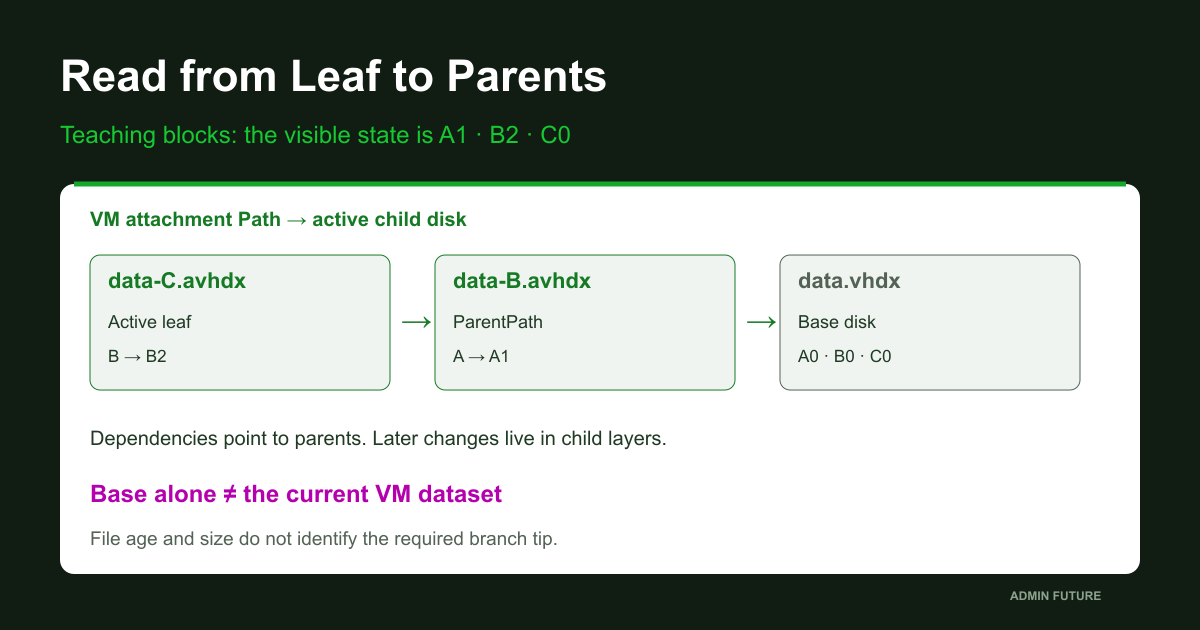
Attaching only the base can sometimes produce a bootable system. It nevertheless exposes a different dataset. To the user, today’s documents may have disappeared. Successful OS startup does not prove the correct recovery point.
Picking the newest AVHDX is no better: a timestamp does not identify the required branch tip. Begin with Path on the specific VM disk attachment, then follow ParentPath metadata. That turns a filename guess into a graph we can inspect.
Level 1. Establish VM Identity and the Host Observing It
APP-LAB is a useful narrative name; a GUID selects the actual object. Another host may contain a copy with the same name. A clustered VM may have moved since last night’s backup. Record VMId, ComputerName, state and every disk attachment, including controller numbers and locations.
Run elevated Windows PowerShell on the current VM host. If ownership is unknown, establish it in Failover Cluster Manager or with Get-ClusterGroup and confirm the VMId mapping. Do not assume the CSV coordinator owns the VM. See the separate Get-ClusterGroup reference.
# Read-only, on the current Hyper-V host, elevated Windows PowerShell.
Import-Module Hyper-V -ErrorAction Stop
$ErrorActionPreference = 'Stop'
Get-VM | Select-Object Name,VMId,ComputerName,State,Status
$vmId = [guid](Read-Host 'Paste the reviewed VMId from this host')
$vm = Get-VM -Id $vmId -ErrorAction Stop
$vm | Select-Object Name,VMId,ComputerName,State,Status,Version
Get-VMHardDiskDrive -VM $vm | Select-Object ControllerType,ControllerNumber,ControllerLocation,Path
Get-VMSnapshot -VM $vm -ErrorAction Stop | Select-Object Name,Id,SnapshotType,CreationTime
Get-VMSnapshot -VM $vm -SnapshotType Recovery -ErrorAction Stop | Select-Object Name,Id,SnapshotType,CreationTime
# Empty result is not an error, nor proof of no disk dependency.
The explicit Recovery query documents that checkpoint type. An error is not converted into an empty result. Zero objects establish what the query returned, not that storage dependencies disappeared. Get-VMSnapshot and SnapshotType.
For an in-use disk on shared storage, run Get-VHD from the host using it. Failure from another node can be an ownership/access issue rather than corruption. This is a documented limitation of Get-VHD. Correct the observation point before judging the chain.
Level 2. Walk Upward from the Attached Disk
The function accepts one VM GUID. For every file-backed attachment it starts at the actual Path, reads ParentPath and walks toward the root. Controller location accompanies every row, keeping the operating-system chain separate from the database chain.
# Windows PowerShell 5.1+, Hyper-V host, elevated approved read access.
# Read-only on VM/storage. Returns observations, never merge/delete/repair commands.
function Get-AFHyperVChain {
    [CmdletBinding()]
    param(
        [Parameter(Mandatory = $true)][Guid]$VMId,
        [ValidateRange(1, 1024)][int]$MaxDepth = 128
    )
    $vm = Get-VM -Id $VMId -ErrorAction Stop
    $start = @(Get-VMHardDiskDrive -VM $vm -ErrorAction Stop)
    foreach ($drive in $start) {
        $slot = '{0}:{1}:{2}' -f $drive.ControllerType, $drive.ControllerNumber, $drive.ControllerLocation
        $leaf = [string]$drive.Path
        if ([string]::IsNullOrWhiteSpace($leaf)) {
            [pscustomobject]@{ VMId=$VMId; VMName=$vm.Name; Slot=$slot; Leaf=$leaf; Depth=0; Path=''; ParentPath=''; VHDType=''; SizeBytes=$null; FileSizeBytes=$null; Status='UnsupportedAttachment'; Detail='No file path: inspect pass-through/shared storage separately'; ObservedUtc=[DateTime]::UtcNow.ToString('o') }
            continue
        }
        $seen = @{}
        $path = $leaf
        $depth = 0
        while ($path) {
            $depth++
            $row = [ordered]@{ VMId=$VMId; VMName=$vm.Name; Slot=$slot; Leaf=$leaf; Depth=$depth; Path=$path; ParentPath=''; VHDType=''; SizeBytes=$null; FileSizeBytes=$null; Status=''; Detail=''; ObservedUtc=[DateTime]::UtcNow.ToString('o') }
            if ($depth -gt $MaxDepth) {
                $row.Status='DepthLimit'; $row.Detail='Traversal stopped; chain is incomplete'
                [pscustomobject]$row; break
            }
            if ($seen.ContainsKey($path)) {
                $row.Status='Cycle'; $row.Detail='Repeated path; inspect identity/path resolution'
                [pscustomobject]$row; break
            }
            $seen[$path] = $true
            try { $disk = Get-VHD -Path $path -ErrorAction Stop }
            catch {
                $row.Status='ReadError'; $row.Detail=$_.Exception.Message
                [pscustomobject]$row; break
            }
            $row.Path=[string]$disk.Path
            $row.ParentPath=[string]$disk.ParentPath
            $row.VHDType=[string]$disk.VHDType
            $row.SizeBytes=$disk.Size
            $row.FileSizeBytes=$disk.FileSize
            if ($row.ParentPath) {
                $row.Status='ParentLink'
            } elseif ($row.VHDType -eq 'Differencing') {
                $row.Status='UnexpectedNoParent'
                $row.Detail='Differencing disk with no readable parent; not a validated root'
            } else {
                $row.Status='RootObserved'
            }
            [pscustomobject]$row
            if ($row.Status -ne 'ParentLink') { break }
            $path=$row.ParentPath
        }
    }
    $after = @(Get-VMHardDiskDrive -VM $vm -ErrorAction Stop)
    $signatureBefore = @($start | ForEach-Object { '{0}|{1}|{2}|{3}' -f $_.ControllerType, $_.ControllerNumber, $_.ControllerLocation, $_.Path } | Sort-Object)
    $signatureAfter = @($after | ForEach-Object { '{0}|{1}|{2}|{3}' -f $_.ControllerType, $_.ControllerNumber, $_.ControllerLocation, $_.Path } | Sort-Object)
    if (($signatureBefore -join "`n") -ne ($signatureAfter -join "`n")) {
        Write-Warning 'AttachmentChanged: report is not a stable chain snapshot. Recollect after the supported operation completes.'
    }
}
Results include depth, type, virtual capacity, Get-VHD file size and observation time. FileSize is not a universal measure of allocated physical space in underlying thin storage. RootObserved means no parent was found for the readable node; it does not validate a SQL database or authorize a configuration edit.
Traversal stops on a read error, repeated path or depth limit. Non-file attachments are marked separately. The function deliberately does not guess replacement parents or change identifiers. An incomplete report with an explicit error is safer than a tidy table that silently omitted a disk.
It compares VM attachments before and after collection. AttachmentChanged warns that the observation was unstable. Absence of that warning still does not make this an atomic disk-content snapshot: consolidation or backup may have continued internally. Recollect after the approved operation completes.
Reading the Report: a Dependency Is Not Yet a Diagnosis
Save the function as Get-AFHyperVChain.ps1 or execute its definition above. Collect in the same session. It changes neither VM nor storage; CSV output is written only to your selected report path. Use a separate restricted directory because disk paths disclose infrastructure structure.
# Same session: $vmId was selected and verified above.
# If the function is not already defined, load its reviewed local file:
# . .\Get-AFHyperVChain.ps1
$rows = @(Get-AFHyperVChain -VMId $vmId)
$rows | Format-Table Slot,Depth,VHDType,Status,Path,ParentPath -AutoSize
# Use an EXISTING, restricted report directory; this refuses file overwrite.
$reportDirectory = Read-Host 'Absolute path to an existing restricted report directory'
if (-not (Test-Path -LiteralPath $reportDirectory -PathType Container)) { throw 'Directory not found' }
$report = Join-Path $reportDirectory ('hyperv-chain-{0}-{1}.csv' -f $vmId,[guid]::NewGuid())
$rows | Export-Csv -LiteralPath $report -NoTypeInformation -Encoding UTF8 -NoClobber
Write-Output $report
| Status | Established observation | Next step |
|---|---|---|
| ParentLink | Readable node references a parent | Continue dependency inspection |
| RootObserved | Readable node has no ParentPath | Compare with the expected architecture |
| ReadError | Node could not be read | Check using host, access, path and storage |
| Cycle / DepthLimit | Traversal stopped; report incomplete | Do not generate an automatic merge plan |
| UnsupportedAttachment / UnexpectedNoParent | Attachment or metadata outside the ordinary model | Investigate separately; delete nothing |
In the illustrative incident, the OS disk has one RootObserved row. The data attachment has two ParentLink rows and a root. Application data therefore depends on three files. That already rules out deleting any of those links. It does not yet identify which backup component caused the situation.
Do not sum Size as the database’s space consumption: it repeats virtual capacity across layers. Do not count FileSize twice when several branches share a parent. Capacity work needs unique-file inventory and storage-platform measurements. This report answers dependency questions; capacity is a separate investigation.
However readable the table, the actual attachment takes precedence over a convincing filename. Get-VMHardDiskDrive identifies the attached disks from which traversal must begin.
Why “Backup Successful” and “Chain Cleanup Completed” Are Separate Checks
A timeline is more useful than a green badge. Our teaching hypothesis is: job starts, temporary state is created, data transfers, success is reported, and cleanup remains incomplete. These are proposed stages to correlate with product and Hyper-V logs, not invented measurements.
Products do not all define success identically. Record job identity, VM, host, intervals, checkpoint/remove/merge messages and restore results. If the product promises cleanup as part of successful completion, a contradictory host state is evidence for its support team, not something to dismiss as normal.
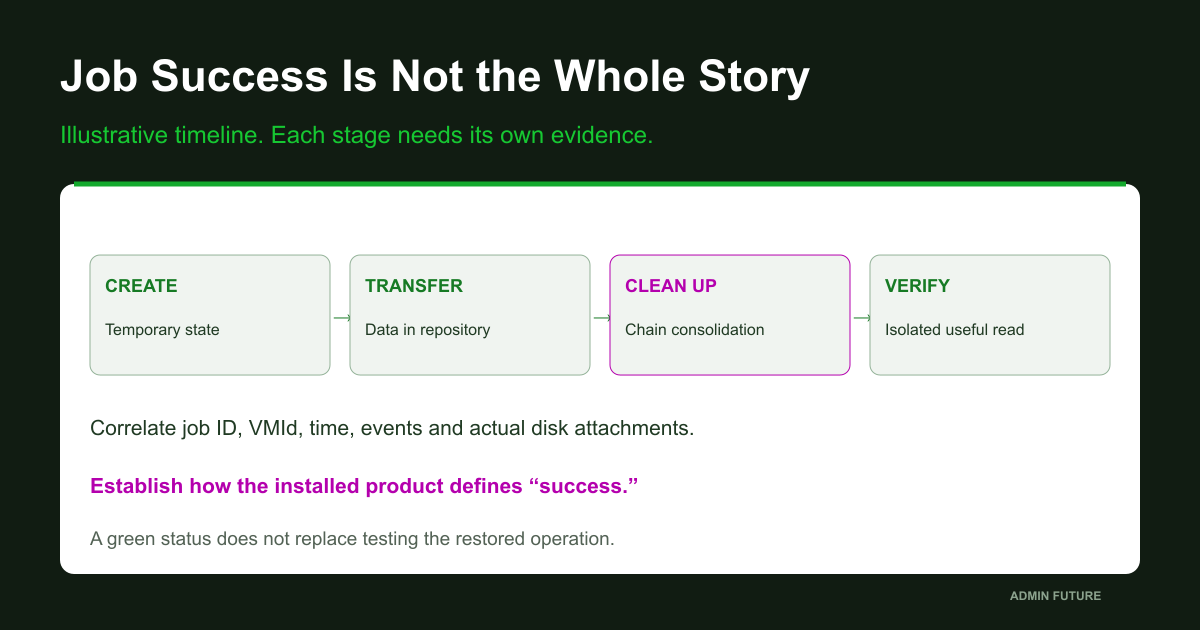
VSS coordinates requester and writers to obtain a suitable data state. Evidence that its phase succeeded does not prove every later product action completed. VSS coordination.
A full VM backup and a disk-data-only backup have different restoration requirements. Record configuration, state and the chosen recovery approach. Copying an open AVHDX through Explorer does not become a consistent backup merely because the copy operation returned success. Hyper-V backup approaches.
Level 3. Correlate Events Instead of Blaming an Extension
Build a common timeline: host timezone, backup-server clock, job start/end, VMId and Hyper-V messages. Begin with a narrow interval. Do not enable extra logging or restart services merely to appear busy.
# Discover actual enabled channels; do not enable or clear logs.
$since = (Get-Date).AddHours(-6)
$channels = @(Get-WinEvent -ListLog 'Microsoft-Windows-Hyper-V-*' -ErrorAction Stop | Where-Object { $_.IsEnabled -and $_.LogName -match '(VMMS|Worker).*(Admin|Operational)$' })
$channels | Select-Object LogName,RecordCount,IsEnabled
foreach ($channel in $channels) {
    Write-Output ('LOG: ' + $channel.LogName)
    try {
        Get-WinEvent -FilterHashtable @{ LogName=$channel.LogName; StartTime=$since } -MaxEvents 100 -ErrorAction Stop | Select-Object TimeCreated,Id,LevelDisplayName,ProviderName,Message
    } catch {
        Write-Warning ('Query failed or no matching events: ' + $channel.LogName + ' :: ' + $_.Exception.Message)
    }
}
# Compare the full event data with VMId, backup job ID and timestamps.
# A host-wide query does not attribute every returned event to this VM.
The code discovers available channel names rather than assuming their spelling. It displays a bounded number of events in the selected window. During a serious incident, retain original records or EVTX through an approved process before retention overwrites them. A formatted Message column is convenient, but does not replace the complete event.
Look for a sequence rather than one magic event ID: who started an operation, which object it named, what failed and whether retries continued. No GUID match in rendered Message does not prove absence of activity; identifiers can be in structured fields or the backup agent’s own log.
If a file grows, make a few bounded observations of size and time alongside current attachment Path. Growth can be normal guest writes and does not independently prove a stuck merge. Lack of growth does not authorize deletion either. We need relationships among observations, not a convenient single indicator.
Running Out of Space: Budget Recovery Without Deleting Its Source
Space pressure creates an awkward constraint: the remedy also consumes resources. Establish free space on volumes hosting every chain member, underlying thin-pool availability, and room for an independent verified copy. Children, parents and the backup repository may be on different storage paths.
# Read-only Windows volume view. Check UNC/SAN/thin-pool capacity separately.
Get-Volume | Select-Object DriveLetter,Path,FileSystemLabel,HealthStatus,Size,SizeRemaining
# Inspect ONLY paths observed in the chain; no recursive storage-wide scan.
$paths = @($rows | Where-Object { $_.Path } | Select-Object -ExpandProperty Path -Unique)
foreach ($path in $paths) {
    try { Get-Item -LiteralPath $path -ErrorAction Stop | Select-Object FullName,Length,LastWriteTimeUtc }
    catch { Write-Warning ($path + ' :: ' + $_.Exception.Message) }
}
# Do not sum repeated virtual Size values to estimate required merge space.
Get-Volume describes Windows volumes, not guaranteed physical capacity remaining in the array. Check UNC capacity on its file server and thin pools using their own platform tools. Size minus FileSize is not a reliable estimate of merge workspace. Get-Volume reference.
There is no universal rule that this repair needs exactly the AVHDX file length. Changed-block placement, destination growth, disk type, operation and concurrent workload matter. Budget headroom and define the response to a critical remaining-space threshold before starting.
Manually moving the active child is not a capacity strategy: it changes path availability without preserving parent dependencies. Temporarily coordinating new jobs, expanding the relevant capacity layer, or preparing recovery on another store can be appropriate separate changes. Deleting the working chain is not headroom.
Level 4. Choose Recovery by State, Not by a Favorite Command
Four questions now govern the decision: is a checkpoint object still managed by the platform; is an approved operation active; is the chain readable end to end; and are verified recovery and capacity available? Their answers determine the route.
| State | Preferred route | Not a substitute |
|---|---|---|
| Managed checkpoint exists | Approved Hyper-V management operation | Deleting its file in Explorer |
| Backup-owned recovery state | Owner-supported completion/cleanup | Blindly starting another job |
| No object; readable chain | Supported plan, verified copy and window | Empty UI list as merge authorization |
| Missing parent / read failure | Preserve evidence and recover dependencies | Deleting the failing link |
| Separate unattached offline copy | Consider Merge-VHD under its documented contract | One VM being Off as proof of exclusivity |
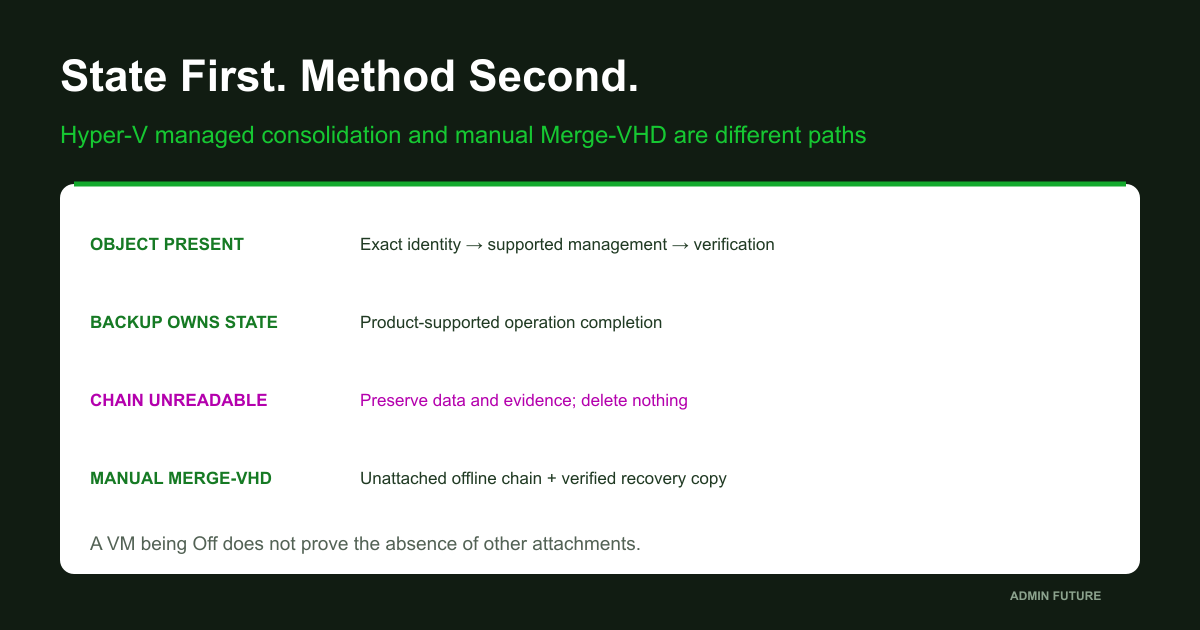
For a visible checkpoint, supported removal consolidates changes; it is not a guest rollback. Apply/Restore is a different operation. If a backup product owns the recovery state, investigate its supported completion procedure for the installed release. Do not run competing managers against one chain.
When the object is absent, creating another checkpoint on nearly full storage is not a universal nudge. It may add another state and further space demand. Restarting VMMS, shutting down the VM or starting another backup is not proof of repair either.
Microsoft documents invisible checkpoints, but its section discussing an online scenario is not permission to invoke Merge-VHD on an attached working chain. The cmdlet’s own reference explicitly requires offline operation. Where a short recipe and an operation’s contract diverge, follow the narrower documented condition and platform support. Invisible-checkpoint guidance.
A Managed Checkpoint: Exact Identity and Preview First
If a checkpoint is actually present and no backup operation is active, select its GUID. A readable name does not prevent duplicates or unexpectedly broad wildcards. Verify VMId, type, creation time and relationships. The example stops at WhatIf: it removes nothing and initiates no merge.
# PREVIEW ONLY. No active backup/merge; inspect before choosing any object.
$checkpointId = [guid](Read-Host 'Paste the exact reviewed checkpoint GUID')
$candidate = @(Get-VMSnapshot -VM $vm -ErrorAction Stop | Where-Object { $_.Id -eq $checkpointId })
if ($candidate.Count -ne 1) { throw 'Exactly one checkpoint belonging to the selected VM is required' }
$candidate | Format-List Name,Id,VMId,VMName,SnapshotType,CreationTime
$candidate | Remove-VMSnapshot -WhatIf
# Actual removal needs a separately approved plan, recovery and capacity.
# Do not replace this with a wildcard or IncludeAllChildSnapshots.
Actual removal is a separately approved storage/configuration change. It needs recovery, a window, capacity monitoring and completion criteria. Do not broaden the command to every checkpoint older than a date merely because that is easy to express.
WhatIf previews an action; it does not simulate block transfer, reserve capacity or prevent a job starting a minute later. After an approved platform operation, recollect and test the application. A console confirmation is useful, but cannot replace identifying the object beforehand.
This route does not apply when the management object is absent: a cmdlet cannot select something missing from its model. An empty pipeline is not successful cleanup. Remove-VMSnapshot contract.
Offline Work: the Critical Boundary Comes Before Merge-VHD
Warning: merging modifies the destination and can leave source children invalid for further use. Rollback is not simply reattaching the old leaf afterward. Before changes, retain an independent verified copy of the full dependency set, original configuration and an application recovery plan.
Manual Merge-VHD requires the chain to be unattached at operation start. A VM being Off does not establish that nobody else attached the files: other VMs, host mounts, agents and nodes matter. Stopping application services, stopping a VM and detaching storage are distinct actions. This article supplies no bulk production-detachment command.
# PREVIEW ONLY, on an isolated OFFLINE working copy with all parents preserved.
# A stopped VM is not proof that the chain is unattached everywhere.
$leaf = Read-Host 'Absolute path of the reviewed OFFLINE COPY leaf'
$disk = Get-VHD -Path $leaf -ErrorAction Stop
if ($disk.VHDType -ne 'Differencing' -or -not $disk.ParentPath) { throw 'Expected a differencing child with a readable parent' }
$parent = Get-VHD -Path $disk.ParentPath -ErrorAction Stop
$disk,$parent | Select-Object Path,ParentPath,VHDType,Size,FileSize
if (-not (Test-VHD -Path $leaf -ErrorAction Stop)) { throw 'Chain usability test failed' }
Merge-VHD -Path $disk.Path -DestinationPath $parent.Path -WhatIf
# Does NOT execute merging, establish exclusivity, budget space or validate SQL.
# Do not run actual Merge-VHD on an attached production chain.
This block only reads the selected file, tests the chain and previews a merge into its immediate parent. It does not establish infrastructure-wide exclusive access or execute repair. Metadata determines source and destination, not AVHDX filename sorting.
Merging through intermediate ancestors is possible, but a pre-generated command list must not assume every old child remains valid after each step. Re-read current state. The cmdlet documents specific consequences for participating children: Merge-VHD reference.
A missing or damaged parent cannot be reconstructed by wishful merging. A read error never authorizes deleting the link. Forcing Set-VHD -IgnoreIdMismatch does not recreate correct data history. Disabling a check does not replace missing evidence. Set-VHD and ParentPath changes.
Learn the Mechanism on an Empty Disposable Chain
Do not recreate a backup failure against a working database. First inspect dependencies among three new unattached disks. This script is for a disposable Hyper-V lab: it creates a new directory and files, but never mounts, formats, attaches to a VM or executes a merge.
# Disposable Hyper-V lab only. Creates three NEW, UNATTACHED empty disks.
# No VM changes, mounting, formatting, merge execution or deletion.
[CmdletBinding()]
param([Parameter(Mandatory = $true)][string]$LabRoot)
$ErrorActionPreference='Stop'
if ($env:OS -ne 'Windows_NT') { throw 'Run on a disposable Windows Hyper-V lab host' }
Import-Module Hyper-V -ErrorAction Stop
if (-not [IO.Path]::IsPathRooted($LabRoot)) { throw 'Use an absolute NEW lab-directory path' }
if (Test-Path -LiteralPath $LabRoot) { throw 'LabRoot must not exist; no reuse or overwrite' }
$null = New-Item -ItemType Directory -Path $LabRoot -ErrorAction Stop
$base=Join-Path $LabRoot 'base.vhdx'
$middle=Join-Path $LabRoot 'middle.vhdx'
$leaf=Join-Path $LabRoot 'leaf.vhdx'
New-VHD -Path $base -SizeBytes 64MB -Dynamic -ErrorAction Stop | Out-Null
New-VHD -Path $middle -ParentPath $base -Differencing -ErrorAction Stop | Out-Null
New-VHD -Path $leaf -ParentPath $middle -Differencing -ErrorAction Stop | Out-Null
$leaf,$middle,$base | ForEach-Object { Get-VHD -Path $_ -ErrorAction Stop } | Select-Object Path,ParentPath,VHDType,Size,FileSize
Test-VHD -Path $leaf -ErrorAction Stop
Merge-VHD -Path $leaf -DestinationPath $base -WhatIf
# WhatIf is NOT a capacity, data-integrity or concurrency test.
# Lab files remain for manual inspection. No automatic cleanup.
Save it as New-AFChainLab.ps1 and supply an absolute new-directory path through LabRoot. Existing directories are refused. If creation stops halfway, files remain for inspection; cleanup is not automatic. Confirm the host is disposable and its volume has headroom. Even empty virtual disks write files to the selected storage.
The output should show leaf pointing to middle and middle to base. Test-VHD should report a usable observed chain, while WhatIf describes an operation without merging. There is no application database in this lab. It demonstrates dependency and command interfaces, not transaction preservation or your backup product’s behavior.
A separate A1/B2/C0 read experiment belongs on disposable data under an approved procedure, never as a substitute for real 1C restoration. Base and differencing creation use New-VHD; chain usability checking is described in Test-VHD.
Acceptance: a Successful Boot Is Only the Beginning
The useful ending is not fewer files; it is the intended operation against the intended data. After supported recovery, record VMId, every disk attachment, ParentPath, VM state and storage state again. If a chain remains, explain why it is expected. Zero chain depth is not a universal target for every architecture.
| Check | Criterion | Retain |
|---|---|---|
| Identity and attachments | Correct VMId, host and controller slots | Before/after observations |
| Disk graph | Expected parents; no unexplained errors | Path/ParentPath and collection time |
| Storage | Headroom and approved operation completion | Capacity at each layer and events |
| Application | Current data and a useful operation | Agreed scenario and result |
| Next backup | Expected cleanup and isolated recovery | Job ID, disk structure and restore check |
Inside the guest, check filesystem, services and database through the application owner’s procedures. For 1C, agree how to confirm known documents are current and which harmless operation to test. Signing in does not establish that the latest transaction survived. Schedule database integrity work for its real load rather than launching an expensive check without a window.
Then validate the next approved backup: required state creation, cleanup completion, isolated restore and a useful read operation there. Record time, identity and evidence rather than just Passed. Update restoration planning because resumed production writes create a new history that has moved beyond the recovery copy.
Download the chain reader, disposable lab, RU/EN guides, acceptance matrix and sources.
PowerShell code underwent local syntax checking and traversal-logic tests using mocked objects. That is not Hyper-V execution: actual merging, VSS and VM recovery were not reproduced. This boundary distinguishes an example tool from a tested procedure for your environment.
The Checkpoint Disappeared from the List. Verify the Dependency Separately
We started with unfamiliar files and built an observable model: one VM, its controller, active child, parents, management operation and application data. A recovery decision can now explain which file matters, what prevents consolidation and which route is permitted.
A file belongs to the dataset because the selected virtual-disk state depends on it, not because its name looks right or a management interface lists it. Deleting an unexplained AVHDX does not resolve uncertainty; it can make the consequences irreversible.
Thank you for reading. Operationally, I would retain three independent checks: backup-job outcome, expected disk structure afterward, and a useful operation in the restored copy. That catches incomplete cleanup before the volume is full.
- How do you distinguish an expected temporary recovery checkpoint from state left behind after a job?
- Does backup verification inspect actual attached-disk Path, or stop at the product report?
- Which operation in your restored VM establishes data currency rather than merely OS bootability?